Renaming transaction not showing all Payees
When trying to add a renaming rule not all memorized Payees are showing up in the selection box. I looked at Payee that does and one that does not and cannot see any difference. In fact the Payees that do show up are far fewer than what I actually have?
Thanks!
Comments
-
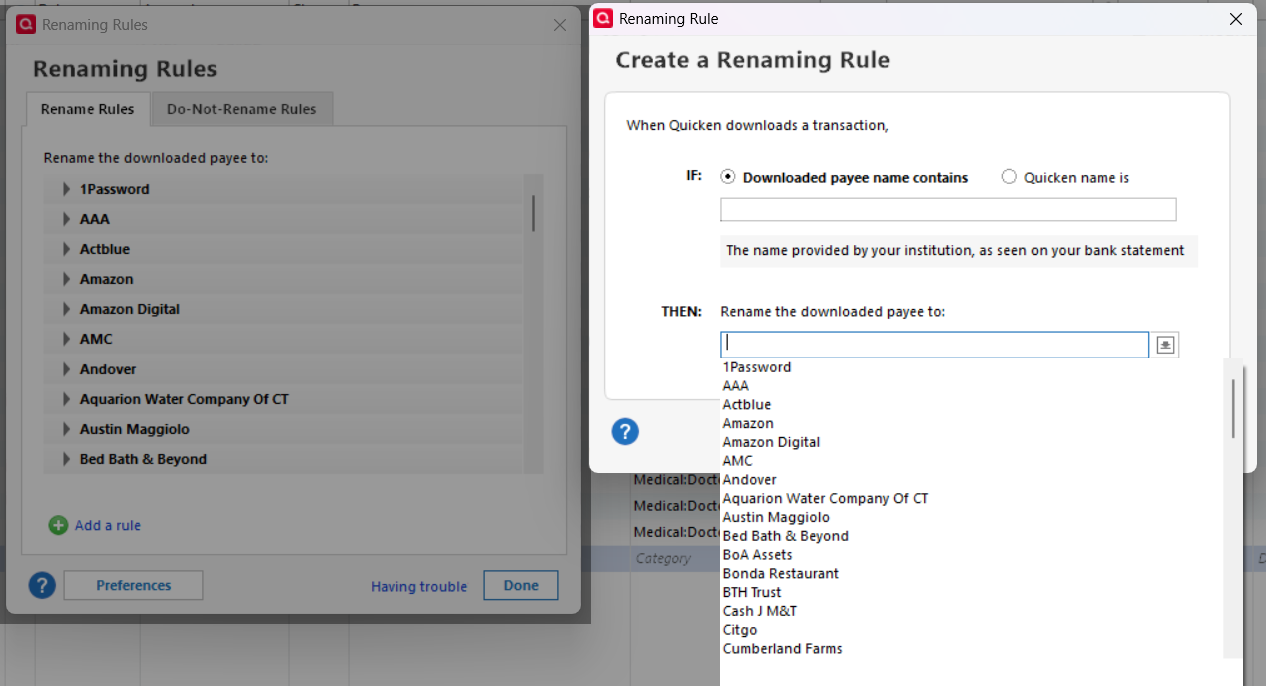
The setup process for renaming rules has changed in the past year or so and somewhat confusingly, the dropdown list that is shown in the Create Renaming Rule dialog is not the existing Memorized Payees, it is the existing Renaming rules. As you can see from the screenshot, the dropdown, the lists match. If you pick one of them, it will create a new condition for that rule.
If you want to create a new rule that will match an existing entry in the MPL, you must type in the Payee as it appears in the MPL.
Note also that when you click on the question mark in the Create a Renaming Rule dialog, the Help is still referring to the old dialogs.
QWin Premier subscription0
Categories
- All Categories
- 58 Product Ideas
- 34 Announcements
- 238 Alerts, Online Banking & Known Product Issues
- 19 Product Alerts
- 511 Welcome to the Community!
- 678 Before you Buy
- 1.4K Product Ideas
- 55.2K Quicken Classic for Windows
- 16.7K Quicken Classic for Mac
- 1K Quicken Mobile
- 828 Quicken on the Web
- 123 Quicken LifeHub