Concerning data entry Quicken classic windows

Sue8
Sue8 Quicken Windows Subscription Member

It would be so nice if, when entering checking information, I could move it in such a way that I would be entering more in the center of the screen instead of each entry going to the bottom of the screen. Also, wouldn't it be nice if I could find the place to ask a question without spending way too much time trying to find that place. Couldn't find it today! Don't have time to spend any more time searching!


Comments

  • UKR
    UKR Quicken Windows Subscription SuperUser ✭✭✭✭✭

    Does your checking account register have an area at the bottom of the register view, titled
    Downloaded Transactions Bill and Income Reminders … ?

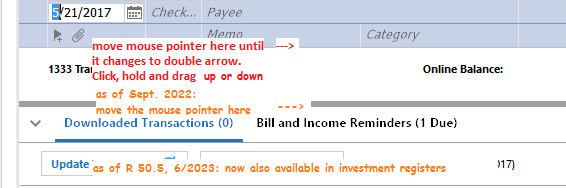
    If that area is minimized, click the ">" triangle to the left of the title line, to expand the view. The ">" will change to a "v".
    Depending on the size of your Quicken window, this will cover 1/3 to 1/2 of your screen and move your new transaction line towards the center of the screen.

    cap8 change size of downloaded transactions tab.png

    If that area is too tall or not tall enough, you can adjust the size of this area. Move your mouse pointer to the grey divider line between register and tab area. Slowly move it up and down until the mouse pointer changes to a vertical double arrow, similar to ↕️. Click, hold and drag the mouse up or down until the tab area is sized right.

  • Sue8
    Sue8 Quicken Windows Subscription Member

    Genius!! That works perfectly! Thank you so very much!

  • Sue8
    Sue8 Quicken Windows Subscription Member

    Another question, Please. When reconciling my credit card account, at the beginning quicken asks for 1. Charges 2. Payments 3. Ending Balance 4. New Stmt. Ending & 5. Finance Charges. I thought when I entered these items, the Payments are automatically subtracted from the charges, and I wouldn't have to enter the payments a second time under charges on the second page where it shows the individual charges. Anyway, am I forgetting and have to enter the payments a second time? Because they are not automatically subtracting. I don't recall having done that before.

  • Chris_QPW
    Chris_QPW Quicken Windows Subscription Member ✭✭✭✭

    @Sue8 Your profile says you are using Quicken Subscription, but from what I have seen the reconcile dialog in Subscription doesn't have "Finance Charges". Can you post an image of that dialog?

    At any rate the Charges & Payments and field do nothing. See this thread:

    Signature:
    This is my website (ImportQIF is free to use):

    http://www.quicknperlwiz.com/

  • Sue8
    Sue8 Quicken Windows Subscription Member

    Figured it out! Thanks

  • Sue8
    Sue8 Quicken Windows Subscription Member

    Great Response time, Thank you for yourr suggestions!