Separate payments and credits when starting to reconcile. Many vendors have separated these values on their statements.
What kind of account are you referencing? Because when I start a reconciliation of a banking or card account, the dialog that pops-up has separate columns for Payments vs Deposits (checking acct) or Charges vs Payments (card).
If you could show us a graphic (jpg, png or gif format, please) of what you're seeing, it would be helpful.
I misunderstood the question.
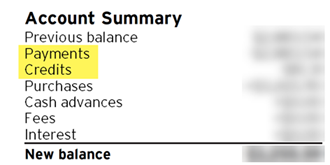
@erenrich - I totally agree with you. Although not all statements separate payments and credits, many do such as my Costco Visa statement as shown below. This additional field would make the reconcile process just that much easier.
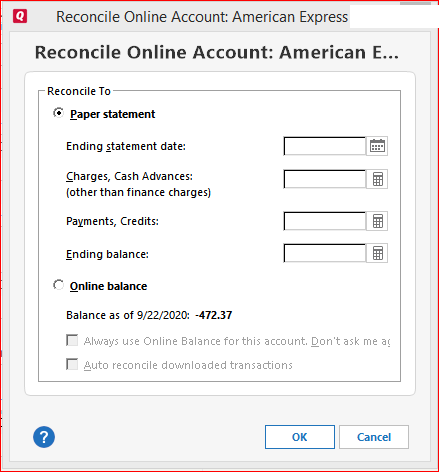
If you're working with this manual Reconcile dialog to get started …
it is not necessary to calculate the values for Charges and Payments. Just enter 0(zero). All that Reconcile really needs are the Ending statement date and the Ending balance.
@UKR - can you explain why this is the case?
Not really, because I'm not the person who programmed this function.
All I know is what I've been doing for years without any problems: put 0 into these two fields and Reconcile will work properly.
For reference: There's an archived discussion on the same subject dating back to 2018 (accessible to moderators and Superusers only). There are other similar discussions on this subject. Just search the Community.
From an accounting perspective, there's no difference between a payment and another credit.
And the calculator icon next to that input field allows you to add together any separate amounts.
But, the question that I have to ask is HOW MANY payments, and how many credits do you have per billing cycle? If you truly need to know the sum of the credits, you can UNcheck the payments, check ONLY the credits and what's checked will be summed at the bottom of the Payments column of the Reconcile dialog.
I think there is general misunderstanding of this dialog.
It is easy to see why because I have never really understood how anyone can really need all these fields, but since they are there and because others have said they need them, they stay there.
The question has to be if you put a number in the charges or payment/credits line, what does it do with that number?
The answer is it creates a transaction with that amount.
This is the crazy part. One would think that the proper way is to enter all the transactions in the register and then do a reconcile. If you do that, you have no "payment/credits" or "charges" to enter, and that is why it should be zero.
This line is somehow "I decided that there is one more transaction that wasn't put in the register that I have to take account of". Why that would ever happen I have no idea, but that is what it is for.
In fact, I haven't tested that in years, so I can't even for sure say that they still create the automatic transaction and I'm not at home to test it.
I tried this out. Quicken doesn't automatically create the charges or payment/credits transactions, so in fact the lines on this dialog do nothing.
I was thinking of another field that no longer exists, the Finance Charges.
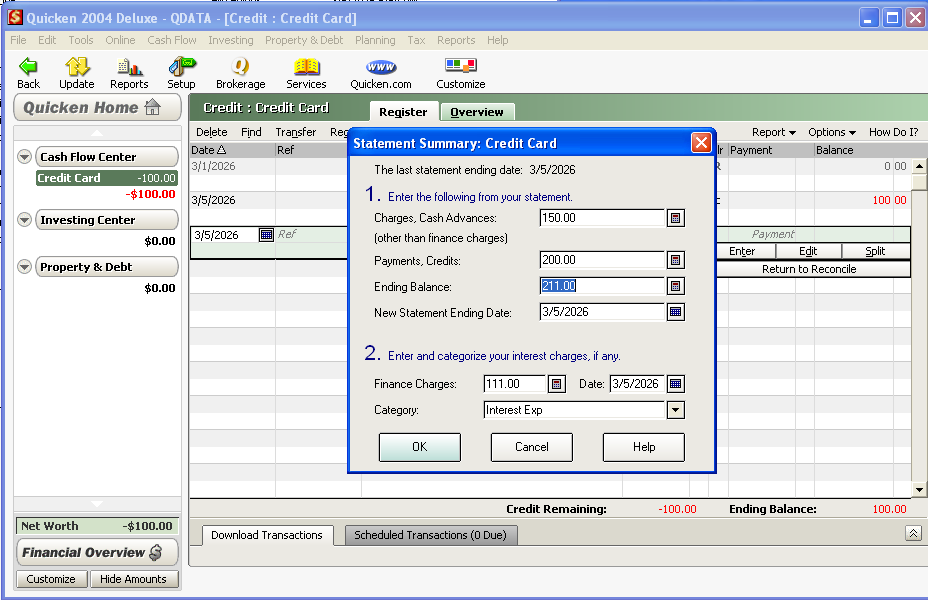
Here is going back to Quicken 2004.
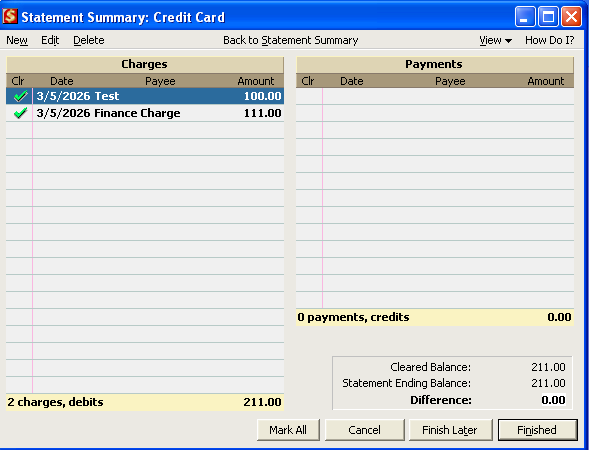
As you can see from the follow reconcile window, it added a transaction for the finance charge I entered for $111.00, but not for the Charges, Cash Advances ($150) and the Payments, Credits ($200).
So, those useless fields have been around forever.
[Edited - Removed Partial Account Number]
Hello All,
This Idea seems to have stalled, and we would like to gauge the current interest in this request.
Thank you!
@Quicken Kristina I think it's important to have the Quicken Tech or Dev team weigh in on the ambiguous fields on the Balances form. As @UKR mentions on March 4, only the balance and ending date are needed. As I asked also on March 4, why aren't values in Charges and Payments fields required? What is their purpose? This is a case where asking other users won't answer that, so the Quicken team needs to tell us. Once that information in known, I think that will bring focus to the conversation.
BTW - I tried @UKR's suggestion to enter 0 (zero) values for Charges and Payments. He is correct that these values are not needed for a successful Reconcile task. As Reconcile is core functionality of Quicken, let's find out why these fields are here and then we can make recommendations about how this dialog box should work.
Hello @Don406,
Thank you for your feedback! The Community is a user-to-user forum with some moderators who can help troubleshoot issues. Developers rarely monitor the Community or respond to discussions here.
I was able to replicate what @Chris_QPW & @UKR mentioned. The two fields are mandatory, but they don't automatically create transactions as the finance charges field does, and they don't seem to affect the reconciliation in any way.
I forwarded this to the proper channels for further investigation.
@Chris_QPW,
When I tested, the Finance Charges field still exists when reconciling a credit card. Were you using a credit card account when you tested?
(CBT-1296)
@Quicken Kristina the reconcile dialogs are different for a manual credit card account and a credit card account enabled for transaction downloading. There is no finance charge field on the online enabled dialog because the finance charge will download along with all the other downloaded transactions. For the manual credit card account, the finance charge field streamlines recording the finance charge transaction.
The reconcile dialog for manual savings accounts and online enabled savings accounts, with the manual account dialog having the interest field.
Hi Quicken Kristina,
Thank you for your reply. Yes, I was testing a credit card reconciliation, and I do understand this is a user-to-user forum. The reason for my comment asking to bring in an expert is that the purpose and function of credit card Charges and Payments (and Finance Charges) fields are not clearly understood by the user community, me included. In fact, it's not documented at all. Read on.
This morning I realized I hadn't done my due diligence by checking out Quicken Help for more information. I just did so and this is where things get interesting and I think it explains much of the confusion. I thought I would find answers in Help but instead found myself getting frustrated at the serious lack of documentation.
After bringing up Help (F1), I initially did a search on "reconcile" and got 87 hits beginning with "Release R53.16". Hmmm - apparently, the result ranking is goofy. And it seems there's no support for advanced searches using Boolean logic (AND, OR, NOT). The help search function is obviously quite dated and really needs to be brought into the 21st century. Doing so would simultaneously benefit users and lessen support load.
So, I did the next best thing and clicked the "?" icon for Help (lower left). This brings you to a generalized Help screen - whether you're reconciling a credit card, checking account etc. even though the reconcile dialogs are quite different for differing account types. (FYI, here's the link to this generalized online Help page: How do I reconcile a spending account? | Quicken Help.) There is some useful information here, but it's missing most of the essential detail. In fact, it turns out the Charges, Payments and Finance Charges fields are not even documented in Help. But it does mention opening balance, even though that doesn't apply to credit cards. Again, it's generalized, not specific. This is really disappointing for what is supposed to be a world-class product (that I pay for every year).
I appreciate you forwarding my request to bring in an expert over to proper channels for more investigation. In addition to hopefully getting answers on these fields in question, I would strongly encourage that the Help documentation also be reviewed and updated to fully document the different reconcile dialogs for various account types, and that all fields are fully explained. To me, this means creating a unique Help page for each type of Reconcile process.
Again, thank you for engaging in this discussion.
Best regards,
Don Senior software consultant (retired) Deloitte, KPMG