Adjusting Cost Basis for Limited Partnerships
Is there a way to modify the cost basis of an LP investment that asjusts the cost base each year in a K1 form? For instance i have an investment that has had income and cash distributions over the year but in Quicken the cost basis is not different from the cost basis used by the IRS if i were to liquidate.
It would be helpful if Quicken to design a mechanism that allows users to adjust the cost basis each year so when running analysis of unrealized cap gains is more accurate.
Best Answer
-
Yes, there is a way. Do a return of capital, that will adjust it.
0
Answers
-
Yes, there is a way. Do a return of capital, that will adjust it.
0 -
I've never had an LP investment so I'm really flying blind here. I'll will note that Quicken really has no utility or "wizard" to accurately report information that can show up on a K-1, particularly tax information.
But if what you're seeing on the K-1 is in effect a reduction of some income that has been distributed to you in cash during the year, cash that you entered in Quicken as some sort of income, (similar to receiving a 1099-DIV where a company is now telling you that some of the "dividend" they paid is actually a Return of Capital), then the general recommendation is to make two 12/31/XX entries in the Account, one to decrease the income and the other to decrease the cost basis. That entry leaves cash unchanged.
If that's not really doable for you and you simply want to reduce the basis, then a Return of Capital transaction will do that, and if you enter as the "Category" the name of the Account in which you're making the entry then cash will not be affected.
1 -
Thank you Tom. How would you suggest i enter the decrease in cost basis? I don't see a relevant filed in the 'enter transaction' dropdown?
0 -
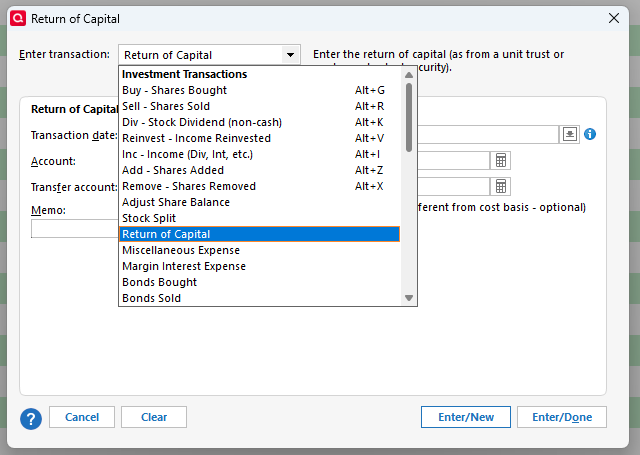
I think most Investment Accounts in Quicken have the Return of Capital action available in the drop-down menu when you click in the Action column:
Or by clicking on the Enter Transactions button:
In a test file I did add an "Other Investments > Investment Partnership" Account and I see that Account does have both paths to entering a Return of Capital transaction.
0 -
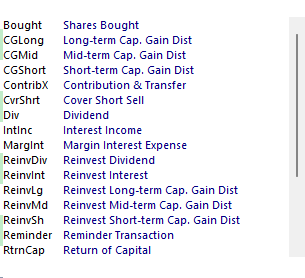
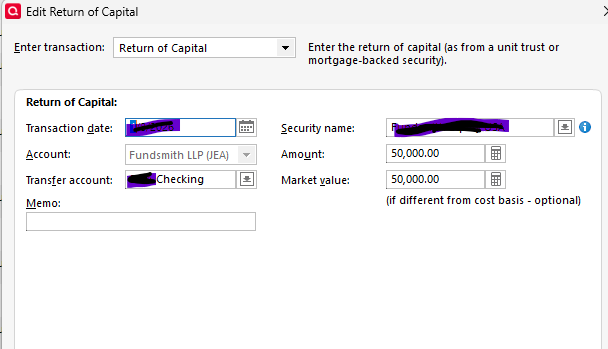
OK. I created a RtrnCapX entry to reflect an actual redemption of $50,000 that i then transferred to my checking account back in January, here's what happened:
- It reduced the cost basis by $50,000. Perfect.
- If correctly transferred the balance to my desired checking account.
- However, a $50k cash balance still sits in the investment account as well, which it should be zero else it is now has double counted. Meaning if transferred it to my checking, it should not sit as a balance in the investment account.
Here's is how it shows in the 'Investment account" register.
The $50k in the red circle should actually be zero as its been transferred out.
Note the balance in the checking account (where i transferred the $50k to) is correct.
Please advise how to correct.
Thank you @Tom Young @fun1000000
0 -
There really is no way in the world that a single entry for a ROC for $50K, $50K transferred to a checking Account, should leave the money in the investment Account, unless there's something else going on.
The Account had no cash in it before the ROC and it has no cash in it after the ROC.
As I said, there's a couple of ways of getting the cost basis right.
The first and "most correct" way of doing this is to effectively reverse some entry - I'll go with Dividend Income as that's probably the most common use situation - is to make an entry reversing dividends previously reported in the Account taking out "cash", and then another entry for the ROC, putting that "cash" back in, for no net change in cash.
The second way is to make your ROC entry for the correct amount, and instead of transferring that cash out of the Account - as you've done here - you make the Account receiving that cash the same Account in which you're recording the ROC. It's a bit of Quicken "magic" of fixing something in an Account without affecting any other Category or Account in your file. (Actually it affects the Net Worth you'd see in a balance sheet.)
But it doesn't look like you took either route.
The only thing I can conjure up to explain what I'm seeing with that entry is some sort of "Placeholder", maybe.
As you've been receiving cash from the partnership how have you been doing the accounting for that cash?
And, which route do you want to go here with the ROC correction?
0 -
I looked how I entered it back in 2022. I didn't use Checking as the Transfer account. I used Equity.
I did some research and found the following:
ROC is not a movement of cash between accounts-it's a non taxable adjustment that reduces your investment's cost basis directly in the holding account. Entering a transfer account would incorrectly link it to another account (e.g. checking) treating it like a withdrawal instead of a principal return.
No transfer Account Needed
For ROC distributions in Quicken, leave the Transfer Account field blank or set to None
ROC isn't cash moving between accounts-it's an adjustment reducing your investments cost basis in place, without affecting cash balances esewhere.
Using a transfer account (like checking) would wrongly show it as a withdrawal, distorting reports and tax tracking.
Enter via Return of Capital transaction type, input the amount (positive reduces basis) security details and an uncategorized category-no transfer required.
To ensure that the market value also declines with ROC, you must update the price of the security. This new price equals the current price times the factor.
Hope this helps
0
Categories
- All Categories
- 49 Product Ideas
- 34 Announcements
- 244 Alerts, Online Banking & Known Product Issues
- 22 Product Alerts
- 514 Welcome to the Community!
- 679 Before you Buy
- 1.4K Product Ideas
- 55.5K Quicken Classic for Windows
- 16.8K Quicken Classic for Mac
- 1K Quicken Mobile
- 829 Quicken on the Web
- 125 Quicken LifeHub