I set up my account wrong and it won't show up in properties. How do I fix this?
Hello @stirredh2o,
Thank you for reaching out with this question. To better assist, please provide more information. How did you set up your mortgage account? Did you add it as an offline account or a connected account?
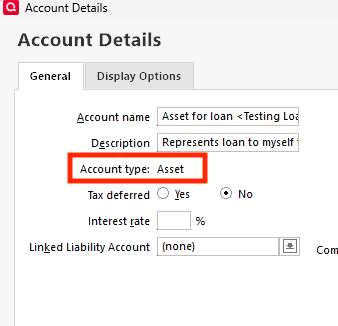
What account type do you see for the account? You can check that by going to Tools>Account List and clicking the Edit button next to the account. The Account type will be visible on the General tab, near the upper left.
I look forward to your reply!
I set it up as credit account instead of asset
Thank you for your reply,
Is this credit account an offline account or is it connected to the financial institution? If it's a connected account, then the account type is determined by the information the financial institution sends us, and you'd need to create a separate asset account to track the value of the house.
If it's a manually created account, since there isn't a way to convert a credit account into an asset account, you would need to backup your Quicken, delete the incorrect account, then create the asset account.
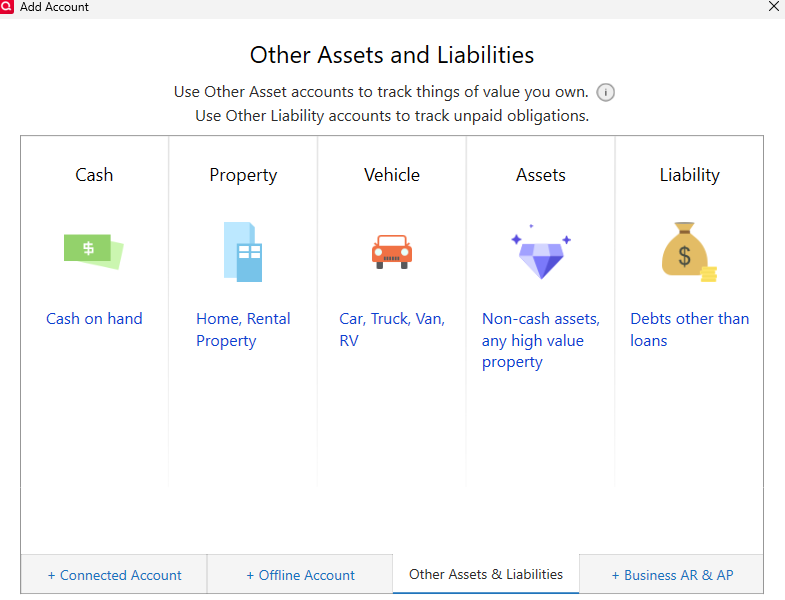
To create an asset account, go to Tools>Add Account. Click the Other Assets & Liabilities tab, then click on Home, Rental Property.
Near the end of the process to add the account, it will also give you the option to track the mortgage loan, if you have one.
I hope this helps!
We haven't heard back from you in a while. Do you still need assistance?
Check back and let us know! Thank you.
Unless you're the Lender, a mortgage is a Liability … not an Asset.
Are you the lender for this account?
Hello again,
Checking in once more before this thread is closed. Let us know if you still need assistance.
Thank you!
Due to the lack of response, I went ahead and closed this post.
If you still require assistance, please feel free to start a new post.