No option in Quicken to switch "Web Connect" to "Express Web Connect"
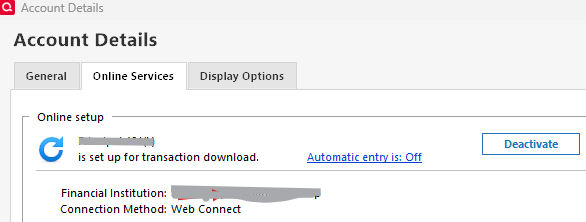
Running Quicken Windows Subscription Classic Deluxe on Win 11. Was happily using "Web Connect" to download Bank of America account data until B of A said they no longer supported the file format. So I looked at the accounts in Quicken and noticed they were set up for "Web Connect." I deactivated that then went through the process of authorizing Intuit to connect directly with B of A. Worked fine for my checking and savings accounts, but hit a snag when I tried to connect my credit card account. In the account editing window in Quicken, the account is designated as set up for Web Connect, but there is no option to deactivate it.
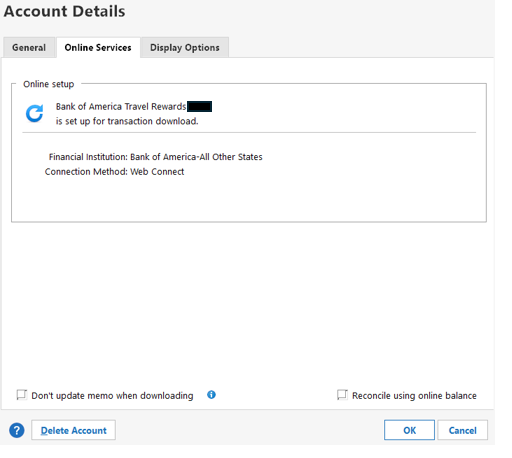
Therefore, when I get to to step where the linked accounts are to be identified, the credit card account doesn't show up. The only way I found to get an account to show up at that step was to deactivate online access first, which I can't seem to do for the credit card account. Hoping somebody out there has found a way to solve this problem.
Thanks
Answers
-
There's no option to disconnect, because there's no "connection". Web Connect is initiated by you at BofA's website. "Connection" refers to download methods initiated from within Q.
BUT, the other reason for your issue is that "Bank of America-All Other States" is no longer a supported name for BofA.
BofA's support of Q is going thru a transition, so I'd suggest that you look in the Announcements and "Alerts …" sections of the forum for ideas as to how to proceed.
Q user since February, 1990. DOS Version 4
Now running Quicken Windows Subscription, Business & Personal
Retired "Certified Information Systems Auditor" & Bank Audit VP0 -
I don't use BofA, but if they provide either a CSV or QIF file, you could use ImportQIF (by QuicknPerlWiz, it is free) to make Quicken compatible QIF files and import them into Quicken. The only downside is that subscription Quicken automatically imports a QIF file without Renaming capability, but ImportQIF will do renaming and category assignments for you.
QuicknPerlWiz does a great job of supporting his program via his website. I use it routinely since I will not use either EWC or EWC+ download methods, only Direct Connect.
-splasher using Q continuously since 1996
- Subscription Quicken - Win11 and QW2013 - Win11
-Questions? Check out the Quicken Windows FAQ list0 -
Thanks to NotACPA and splasher. Not sure which DOS version I started with, but I have transactions entered in 1985, so…. I was reluctant to switch to the Windows versions.
Anyway, I am curious why splasher will not use EWC or EWC+. Security concerns? I will check out QuicknPerlWiz, thanks.
I was aware that "Bank of America-All Other States" is no longer a valid bank designation, but I have no clue as to how to get rid of that designation for this account. I don't want to delete the account and start over-too overwhelming to even think about. The other accounts I was able to adapt to EWC gave me the option to deactivate the connection in the account editing window, but, as the screenshot shows, no such option seems to exist for the credit card account. I was hoping someone had a work-around for that problem.
Thanks again.
0 -
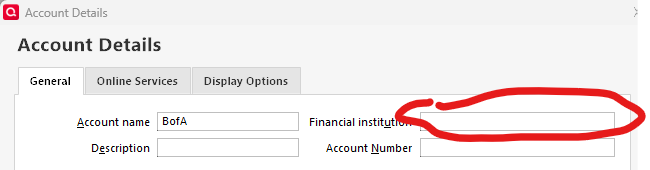
For an account that isn't connected, you should be able to change the FI name on the General tab of the Account Details dialog, which you displayed above.
Q user since February, 1990. DOS Version 4
Now running Quicken Windows Subscription, Business & Personal
Retired "Certified Information Systems Auditor" & Bank Audit VP0 -
I have Web Connect accounts and all do have a deactivate button.
This issue of not having a 'deactivate' button is recent and has been reported fairly frequently in the past few months. The only solution I have seen suggested by some of the Quicken Moderators that apparently works is to perform a file copy. (always backup your file first just in case)
File menu > Copy or Backup File > Create a copy or template
The windows that opens up will explain it, where this action will create a copy of your data file, with one main difference: ALL of your accounts will be disconnected/deactivated. Which means that you have to reconnect them one at a time and use this new file moving forward. If I recall correctly, all users reported a success rate and I hope it works for you as well. Please let us know.
ADDING: For the BofA accounts, once you create the copy and before you reconnect them, clear the financial institution name. Then make sure to "link" to the correct accounts during the reconnection process.
- Q Win Deluxe user since 2010, US Subscription
- I don't use Cloud Sync, Mobile & Web, Bill Pay0 -
I found one of the Moderators' suggested approach on this but there are a few more as well:
- Q Win Deluxe user since 2010, US Subscription
- I don't use Cloud Sync, Mobile & Web, Bill Pay0 -
@Scribo Why don't I use EWC or EWC+ download methods?
While I have never heard of a data breach of Quicken's information aggregator (Intuit) or any of Quicken's servers, I don't wish to have my collective financial information stored on anymore places in the cloud than is necessary.
Web Connect and Direct Connect downloads and QIF imports are strictly between my computer and the financial institution with none of my data stored, even temporarily, in the "cloud".
I use QIF imports for Discover (they don't provide QFX files), so, I download CSV files and Target creates an invalid QFX file, so CSV is used. Both are converted by ImportQIF which does renaming AND duplication elimination.
-splasher using Q continuously since 1996
- Subscription Quicken - Win11 and QW2013 - Win11
-Questions? Check out the Quicken Windows FAQ list0 -
Thanks, all. Lots to consider.
NotaCPA: "For an account that isn't connected, you should be able to change the FI name on the General tab of the Account Details dialog, which you displayed above."
The FI name on the General Tab for this particular account can't be edited or deleted.
splasher: I have had the same concerns for a long time, which is why I rejected processes like One-Step Update in favor of Web-Connect until the latter became unavailable at my bank.
QuicknPerlWiz is sounding better. How reliable is it?
0 -
"How reliable is it?"
It works as long as you provide it a good CSV or QIF file. Ask further questions on his website.
-splasher using Q continuously since 1996
- Subscription Quicken - Win11 and QW2013 - Win11
-Questions? Check out the Quicken Windows FAQ list0
Categories
- All Categories
- 18 Product Ideas
- 34 Announcements
- 246 Alerts, Online Banking & Known Product Issues
- 19 Product Alerts
- 517 Welcome to the Community!
- 682 Before you Buy
- 1.5K Product Ideas
- 55.7K Quicken Classic for Windows
- 16.8K Quicken Classic for Mac
- 1K Quicken Mobile
- 834 Quicken on the Web
- 127 Quicken LifeHub