Why do I have to verify the Cash Balance? [Edited]

fanfare
fanfare Quicken Windows Subscription Member, Windows Beta Beta

After One Step Update, Accept All to match entered and downloaded transactions,
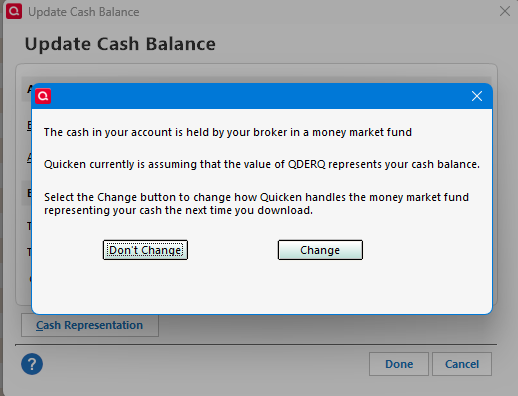
I get this verification message and an Entry in the register with no Security.

It only happens with one investment account of several.
There are no placeholders.
How do I stop it?


Tagged:

Answers

  • Quicken Laura
    Quicken Laura Quicken Windows Subscription Moderator mod

    Hi @fanfare,

    Thank you for sharing what you’re experiencing. I’d be happy to help troubleshoot the issue.

    To better understand what may be causing this behavior, could you please provide a bit more information?

    • How long have you been experiencing this issue?
    • How is your cash balance displayed on the financial institution’s website? Is it listed as a security or as a money market fund?
    • In Quicken, how are you tracking the cash in this account, as a security or simply as cash within the account?
    • Have you already tried deactivating and then reactivating the account in Quicken?

    I look forward to your response!

    Quicken Laura

    Make sure to sign up for the email digest to see a round up of your top posts.

  • fanfare
    fanfare Quicken Windows Subscription Member, Windows Beta Beta

    Hello Quicken Laura

    more than six months across many quicken updates

    my several accounts are at Schwab and all set up the same way.
    showing as cash balance at start of business day

    Only one account does this.

    In Quicken this is a cash balance in the account

    the more serious problem is the spurious Entry transaction.
    If you navigate incorrectly the investment register display turnS into all empty MiscExp transactions
    Then have to close and reopen Quicken.

    • Have you already tried deactivating and then reactivating the account in Quicken?

    No.

  • Quicken Laura
    Quicken Laura Quicken Windows Subscription Moderator mod
    edited March 17

    Hi @fanfare,

    Thank you for providing those details; that’s very helpful. The cash account may have been set up incorrectly, and the steps below could help to correct it. Please make sure to save a backup first:

    1. Open the problematic account.
    2. Click on the Gear icon.
    3. Select Update Cash Balance.
    4. Click Cash Representation at the bottom left.
    5. Please change how Quicken manages cash information. image.png
    6. Finally, update the account.

    Please let me know how it goes!

    Quicken Laura

    Make sure to sign up for the email digest to see a round up of your top posts.

  • fanfare
    fanfare Quicken Windows Subscription Member, Windows Beta Beta

    I tried the update cash balance.

    I noticed that the setting was different from other accounts.
    I made the change so that the settings are consistent.

    However, that did not fix the problem.

  • Quicken Laura
    Quicken Laura Quicken Windows Subscription Moderator mod

    Hi @fanfare,

    Thank you for letting me know the results.

    Let’s go ahead and validate and reset your account. Before starting, please make sure to save a backup of your file.

    Deactivate the affected account

    1. Go to Tools > Account List.
    2. In the Account List, select the account and click Edit.
    3. In the Account Details window, open the Online Services tab.
    4. Click Deactivate next to the online service.
    5. Confirm by clicking Yes.

    Validate the file

    This process helps clear errors and resolve possible file corruption:

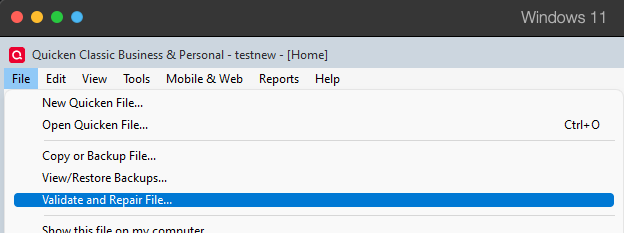
    1. Go to File
    2. Click Validate and Repair File
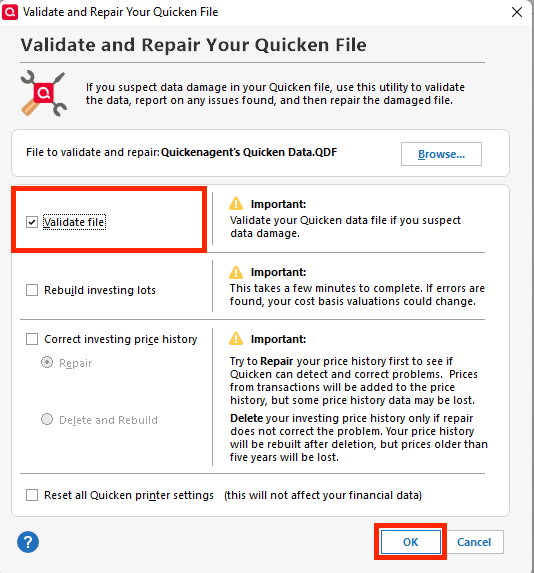
    3. Select the Validate file
    4. Click OK
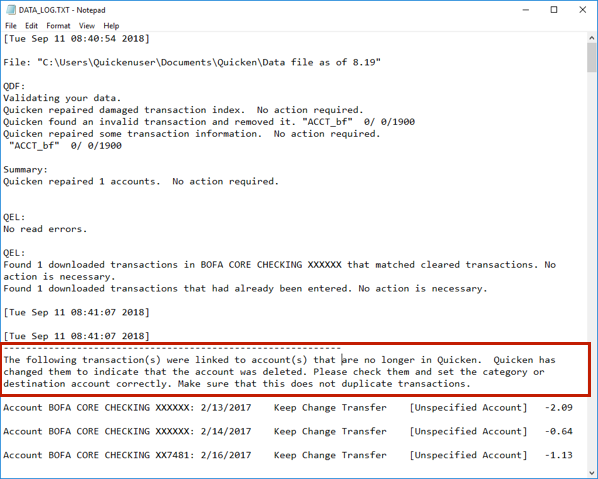
    5. Once completed, a log file (validate.txt) will open in Notepad. Please review it for any unrecoverable transactions that may require manual correction. validate file.png

    Reactivate account:

    1. Go to Tools > Add Account.
    2. Search for and select your financial institution.
    3. If prompted, choose the appropriate connection method.
    4. Follow the on-screen instructions.
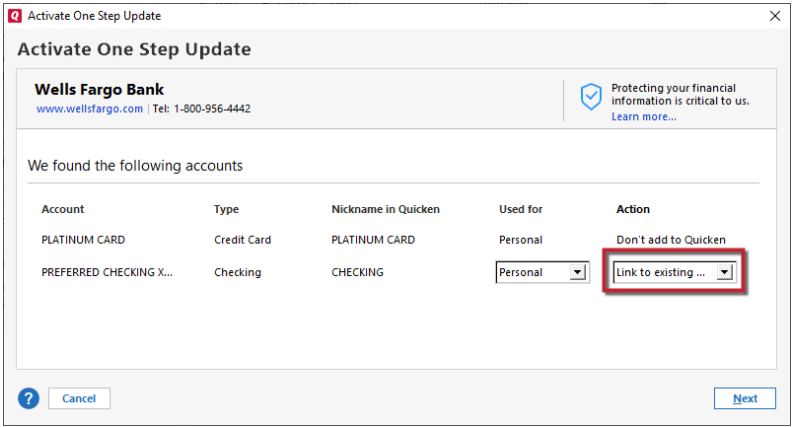
    5. When the list of found accounts appears, be sure to select Link to connect them to your existing accounts (do not add duplicates). Link to Existing.png

    Please let me know how it goes!

    Quicken Laura

    Make sure to sign up for the email digest to see a round up of your top posts.

  • fanfare
    fanfare Quicken Windows Subscription Member, Windows Beta Beta
    edited March 25

    Validate + Reactivate just made a bigger mess. I ended up with two connections to Schwab.

    One new thing with the Rollover account, the first with other accounts.
    Update reported 3841 transactions downloaded, but those were nowhere to be found.

    I went back to the old file.

    Then I got the barred red circle that forced me to reactivate again

    After three tries, I'm back where I started. The problem persists.

    [Edited Readability]

  • Quicken Laura
    Quicken Laura Quicken Windows Subscription Moderator mod

    Hi @fanfare,

    Thank you for trying the steps provided. I’m sorry to hear the issue is not resolved yet.

    At this point, I recommend contacting Quicken Support for further assistance. They can guide you through additional troubleshooting steps in real time or escalate the case if necessary.

    Phone support is available Monday through Friday, from 5:00 AM PT to 5:00 PM PT.

    I apologize that I could not provide a more direct solution, but please don’t hesitate to reach out again if you have any other questions.

    Quicken Laura

    Make sure to sign up for the email digest to see a round up of your top posts.

  • fanfare
    fanfare Quicken Windows Subscription Member, Windows Beta Beta

    Quicken Laura—

    I was pretty sure I had got back to one Schwab connection with all accounts linked.

    But now I see that I have one Schwab connection with Rollover account and one Schwab connection with the other accounts.
    Is this an issue that has been reported? After deactivate and reauthorization I am adding Rollover as an existing Quicken account.