Discover keeps asking to reauthorize

This discussion was created from comments split from:
Why do I have to verify the Cash Balance? [Edited]
.
Comments
-
I've given up on trying to fix this and will live with it.
I currently have two connections to Schwab, one for the Rollover account and another account,
and another connection with the remaining accounts.
—
Meanwhile here's my new problem.Discover keeps asking for reauthorize. I update on Mondays, and this has gone on for at least four weeks.
This is pretty annoying.0 -
Hello @fanfare,
Thank you for your response. Since you're asking for help with a different issue, I split this off into a new discussion.
Since this issue has been persisting for at least 4 weeks, per our article on CC-901 errors, please backup your Quicken file and follow these steps to troubleshoot:
Deactivate all accounts with Discover
1. Select the Tools menu and select Account List....
2. In the Account List, select the account you want to deactivate, and then click Edit.
3. In the Account Details window, click the Online Services tab.
4. Click Deactivate next to the service you want to disable.
5. Click Yes to the confirmation message.
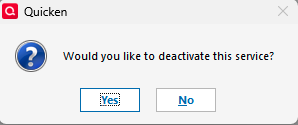
Important: If you are deactivating/reactivating an account to fix an issue, you'll need to deactivate all the accounts with the affected financial institution that you have activated in Quicken (including hidden ones). Once they're all deactivated, then you can follow the steps to reactivate.
To Reactivate Account(s)
- Go to Tools > Add Account.
- Select the bank for the deactivated account(s). If prompted, select the connection method.
- Enter your credentials and click Connect.
- When the list of located accounts appears, choose LINK next to each account you want to reactivate.
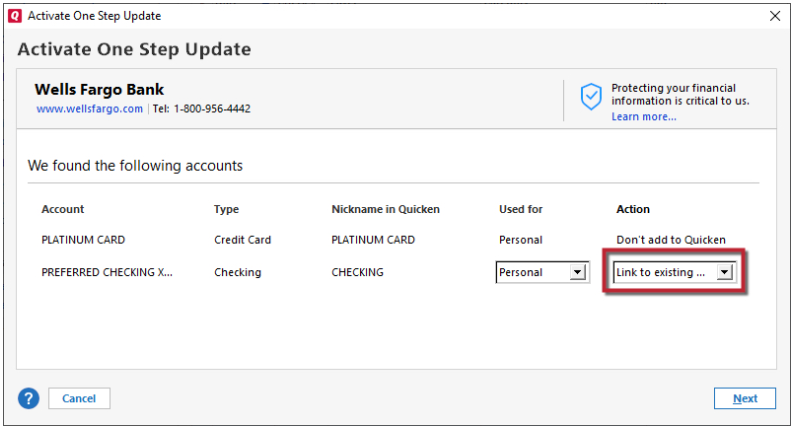
- Click Next then Done on the last prompt.
Please let me know how it goes!
Quicken Kristina
Make sure to sign up for the email digest to see a round up of your top posts.
0 -
I don't do it the way you show above.
I do it by clicking Reauthorize in the update summary window (see snapshot).
This is successful and imports the latest transactions.
Is this method known to fail, that is, require Reauthorization again the next time you do Online Update for Discover?
0 -
Quicken Kristina—
"This is successful and imports the latest transactions."
I thought this is a true statement.
Now you've got me wondering.I will try again next Monday.
By the way, in this situation, there is only one account with Discover.
0 -
Thank you for your reply,
Usually, clicking the Reauthorize button does work. However, since you have followed that process and continue to see the reauthorization prompt, I recommend following the steps I posted above.
One common cause of repeated reauthorization prompts is when the account is added as new rather than linked to the existing one. Even if there should be only one account, I recommend checking to make sure there aren't other Discover accounts in your file.
Please let me know what happens when you try on Monday!
Quicken Kristina
Make sure to sign up for the email digest to see a round up of your top posts.
0 -
I'm not sure why I have to deactivate five investment accounts from Schwab to reauthorize one account.
If I could reconnect without downloading hundreds of transactions that can't be matched but have to be deleted manually one by one, I'd do it that way.
—-
PS this whole problem is based on Quicken insisting I Verify my account balance in just one of my Schwab accounts. That's still happening.0 -
Thank you for your reply,
I'm not sure why I have to deactivate five investment accounts from Schwab to reauthorize one account.
This discussion is troubleshooting the Discover issue. If you would like to revisit the Schwab issue, please start a new discussion for that issue.
In general, we recommend deactivating all accounts with a financial institution when troubleshooting an issue because that is the guidance in our article on deactivating and reactivating accounts:
Important: If you are deactivating/reactivating an account to fix an issue, you'll need to deactivate all the accounts with the affected financial institution that you have activated in Quicken (including hidden ones). Once they're all deactivated, then you can follow the steps to reactivate.
Thank you!
Quicken Kristina
Make sure to sign up for the email digest to see a round up of your top posts.
0 -
I've been having the same annoying issue with Discover, have to go through the reactivation problem 2x just to get the current transactions - and years of history also, which THANKFULLY, is not overriding years of reconciled accounts.
Annoyance #1 is reactivation twice every time I want to update
Annoyance #2 is "Adjusting Transactions" inserted in reconciled history "Adjustment to offset newly-downloaded items before this date." How could there be an adjustment if the account was reconciled (what did Quicken do with my history)?
IF I were to follow the steps outlined by Quicken Kristina, would anything happen to the years of reconciled history? I don't want to risk that blowing up because I use the info therein for tax preparation and support.
0 -
Hello @PatTu,
Thank you for reaching out! Deactivating and reactivating accounts should not affect anything that's already in your account registers. Please make sure to backup your file prior to troubleshooting.
Thank you!
Quicken Kristina
Make sure to sign up for the email digest to see a round up of your top posts.
0 -
FWIW, I also have the same issue with Discover over the past several weeks. It keeps asking me to reauthorize during OSU.
0 -
Hello @GlennD,
Thank you for letting us know you're seeing frequent reauthorization prompts for Discover. To help troubleshoot, please provide more information:
- How often does this happen?
- Do you have Discover accounts connected in multiple Quicken files?
- Is there any action that seems to cause the prompt (such as restoring a backup, switching between files, running One Step Update, etc.)?
I look forward to your response!
Quicken Kristina
Make sure to sign up for the email digest to see a round up of your top posts.
0


