Is there a connection problem (again) between Quicken and Pentagon FCU?

ErnieV
ErnieV Quicken Windows Subscription Member ✭✭

As of two days ago I cannot connect with Pentagon FCU. I don't get a specific error code just a message that there was a problem with the connection. I am using Windows and Quicken Classic Deluxe version R66.23.

Is anyone else having this same problem? Does anyone know if Quicken is working to resolve this issue? I had had no issues with PFCU for about two months, now it looks like we are back to the usual problems that are always happening between Quicken and PFCU. Hopefully, they resolve this issue very soon, as it is very frustrating dealing with this issue over and over again.

Answers

  • Quick92
    Quick92 Quicken Windows Subscription Member ✭✭✭

    No issues for me with Penfed.

  • Quicken Anja
    Quicken Anja Moderator mod

    Hello @ErnieV,

    Thanks for sharing the details.

    I took the liberty of reviewing your account connection on our end, and internally you are receiving a FDP-105 (CC-505) error. The CC-505 error occurs when Quicken is unable to communicate with your bank’s servers. This error usually indicates a temporary issue on their side or a block on the server that Quicken uses to download transactions.

    Here’s what you can try:

    1. Wait one business day – many CC-505 issues resolve on their own after a short delay.
    2. Refresh your online account information:
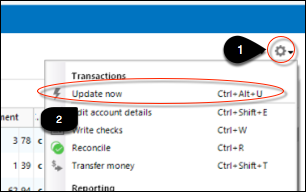
      • In your account register, click the Actions (gear) icon at the top right (or press Ctrl + Shift + N).
      • Select Update Now and follow the prompts. image.png
      • Repeat for each affected account.
    3. Try again the next business day if the problem persists.

    If this continues for more than 48 hours despite following these steps, it’s best to contact Quicken Support so they can assist further or escalate the issue.

    You can also review the full guidance in this support article.

    Thank you!

    -Quicken Anja
    Make sure to sign up for the email digest to see a round up of your top posts.

  • splasher
    splasher Quicken Windows Subscription SuperUser ✭✭✭✭✭

    Have you considered not using One Step Update and just doing a Web Connect .QFX file download from the website and importing it? Generally, there are no hassles with the aggregator (Intuit) dealing with the interface and throwing an error.

    Yes, it does take a little longer, but the Web Connect downloads rarely fail to import.

    One that doesn't work is Target Redcard that still provides a .QFX download that isn't properly created and is not recognized by Quicken because it is not official. It shouldn't even be available from their website.

    -splasher using Q continuously since 1996
    - Subscription Quicken - Win11 and QW2013 - Win11
    -Questions? Check out the Quicken Windows FAQ list