Testing Quicken Classic on Mac

David Green
David Green Member ✭✭✭

I have Quicken Classic for Windows. I am a long time user. I am considering Quicken Classic for Mac to allow me to get rid of the last Windows system I have. I am familiar with the conversion process. I want to test the Mac version. I used it several years ago but have seen there have been a lot of improvements. Before I do, I am trying to find out about having both machines sync to Quicken Cloud for Mobile and Quicken Web. I don't use Web, I do use Mobile. Is there an issue with having both machines syncing the data and/or can I turn that option off on Mac and still download transactions? Most of my searching on this returns answers around trying to sync the same data file between two computers, which is not what I want to do.


Quicken for Windows Premiere
Always the latest version

Comments

  • fun1000000
    fun1000000 Quicken Windows Subscription Member ✭✭✭✭
    edited March 14

    @David Green,


    No, you cannot directly use the same Quicken file on both Windows and Mac via web sync. Quicken for Windows and Quicken for Mac use incompatible file formats, preventing shared access to a single desktop data file across platforms.


    Sync Limitations
    Quicken Cloud syncs only a limited subset of data (like transactions for certain accounts) to the web and mobile apps from one primary desktop file—either Windows or Mac, but not both simultaneously.
    On the secondary platform, you can view and enter basic transactions via Quicken Web, but it won’t fully replace the desktop app or sync back to maintain a unified file.
    Full features require sticking to one platform’s desktop version.

  • fun1000000
    fun1000000 Quicken Windows Subscription Member ✭✭✭✭
    edited March 14

    @David Green ,

    I feel your pain, I’m in the same boat, been using Quicken for Windows for 30+ years,

    I love Apple products, have 3 iPads and an IPhone but never purchased a Mac laptop due to keeping Q for windows.

    I finally broke down and just placed an order for the Mac Neo. Will still be keeping windows PC just for my Q.

    Wouldn’t even think of switching to Q for Mac,

  • jacobs
    jacobs Quicken Mac Subscription SuperUser, Mac Beta Beta

    Wouldn’t even think of switching to Q for Mac

    @fun1000000 I know we all use Quicken differently and depend on different features of a fairly complex program. I'll just say that there are hundreds of thousands of happy Quicken Mac users, a group I'm a member of. It's certainly true that there are some feature of Quicken Windows which don't exist or exist in limited form in Quicken Mac; conversely, there are some Quicken Mac features, including its more modern and robust database database and user interface which are superior to Quicken Windows. I don't know what features that may be driving your choice to stick with Quicken Windows; I just want other users who might read this thread to know that there are many, many satisfied converts from Quicken Windows to Quicken Mac.

    @David Green If you're accepting that your converted Quicken Mac data is completely independent of your Quicken Windows data, then the answer is yes, you can have each of them syncing to the mobile app. You'll want to make sure you do Sync to Mobile each time you are done using Quicken Ma or Quicken Windows. In the mobile app, you can switch between data files by tapping the menu (three dashes) in the upper left, tapping the name of the data file you.are currently viewing, and then from the list, selecting the other data file. (I don't actually do this, but this is what the Quicken documentation states.)

    Is there an issue with having both machines syncing the data and/or can I turn that option off on Mac and still download transactions?

    You can absolutely have Sync turned off on Quicken Mac even if you have it on in Quicken Windows. Again, the two desktop data files (and their associated cloud datasets) are completely separate.

    Quicken Mac Subscription • Quicken user since 1993
  • Jon
    Jon Quicken Mac Subscription SuperUser, Mac Beta Beta

    If you export your data from QWin and import it into QMac it will be a new file, and it should sync to the mobile app as a separate file. But you can turn off Mobile Sync when you set up your QMac file and avoid the whole issue. If you decide to stick with the Mac you can turn it on again later.

  • David Green
    David Green Member ✭✭✭

    This is the answer I am looking for. As to the merits of Quicken on Mac vs Windows I am well aware of those. I still want to reevaluate Quicken on Mac (it has been several years since I've used it) to see if I want to make the switch or figure out a way to keep Windows around.

    Quicken for Windows Premiere
    Always the latest version
  • Chris_QPW
    Chris_QPW Quicken Windows Subscription Member ✭✭✭✭

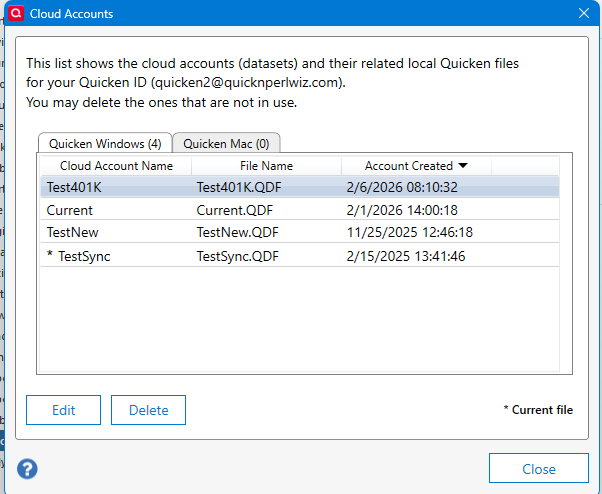
    There is zero overlap between the two, not only are they separate data files. Quicken Windows Mobile/Web and Quicken Mac's are kept separate. The only possible place where the two could contend with each other is at the financial institution level.

    image.png
  • smichels62
    smichels62 Quicken Windows Subscription Member ✭✭

    I have ordered and I'm waiting for a MacBook Neo (getting the 512GB model and nearest store doesn't carry it). My original question was going to be: will I have to purchase a separate copy of Quicken Classic for the Mac but now I'm wondering if I need to consider getting something else that will let me share my data between the two systems. Can't believe they use two different database formats.

  • Jon
    Jon Quicken Mac Subscription SuperUser, Mac Beta Beta
    edited March 15

    The answer to your original question is that you only need one sub, it includes both Windows and Mac.

    As for your second question, if you need to move data back & forth between Windows & Mac then you need to look elsewhere, Quicken Classic isn’t set up for that. It isn’t really well suited to being used from multiple computers at all except via Quicken on the Web, but that’s limited in what it can do.

  • fun1000000
    fun1000000 Quicken Windows Subscription Member ✭✭✭✭


    @fun1000000 I know we all use Quicken differently and depend on different features of a fairly complex program. I'll just say that there are hundreds of thousands of happy Quicken Mac users, a group I'm a member of. It's certainly true that there are some feature of Quicken Windows which don't exist or exist in limited form in Quicken Mac; conversely, there are some Quicken Mac features, including its more modern and robust database database and user interface which are superior to Quicken Windows. I don't know what features that may be driving your choice to stick with Quicken Windows; I just want other users who might read this thread to know that there are many, many satisfied converts from Quicken Windows to Quicken Mac.


    @jacobs - Well Jacob’s, if that’s how you feel about it I’ll keep an open mind. As soon as I receive my Apple Neo next week from Costco I will give it a try. I’ll give it a test run just like David Green, following the instructions presented to him.

  • David Green
    David Green Member ✭✭✭

    I didn't intend for this to be a debate over Quicken on Mac vs Windows. The only reason I still have a Windows system is Quicken. I'd like to get away from it if I can.

    Quicken for Windows Premiere
    Always the latest version
  • fun1000000
    fun1000000 Quicken Windows Subscription Member ✭✭✭✭

    @David Green , Don’t get me wrong, I didn’t mean for this to be a debate. As I stated earlier I’m in the same boat as you, I only keep my Windows PC for Quicken

    After reading Jacob’s response to me I will give it a test as instructed to you.

    I always read the community posts, and have high respect for the super users and their postings.

  • jacobs
    jacobs Quicken Mac Subscription SuperUser, Mac Beta Beta

    @fun1000000 I can't say whether you'll find Quicken Mac meets your needs or not, but I think it's a great idea to give it a try to see if you find there are any showstopper shortcomings which would keep you on Quicken Windows.

    Quicken Mac Subscription • Quicken user since 1993
  • smayer97
    smayer97 Quicken Mac Other SuperUser ✭✭✭✭✭
    edited March 15

    A coupel of other options might be worth considering, if you find QMac to be insufficient:

    1. use a VM to run QWin on a Mac
    2. Since you still have your Windows computer, use remote access software (several free) to access QWin running on your Windows computer, from any Apple device, and from anywhere. Here is a good article to guide you (Though it is written with Macs in mind, many of the solutions work on Windows too.): http://machow2.com/rdp-for-mac/

    Have Questions? Help Guide for Quicken for Mac
    FAQs: Quicken MacQuicken WindowsQuicken Mobile
    Add your VOTE to Quicken for Mac Product Ideas

    Object to Quicken's business model, using up 25% of your screen? Add your vote here:
    Quicken should eliminate the LARGE Ad space when a subscription expires

    (Now Archived, even with over 350 votes!)

    (Canadian user since '92, STILL using QM2007)

    image.png