NY's 529 College Savings Program - INVALID_CREDENTIALS (FDP-103)

Hello
Following up on ONGOING 2/17/26 NY's 529 College Savings Program - FDP-102 / CC-502 as its been a month since any updates.
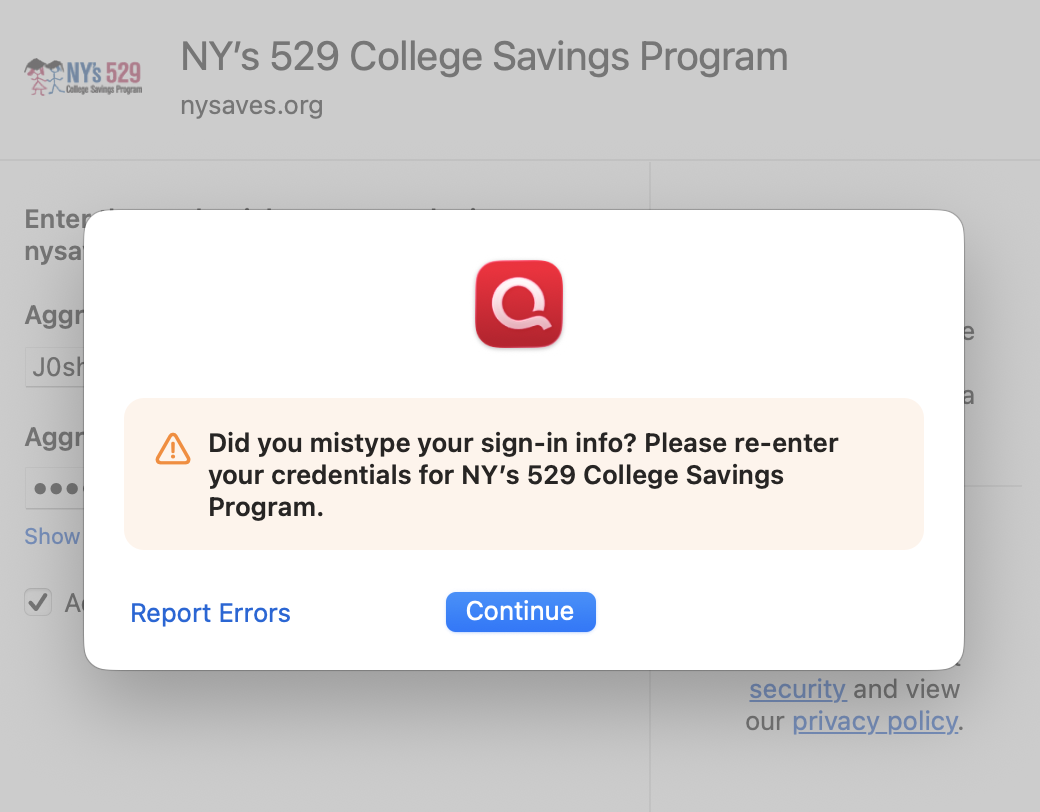
I am receiving a new error now (FDP-103) regarding invalid credentials. I can verify I am using the correct credentials as they work when access the website directly.

Is anyone else recieving the same issue? Would love to get this finally resolved so I don't need to manually update.
Thank you.
Comments
-
HI @JoshyG,
Thank you for reaching out to the Quicken Community. I understand how frustrating this issue can be.
To get started, we recommend creating a backup of your file. After that, please follow the steps below to disconnect and reconnect your accounts.
First, disconnect the accounts:
- Go to the Accounts menu and choose Hide and Show Accounts.
- Uncheck any accounts with this specific financial institution that are hidden in Lists.
- Click on the account name for the affected account(s) in the Accounts toolbar in Quicken.
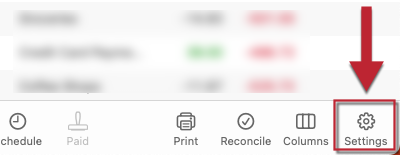
- Click the Settings icon in the bottom-right corner.
- Go to the Downloads tab.
- Click Disconnect Account.
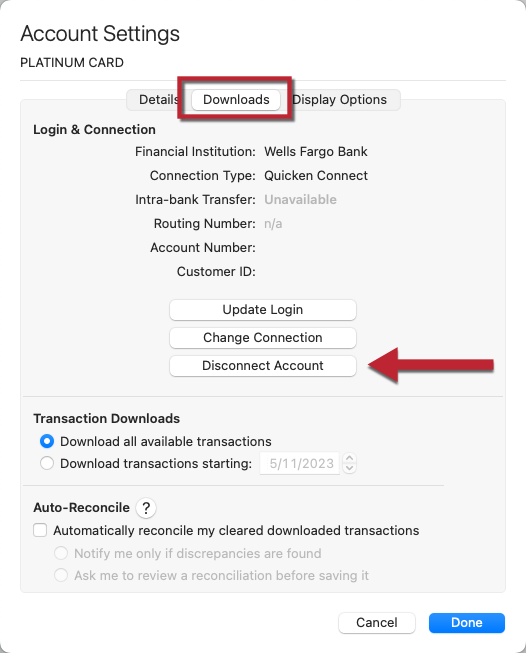
- Click Done. Repeat these steps for each account with this financial institution.
- Quit Quicken.
Delete Quicken passwords from Keychain:
- Open Finder and type “Keychain Access” in the search bar (upper-right corner).
- Double-click the Keychain Access icon.
- If prompted to open the Passwords app, select Open Keychain Access instead.
- In the left panel, set Keychains to login and Category to Passwords.
- Locate and delete any entries related to Quicken, Quicken Connect, and this financial institution.
- Close Keychain Access and reopen Quicken.
Reconnect the accounts:
- Go to Accounts > Add Account.
- Enter the name of your financial institution and select it.
- Input your login credentials and click Continue.
- When Quicken displays the accounts it finds, carefully link each one to the corresponding existing account in Quicken.
Feel free to keep me updated on your progress.
Quicken Carlos
Make sure to sign up for the email digest to see a round up of your top posts.
0 -
Thank you for the troubleshooting steps. I followed them but am still receiving the same error (FDP-103) from this financial institution (NY Saves)
0 -
Hi @JoshyG
Thank you for your reply.
If you haven’t already, I recommend changing your password with your financial institution.
I suggest using a password between 6 and 20 characters and avoiding special characters that can sometimes cause issues with Quicken. These include the ampersand (&), left angle bracket (<), right angle bracket (>), backslash (), and forward slash (/).
Once you’ve updated your password, please try adding the financial institution to your Quicken file again.
I’ll be here and look forward to your reply.
Quicken Carlos
Make sure to sign up for the email digest to see a round up of your top posts.
0 -
I changed the password not using any special characters but still receiving the same error unfortunately. I feel like it has something to do with the previous known issue - is there any update on that thread?
Thanks for your help!
 0
0 -
Hi @JoshyG ,
Thank you so much for trying our suggestion.
At this time, we do not have an update regarding this issue. We have reached out to our escalations team for more details. If additional information becomes available, the alert will be updated.
I recommend that you continue to monitor the alert for updates. We appreciate your patience.
Quicken Carlos
Make sure to sign up for the email digest to see a round up of your top posts.
0 -
Thank you @Quicken Carlos appreciate your help.
0

Categories
- All Categories
- 18 Product Ideas
- 34 Announcements
- 247 Alerts, Online Banking & Known Product Issues
- 19 Product Alerts
- 518 Welcome to the Community!
- 682 Before you Buy
- 1.5K Product Ideas
- 55.7K Quicken Classic for Windows
- 16.8K Quicken Classic for Mac
- 1K Quicken Mobile
- 834 Quicken on the Web
- 128 Quicken LifeHub