Connection to Victory Capital
Version R66.28 Build 27.1.6628 Windows 11
Has anybody gotten Quicken to connect and download from Victory Capital?
I'm getting CC-501 or CC-502 errors. Quicken phone support so far has not figured it out, even on "escalation."
Tried a 'new' database just to see if it was something in my data I was using. Nope.
Any suggestions welcome. Thanks
Comments
-
Hello @MVW,
Thank you for the detailed explanation.
Upon reviewing your account on our end, we see that you're receiving an internal FDP-102 (CC-502) error.
A CC-502 error is typically caused by maintenance or temporary issues on the bank’s servers that Quicken uses to connect, even if you can log into the bank’s website successfully. Because of that, we actually recommend not deactivating and reactivating accounts when troubleshooting this specific error, as it can sometimes introduce additional connection problems.
Please review this support article for more information. Here are the recommended guidance:
1. Refresh the account connection
- Open the affected account register.
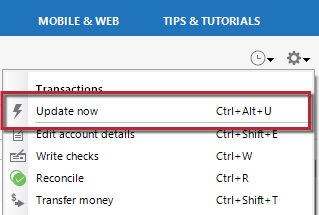
- Click the Gear icon in the upper-right corner.
- Select Update Now and follow the prompts.
Repeat this for any other accounts showing the error.
2. Wait and retry
If the error continues, wait one full business day and try updating again. CC-502 errors are often related to temporary server maintenance on the financial institution’s side.If the problem continues after following the guidance above and waiting a business day (which it sounds like you already have), then we recommend contacting Quicken Support so they can review your logs and connection attempts in more detail.
Thank you!
-Quicken Anja
Make sure to sign up for the email digest to see a round up of your top posts.0 -
Anja, definitely NOT a "maintenance or temporary issue"; its been 3 months now. The last one on your system should have been a CC-501. The time before was a CC-502. The time before that was a CC-501. ………………
Oh, and yes, other accounts are downloading nicely, just VCM that isn't.
Quicken Ticket 12265341 has been in for almost a month now since it was 'escalated', what ever that means. Talked to 3 different Quicken people. I'll try again when I have a few hours to waste.
Last post on the community about this was Dec 27, 2024, so I was hoping someone would tell me if they actually have it downloading and how they did it.
-1 -
@MVW Have you contacted Q Support, via the link at the top of this page, as @Quicken Anja suggested?
Q user since February, 1990. DOS Version 4
Now running Quicken Windows Subscription, Business & Personal
Retired "Certified Information Systems Auditor" & Bank Audit VP0 -
Yes, as mentioned in both messages. Quicken Ticket 12265341 still pending. So far nothing works from them so I was asking the community.
0 -
@MVW I reviewed your escalation ticket (12264213), and the notes indicate that at the time it was requested that you reach back out to Quicken Support to continue the escalation. The recommendation in the ticket was to contact them again so they could further review your connection and logs.
I hope that helps clarify the need to reach back out to support! Thank you.
-Quicken Anja
Make sure to sign up for the email digest to see a round up of your top posts.0 -
I've done so twice now but after an hour each time I needed to go. I will try again when I have some time.
Thanks.
0 -
@MVW Thanks for the update, I understand how frustrating that’s been.
Since this is already escalated, Support is still the best path forward. When you reach back out, be sure to reference your existing ticket so they can continue where things left off.
We appreciate your patience as this gets worked through!
-Quicken Anja
Make sure to sign up for the email digest to see a round up of your top posts.0