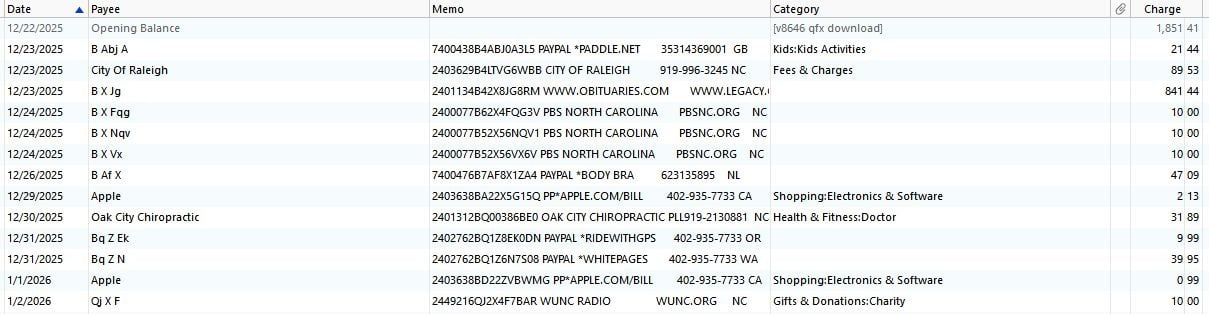
For a year, Coastal Credit Union has provided buggy QFX downloads. The name field, once imported, shows some of the unwanted code listed with Capitalized first letter and a few characters of the name. Nothing more. Not enough to make sense. The Memo field has the 17
digit code and more characters of the name field. This is Quicken Premier on Windows Desktop. Operating system completely updated, and so is Quicken Premier. Full malware scan complete. Zero issues.
After import the Coastal Credit Union import looks like this in the register:
Contacting both Quicken and the Credit Union has not budged this problem one bit. Each blames the other. I make rounds to each every two months.
Even testing with fresh Quicken software installation, fully updated, opened a new QDF file, and tried to import the QFX file. The name field is a mess of truncated Code and truncated name.
And now, some of the downloads won't even import at all.
It's obvious the programmer needs to fix the query, or adjust the code that is pulling the data in order to get it right. As to why this is allowed to continue for a year without improvement is baffling.
No wonder people drop using Quicken.
I have tried editing the downloaded QFX file and now Quicken is blocking that.
I have tried conversion software on CSV downloads, like Propersoft, but the file it makes is blocked from importing to Quicken. I have also tried editing this QFX file. That is also being blocked upon attempt to import.
This is for Credit Card accounts only.
How can Quicken just let the bank continue to do this? It ruins the utility of the Quicken software. The bank says there data aggregator doesn't provide anything else, so they are stuck with it. Since when does a business subcontract their work, and then drop responsibility for it?
Has anyone seen this problem before?