Bill Reminders wiped when One-Step Update for a credit card is run

Khyron
Khyron Quicken Canada Subscription Member

I have monthly bill reminders for prop tax, car/house insurance etc. When I one-step update a westjet mastercard (which has NONE of those transactions in it) the next occurance of those monthly reminders is wiped from the calendar. Ie if I ran it today, the April 2-5 reminders would be wiped but not the May ones.

I can then go into those reminders and bring the next occurance back a month to put them back. I can literally watch them vanish while the one-step is running. If I run one-step again, it will wipe the next occurance again only if it's within the next month. Ie it won't keep wiping the next and the next and so on.

The really weird part is my car and home insurance are identical, on the same day, just different amounts. The one-step update wiped the car but not the house. I then put the "next date" back a month and it comes back. But it leaves the other one alone.

Win 11, latest update, latest version. R66.26

Comments

  • Quicken Kristina
    Quicken Kristina Quicken Windows Subscription Moderator mod
    edited March 22

    Hello @Khyron,

    Thank you for taking the time to report this issue to the Community. We apologize for any frustration or inconvenience experienced.

    This issue is a bug that has been reported to our Development and Product teams for further investigation and resolution. I see that you already sent a problem report with log files attached. It will help our teams investigate the issue! I added you to the ticket.

    Although we do not currently have an ETA, once a solution is developed, it will be made available in a future release.

    Thank you!

    (CTP-15510)

    Quicken Kristina

    Make sure to sign up for the email digest to see a round up of your top posts.

  • Michael_CAN
    Michael_CAN Quicken Canada Subscription Member ✭✭

    I have been dealing with issue for almost 2 years and reported and still it’s not fixed.

  • Quicken Anja
    Quicken Anja Moderator mod

    Hello @Michael_CAN,

    Thank you for chiming in and sharing that you’ve been experiencing this as well.

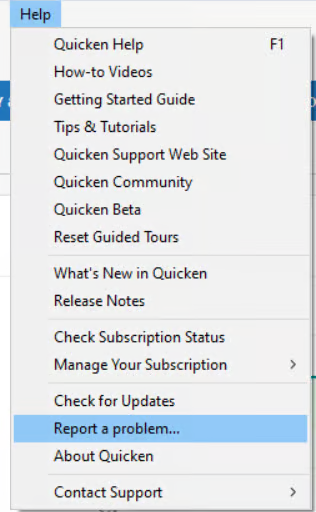
    The ticket for this issue is still open and actively being worked on by our teams. To help further the investigation, please go ahead and submit a problem report with your log files via Help > Report a Problem in Quicken.

    image.png

    Once submitted, let us know here and we can make sure your details and files are added to the existing ticket.

    We appreciate your continued patience as this is being worked on!
    (CTP-15510)

    -Quicken Anja
    Make sure to sign up for the email digest to see a round up of your top posts.