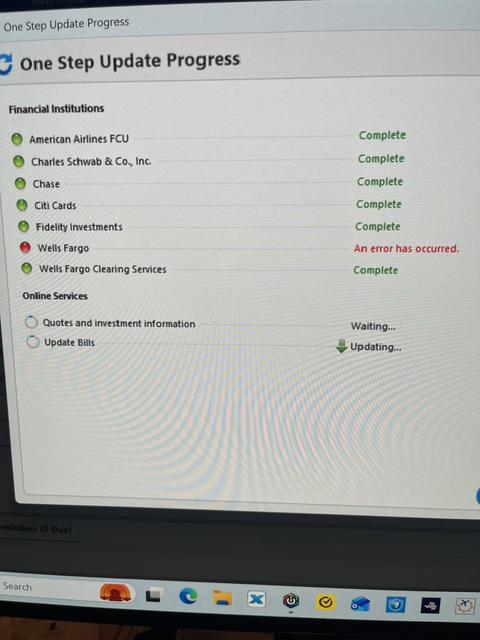
Several attempts to update/download WFB. The only message is "an error occurred".
No Error Code.
Hello @KernBuckle,
To better assist you, could you please provide the following details?
Your answers will help us diagnose the issue more effectively.
Looking forward to your response!
There is NO error message. Just "an error has occurred".
Started this morning, it has worked before. I have made no changes, VPN/AV or anything else.
All other accounts download OK. It is just WFB.
File is on my Hard Drive
@KernBuckle Thanks for the additional details. Since we’re not seeing any specific errors on our end, we’ll need a bit more information to narrow this down.
I know you mentioned there’s no error code, but if you’re able to provide a screenshot of exactly what you’re seeing (“an error has occurred”), that would still be very helpful for us to review.
Additionally, could you clarify a couple things:
Looking forward to your reply!
It is now working again. I made no changes to my download, so maybe it was on WFB???
Thanks for your help
Glad to hear it’s working again, @KernBuckle! It does sound like it may have been a temporary issue on the bank’s side.
If it happens again, feel free to reach back out! Thank you.
Not working again. Ugh.
I have no issues connecting/downloading from Wells Fargo Bank, so it's not the bank's servers. The first troubleshooting step I would try is Resetting the connection.
This error is still occurring. No other Error Codes.
Thanks RC for the tip to reset connection. It did not correct the error. Ugh
Quicken Anja are you still investigating this issue?
@KernBuckle Thanks for following up, and I'm sorry to hear the issue has returned.
If you haven't already, I suggest you try signing out of your data file completely and then signing back in to refresh the registration token for your Online Connected Services. However, I do recommend that you first please ensure you are on the latest version of Quicken (Help > Check for updates), and save a backup file prior to performing these steps.
Let us know how it goes!
Hello again,
We haven't heard back from you in a while. Do you still need assistance?
Thank you!
Checking in once more before this thread is closed. Let us know if you still need assistance.
Due to the lack of response, I went ahead and closed this post.
If you still require assistance, please feel free to start a new post.