I have a missing category in the Category List
I have an expense category that I have posted transactions to for years. I can get a listing of those transactions in the "Spending by Category" report, However, I just discovered that the category is missing from the Tools>Category List.
Any ideas on this? Thanks
Best Answer
-
When reviewing your Tools / Category List please make sure that
• the Category List is set to "Show Full List" and
• "[x] Show hidden categories" is selected and
• the list is sorted by category (if the Category column title does not have a "▲" in it, click the title to sort the list)
• the grey sidebar is set to show All Categories
and
• the Search field is blank
You should now be able to spot anomalies.
It's been reported that previously invisible categories named ACCT_xxxx or TEMP_xxxx (where xxxx is a 3-digit or longer decimal or hexadecimal number) are now causing problems displaying categories in selection lists. These categories need to be deleted to restore the selection lists to normal.
Several years ago there was a bug in the transaction download process which, when an error occurred, left temporary accounts behind. Validate and Supervalidate was needed to eliminate them. Apparently, a leftover category entry may still pop up on occasion. It should be easy to delete it from Tools / Category List.0
Answers
-
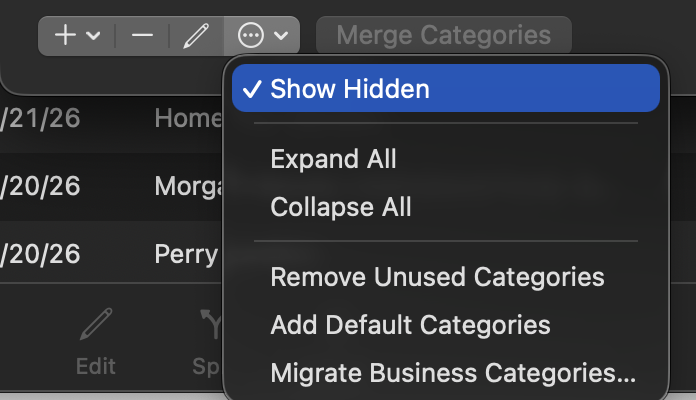
Have you accidentally (or intentionally) hidden it? Click on the dropdown to make sure the "Show Hidden" is selected:
You can deselect the hidden status after that if you no longer want it hidden.
0 -
@Bobbo "Tools" is a Quicken Windows menu; are you indeed using Quicken Windows? You posted in a Quicken Mac category of the site, and @John_in_NC's reply above pertains for Quicken Mac.
Quicken Mac Subscription • Quicken user since 19930 -
The QWin counterpart to @John_in_NC's suggestion is TOOLS, Category List and check "Show Hidden Categories" at the bottom of that dialog. And UNcheck the HIDE box to the far right of the category if you want it unhidden.
Q user since February, 1990. DOS Version 4
Now running Quicken Windows Subscription, Business & Personal
Retired "Certified Information Systems Auditor" & Bank Audit VP0 -
…and the plot thickens.
First, I do have the "Show Hidden Categories" box checked, so that isn't the problem.
Second, I don't know how I ended up in the Quicken MAC section. I wasn't even aware that there was a choice between Windows and MAC. All I did was click the "New Post" box. Then it gave me the choice of "Ask a Question," or "Discussion." I didn't see anything after that about selecting Win or MAC. Maybe you can help me out with that.
Meanwhile, any other suggestions as to why my Category doesn't show up in the Category list. Just to see what would happen, I added another category and that doesn't show up either.
0 -
When reviewing your Tools / Category List please make sure that
• the Category List is set to "Show Full List" and
• "[x] Show hidden categories" is selected and
• the list is sorted by category (if the Category column title does not have a "▲" in it, click the title to sort the list)
• the grey sidebar is set to show All Categories
and
• the Search field is blank
You should now be able to spot anomalies.
It's been reported that previously invisible categories named ACCT_xxxx or TEMP_xxxx (where xxxx is a 3-digit or longer decimal or hexadecimal number) are now causing problems displaying categories in selection lists. These categories need to be deleted to restore the selection lists to normal.
Several years ago there was a bug in the transaction download process which, when an error occurred, left temporary accounts behind. Validate and Supervalidate was needed to eliminate them. Apparently, a leftover category entry may still pop up on occasion. It should be easy to delete it from Tools / Category List.0 -
Thanks UKR. I didn't set Show = Full List. Don't know how I missed it. :(
0
Categories
- All Categories
- 6 Product Ideas
- 34 Announcements
- 249 Alerts, Online Banking & Known Product Issues
- 19 Product Alerts
- 266 Welcome to the Community!
- 301 Before you Buy
- 1.5K Product Ideas
- 55.8K Quicken Classic for Windows
- 16.9K Quicken Classic for Mac
- 1K Quicken Mobile
- 834 Quicken on the Web
- 129 Quicken LifeHub