Don't unclear transactions just because they didn't reconcile
I have one credit card account where transactions within the last day or two of the end of the billing cycle don't show up on the next bill even though their posting date is within the date range for the bill. When I reconcile the bill in Quicken, I have to un-check those cleared (downloaded) transactions to get the bill to balance. That's fine. What annoys me is that doing this marks the transactions in the register as uncleared, so I have to go through them all again and re-mark them as cleared. Unchecking a cleared transaction in the bill reconciliation window should just leave that transaction as cleared but not reconciled.
Comments
-
What you are asking to have changed is a 'from the beginning' fundamental aspect of Quicken.
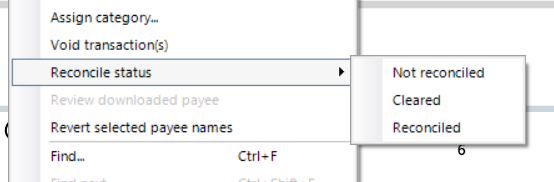
Are you aware that within an account register you can select several transactions, then rt-click to get a menu of options, one of which is to change the "Reconcile status" of those selected transactions. That should be easier than individually altering the status of several transactions.
0 -
When you run a manual Reconcile, you can deselect these cleared-but-not-included-in-the-statement transactions to make Reconcile balance to the Statement Ending Balance.
Next month, when you run reconcile again, these transactions will automatically be included in the process, regardless of cleared or uncleared status. It should not be necessary to change these transactions prior to Reconcile, but you may / will have to checkmark these transactions in the Reconcile dialog window (or click the "Mark all" button) to include them.0