"Transfers Out" configured as "reported as expenses in your budget" aren't in spending. Why?

I have a budget setup and have a bunch of Transfers Out accounts checked in Select Categories to Budget. The help text says "Transfers Outs are reported as expenses in your budget."
They are listed under expenses and I can track spending against allocated budgets. However, it doesn't seem the expenses are included in the Spending graph at the top of the budget. I don't understand why Quicken supports configuring Transfer Outs and Detailed Loan Payments as expenses in the budget if they're not included in the overall spending of the budget. Is this a bug or expected design?
The Transfer Out accounts and Savings Goals are included in the "Budgeted Spending" numbers when I hover over the portion of the budget spending that's considered "savings" (where it shows "x savings = budgeted income - budgeted spending including reminders"). However, they are not included when I hover over the green/red bar that shows total spending making the amount "left" as completely inaccurate.
Answers
-
(edited to remove and add to the body of my original post)
0 -
Hi @alan hartless,
Thank you for reaching out to the Quicken Community!
To help us better understand the issue, I have a few questions:
- Could you please upload a screenshot of what you’re seeing?
- When did you first notice this issue?
- Have you tried restoring a backup from a date prior to when the issue started?
I’ll be looking forward to your reply.
Quicken Carlos
Make sure to sign up for the email digest to see a round up of your top posts.
0 -
Hi Carlos.
I'll provide a screenshot but not comfortable disclosing financial data. Hopefully this helps show what I'm talking about.
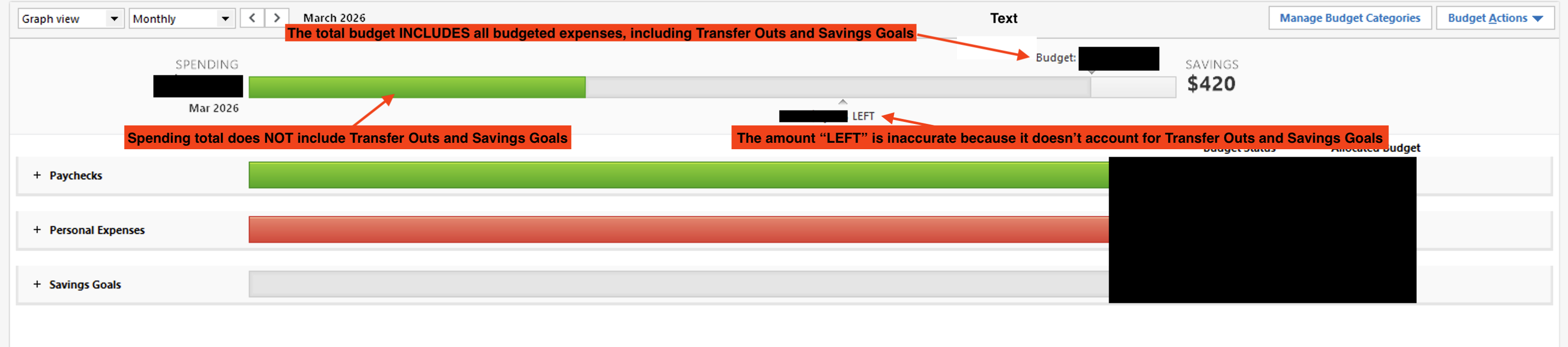
This happens with all new budgets. I just started using a budget and it hasn't worked. I have R66.28 installed.
0 -
Hi @alan hartless,
Thanks for your reply!
After doing some research on my end, I wasn’t able to replicate the issue.I have a few questions to help narrow this down:
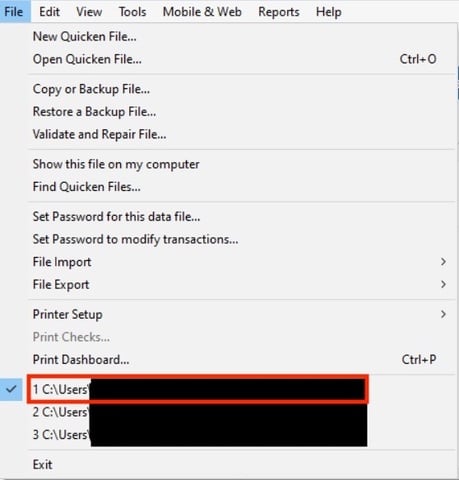
- Where is your Quicken data file located? To check, please open Quicken and go to File. At the bottom of the menu (just above the Exit option), the file with the check mark next to it is the one currently open. Please let me know the full file path shown there.
- Is your file being backed up or synced by any third-party services such as Carbonite, OneDrive, or Backblaze?
- Have you created a new test data file to see whether the same behavior occurs there?
If you haven’t tried this yet, please follow these steps:
- Go to File > New Quicken File.
- In the setup window, name the file “Test” and click Save.
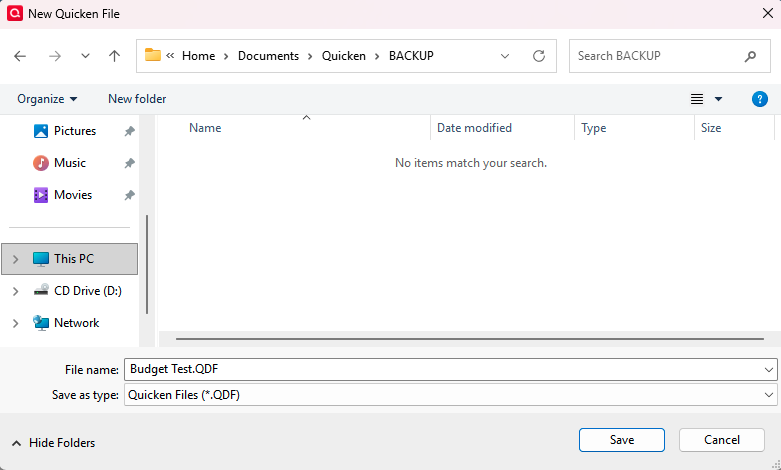
- Make sure Sync to Mobile & Web is set to Off, then click Next.
- Add your accounts and try to replicate the issue.
Please let me know how it goes. I look forward to your reply!
Quicken Carlos
Make sure to sign up for the email digest to see a round up of your top posts.
0 -
Hi Carlos,
Where is your Quicken data file located?
C:\Mac\Home\Documents\Quicken\personal (I use Parallel to use the Windows version on Mac due to the lack of planning features in the Mac version)
Is your file being backed up or synced by any third-party services such as Carbonite, OneDrive, or Backblaze?
No
Have you created a new test data file to see whether the same behavior occurs there?
I also wasn't able to reproduce using a clean test file so it must be something with my primary file that I've used for years. I created a new budget in my primary file exactly as I did the other one and the new budget doesn't have this issue. I don't understand why but somehow the original budget is broken.
I guess we can consider this resolved unless you want to debug why the original budget is broken.
0 -
Thank you for following up with these additional details.
One thing you can try is validating your data file to see if it is able to repair the issue with the original budget. Alternatively, you can just move forward in the new budget.
Here are the validation steps if you want to try that route:
- Save a backup.
- Go to File.
- Select Validate and Repair file…

- Check the first box for Validate file.
- Click Ok.
Once the validation has completed, it will produce a report of anything it has found/corrected. You can then check out the budget to see if the issue remains.
Hope this helps!
Quicken Alyssa
Make sure to sign up for the email digest to see a round up of your top posts.
0 -
Thank you Alyssa. Unfortunately, That didn't fix the broken budget. I'll just continue with the new one.
1 -
Thank you for trying the suggested steps.
Sorry to hear it didn't resolve the issue with the original budget. Continuing in the new one is definitely the easiest route to go.
If you need more help, don't hesitate to reach back out.
Thanks again!
Quicken Alyssa
Make sure to sign up for the email digest to see a round up of your top posts.
0

