"One-step-update hanging or freezing" (Edited)

Has there been any movement on this? My system started doing this and I have updated, reversed window updates, uninstalled and reinstalled.
https://community.quicken.com/discussion/7961740/ongoing-4-30-25-windows-mac-one-step-update-hanging-freezing
Answers
-
Noticed problem April 2 or 3, 2026. Quicken Premier for Windows hangs at "Processing data. . ." when trying to update one account or multiple accounts. Validate and Super Validate show no problems with the file.
Only way out is to End Task.
This seems similar to a problem encountered a couple of weeks ago where it hung with "Waiting . . " when trying to update one or more accounts but the solution that Support provided then does not work this time. (I posted the solution to that previous problem elsewhere in this forum.)
0 -
This discussion was created from comments split from: "One-step-update hanging or freezing" for two weeks now.0
-
Thank you for taking the time to reach out to the Quicken Community!
The issue is still ongoing, and our team is actively working on it. I recommend monitoring the alert, as it will be updated when new updates become available.
For further investigation, I would appreciate it if you could share the following details with us:
- Could you upload a screenshot of the One Step Update freezing or hanging?
- When did this issue start occurring?
- Have you restored a backup file? If so, could you share the date of the backup you restored?
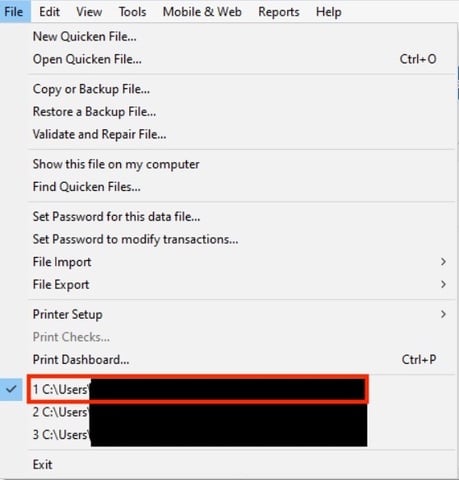
- Where is your Quicken data file located? To check, please open Quicken, go to File, and look at the file path shown at the bottom of the menu (above the exit button). The file with the check mark next to it is the one currently open. Please share the full file path shown there.
- If you have multiple financial institutions, does the issue occur when updating just one institution?
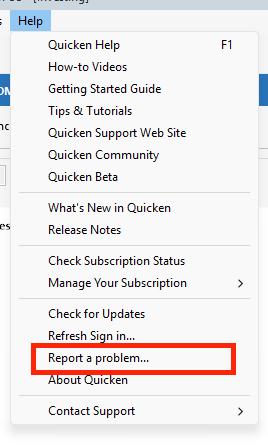
Additionally, we will need the logs for further investigation. To upload them, go to Help > Report a Problem.
I look forward to your reply!
Quicken Carlos
Make sure to sign up for the email digest to see a round up of your top posts.
0 -
I have gone through "report a problem" This issue happens with various accounts whether in a group or solo.
0

