Barclay Bank / BarclayCard balance updating but no transactions downloading (AGAIN)

Hi - it's that time of year, I guess. This:
…is happening again, since Sunday, 4/5/26. Most of my weekend transactions usually show up Sunday night, and in all cases no later than Monday morning. As of today, I have not successfully downloaded any transactions since Friday, April 3, even though at this point the Barclay website shows only one pending transaction. There are at least 13 transactions that have cleared on the website but aren't getting downloaded, even after account resets, deactivation/reactivation of online services, and an attempt to add the card as a new account. (I download my pending transaction, and the 1 pending transaction on the Barclay website, from Tuesday, 4/7, won't download to Quicken, either.)
Please fix it again, like you had to last year at this time!
Thanks.
Comments
-
Hi @OscarVB,
Thank you for sharing what you’ve been experiencing. I understand how concerning this can be. After reviewing your account, I didn’t see any error messages on our end. Have you noticed any specific errors or messages on your side?
Additionally, it would be very helpful if you could submit your log files so we can forward them to the appropriate team for further investigation.
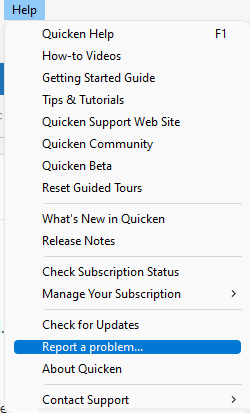
To send your logs:
- Open Quicken
- Click Help
- Select Report a Problem
- Click Send to Quicken
I appreciate your cooperation and look forward to your response!
Quicken Laura
Make sure to sign up for the email digest to see a round up of your top posts.
0 -
Same problem here!
0 -
Hi @chestrenu,
Thank you for joining this thread. We have escalated this issue internally, and our team is actively working on it.
For the latest updates, you can bookmark the Community Alert:
Thank you!
Quicken Laura
Make sure to sign up for the email digest to see a round up of your top posts.
0 -
@Quicken Laura, thank you for the quick move to begin addressing this. Do you still need my logs? If so, can you provide a way of sending them without using the "Help" menu option as described above, perhaps via email to you or other Support team member?
Longer explanation:
I run Quicken Win on a VM (I'm a MacBook user, and the Mac product just isn't up to par…side note: please add rollover budgeting to Quicken Mac) and while virtually everything works really well, I can't use that Help menu option to send as it crashes the VM. I have exported the OFX and CONN log .txt files and saved them to my hard drive; is there an email that I can forward them to? I would prefer not to attach them to a public comment in case IP or MAC addresses are buried in there somewhere.
0 -
Sadly, I have the same issue. Tried reset/reactivate to no avail. Transactions are not downloading.
0 -
Thank you for following up! No need to send the files at this time; we truly appreciate the effort you put into sharing them with our team.
As mentioned earlier, our team is actively working on the issue. Any updates will be posted to the Community Alert, so we recommend bookmarking it to receive notifications as they become available.
We appreciate your patience in the meantime.
Quicken Laura
Make sure to sign up for the email digest to see a round up of your top posts.
0 -
Same issue. No downloads since April 3. Using desktop client v8.5.3 on a Mac.
0 -
V8.5.2
0 -
Hi @Chris McClure,
Thank you for letting us know you’re experiencing the same issue. You can bookmark this Community Alert to receive updates as our team continues working on it.
Thank you for your patience!
Quicken Laura
Make sure to sign up for the email digest to see a round up of your top posts.
0
