This discussion was created from comments split from:
Unable to Link Existing Quicken Invest. Accounts to Fidelity Accounts after Fidelity Reauthorization
.
When I try and add my Fidelity account in Quicken, I get an error
Sign in to Fidelity Investments failed. Try again. Sorry, the sign in failed due to time out or a connection error. Select Sign In to authenticate via your web browser.
Click on Sign In again. Looks fine….I get this:
Your accounts have been authorized successfully! You will now be redirected back to Quicken. If you are not redirected in a few seconds, you can close this window and return to Quicken
But then back to the error.
Hello @Mark Valpreda,
Thank you for letting us know you're seeing this issue. To help troubleshoot, I checked our internal tools. I see that you're getting a CC-505 error, which usually happens when there is a temporary issue with the connection. I can also see that you contacted Support and they recommended that you wait 24-48 hours and try again.
If, after waiting 24 hours, the issue persists, please follow these steps from our article on CC-505 errors:
Try refreshing your online account information:
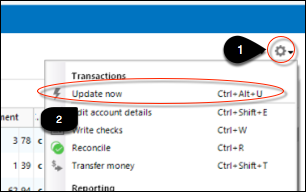
1. From your account register, select the Actions gear icon at the very top right of your register (Ctrl + Shift + N).
2. Select Update Now.
3. Follow the on-screen instructions to complete the update.
4. Repeat these steps for each financial institution experiencing this error.
Try the steps above again the next business day. If the problem continues for over 48 hours contact Quicken Support for assistance.
I hope this helps!
We haven't heard back from you in a while. Do you still need assistance?
Check back and let us know! Thank you.
I'm getting a similar error. I'm trying to reauthorize my Fidelity accounts and once I go through the steps on Quicken and I'm sent to Fidelity to do this, I accept their agreement and then get a Connection Error. Which could be them or it could be Quicken. I've spoken to both and they both say the same.
The problem is I have to do this every couple of weeks since last summer. Quicken just stops downloading transactions from Fidelity for periods of time. I know I make automated purchases every week in various accounts and I know those purchases aren't being downloaded. So I deactivate, wipe out the institution name and account number and try to add the accounts back to link through Fidelity. It's beyond frustrating.
Hi @Smokey7422,
I’m sorry to hear you’re experiencing this connectivity issue; I understand how frustrating that can be. I can see that you currently have an open case, and our team will reach out to you via email with any updates or progress on a resolution. While I’m unable to provide an estimated timeframe at the moment, please know that your case is being actively worked on.
If you have any additional questions in the meantime, feel free to let us know.
I will say I just spoke with Fidelity. They said that over the last six or eight months they have been receiving a much larger number of calls regarding issues where Quicken does not download transactions from Fidelity. They believe Quicken did something and now that is a frequent problem. Something I experience every couple of weeks.
Thank you for sharing the update from Fidelity.
While a broader issue affecting Fidelity account downloads in Quicken has since been resolved, we are currently working through individual cases where the issue may still persist.
We appreciate your patience as our team continues to investigate and assist with your specific situation.
Well, I hope this can get resolved. I cannot reauthorize my accounts with Fidelity. All I get is a Connection Error.
Was unable to connect to one of my Fidelity accounts (worked for years) so removed online services and tried to re-establish. Auto opens up Fidelity, log in, agree to two items, select account, Fidelity reports successful then Quicken error pops up "Sign in to Fidelity Investments failed. Try again." Repeated several times, Quicken won't allow set up. Other Fidelity accounts work fine with Quicken.
I can only get as far as accepting those two items, click I Agree and the next page shows Connection Error. I can't reauthorize any of my accounts (a dozen). Been trying for days.
Hi @Smokey7422 and @TK32 ,
Thanks for following up in the Quicken Community.
To better understand the issue, could you please upload a screenshot of the error you are encountering right now? This will help us identify what’s happening and provide more accurate guidance. I look forward to your reply!
My issues have already been escalated within Quicken but when I try to reauthorize my accounts and go through those steps, once I accept whatever agreement Fidelity wants, I get this. Over and over. Fidelity says it's not them.
Hi @Smokey7422 ,
Thanks for your reply and for sharing the screenshot of the error, t’s very helpful.
After reviewing this internally, I found the FDP-350 error (PAUTH_INVALID_TOKEN). This typically occurs when your security token has expired and your account credentials need to be re-entered. Before starting any troubleshooting, I recommend creating a backup of your file.
To resolve the expired token, you’ll need to deactivate and then reactivate all accounts associated with this financial institution, including any hidden or closed accounts.
To deactivate an account:
Before reconnecting your account, I recommend temporarily turning off any VPN or antivirus software, as they can sometimes block Quicken. You can turn them back on after completing the process.
To reactivate your account(s):
Let me know how it goes, I look forward to your reply!
Carlos, thank you for this but I have tried all of this more times than I can count and I get the same error that I showed earlier.
The only thing I haven't tried is to backup my file, remove Quicken entirely from my computer, download and reinstall it and patch it with a release prior to April's. I see that my main Fidelity account stopped downloading in mid April which probably corresponds to your last release.
Thank you for your reply,
If you haven't already done so, please try using an alternate browser when authorizing with Fidelity. If the issue is caused by a browser setting or extension blocking communication with Quicken, using an alternate browser may correct the issue.
I checked our internal tools, and I can see that the issue you're reporting was escalated to CTP-13694. Typically, our escalated team will reach out to you if they need further information or when they believe the issue is resolved.
Kristina,
Thank you but I've tried three browsers and it's the same problem. Firefox, Chrome, and Edge. All the same error.
@Smokey7422,
Thank you for trying those steps and following up on that.
As of now, this issue has been escalated, and you have been added to the escalation ticket. Our team is investigating the issue, and we do not have an ETA as to when it will be fully resolved.
If the team handling this issue needs any further information, they will reach out to you by email.
Thanks again!
Where can I bookmark to follow the resolution of this problem. I'm having it, too.
Shannon, scroll all of the way to the top of this thread and there is a bookmark to allow you to follow along.
Today I decided to try again. This time I get a little further. I get to this page, which I haven't been able to in over a week:
I select my accounts and click approve and I get this:
Progress? 😉
Today's latest failed attempt.
Thank you for following up and sharing the progression of the issue you are experiencing.
It seems that this has evolved into something new. Due to the nature of this issue, it is recommended that you contact Quicken Support directly for further assistance, as they can walk you through troubleshooting steps in real-time and escalate the situation as needed.
The Quicken Support phone number can be found through this link here.
Thanks, Allyssa. I have a support request in with a ticket number for a few weeks now and I've not had any information about this problem.
I have sent you a direct message. Please navigate to the inbox in the top right-hand corner of the Community page and check your inbox.
Thank you.
I've had the same problem for about one month now. I try to reconnect my Fidelity accounts to Quicken and end up with the same variety of error messages. This is the most recent one. Was able to go through the entire connection process in my browser, but when I return to Quicken, this is what I get.
Hello @bpaul,
Thank you for letting us know you're encountering this issue. Often, the error message you're seeing is caused by something interfering with the communication between Quicken and the financial institution. If you have any browser extensions active, especially ad blockers and pop-up blockers, please turn them off and try again. If the issue persists, please try using an alternate browser. That can often correct the issue if the problem is being caused by a browser setting.
I look forward to your reply!
I've had this issue for a month. I had tried several different browsers. I had a call with a rep that Quicken Alyssa arranged. We did nothing different. I shared my screen with him and he saw the error I was getting by using Chrome. We then made a change to make Edge my default browser and went through the steps and this time it worked. Didn't work a week or so ago but the other day, it worked. So for now, I can update my accounts. The amount of transactions downloaded was a lot. He saw that Quicken was calling some transactions a "Near Match" to transactions that had already been cleared. I have weekly purchases and this was an issue. He glanced over it and I said I could deal with it. Just another unique issue in the land of Quicken.
Thank you for the follow-up,
I'm glad to hear that using an alternate browser helped you get your accounts connected.
Was the "near match" a one-time occurrence after you reconnected the accounts, or does it happen every time you update?
Thank you!
I'm having the same problem. I am trying to add a new fidelity account (I have no previous accounts with Fidelity.)
Chrome: login/password/2FA work. presented with checkbox selection for accounts. Pick all, click ok, and I get an error "HTTP Status 400 – Bad Request" in the browser. Never returns back to Quicken.
Edge & Firefox: login/password/2FA work. presented with checkbox selection for accounts. Pick all, click ok. browser reports "Your accounts have been authorized successfully! You will now be redirected back to Quicken. If you are not redirected in a few seconds, you can close this window and return to Quicken"
However then I get returned to Quicken, and get this error message: "Sign in to Fidelity Investments failed. Try again. Sorry , the sign in failed due to time out or a connection error. Select Sign In to authenticate via your web browser"
I have gone into my Fidelity account profile / security, and removed the External Data Sharing token for Quicken, and I can see that doing another login attempt from quicken causes the Data Sharing entry for Quicken to re-appear in the fidelity website.
Based on the messages in this thread, it sounds like the same problem.
Thank you
herzogs
Hello @herzogs,
Thank you for letting us know you're also encountering issues. To help troubleshoot, please try the following:
I am not running a VPN.
Virus protection is the generic one that comes with windows, and does not use a custom browser. As noted, I tried to connect Quicken/Fidelity with three different browsers.
I am not using a software firewall. I am not on a work network
I do not believe this is a browser or network or router related problem, and here is why. I tried disconnecting one of the other accounts and reconnected it using the same connect/auth procedure and it worked fine. I can link up a US Bank account and a Bank of America account, however it is broken when trying to set up Fidelity.
Having a similar problem. Quicken says I need to reauthorize my Fidelity account. When I go through the process, I receive this from Fidelity.
Tried to reset the account but received same error.
Have another quicken acct with fidelity accounts and not having the issue so don't think it is browser, security issue on my computer
Hi @javasteve,
Thank you for joining this thread and sharing the details of what you're experiencing.
As you mentioned, this issue may be related to the browser. To help rule this out, I recommend temporarily disabling any ad blockers and pop-up blockers, then trying again.
If the issue persists, please clear your browser’s cookies and cache by following these steps:
Steps to clear cookies and cache (Google Chrome):
Once completed, please try the process again.
Let me know how it goes!
I'm having a similar problem, and have been for weeks. I tried all your suggestions, no luck. Anything else we can try?
Trying to add two new Fidelity accounts. I get the same error messages as everyone else.😩
Hi @safaf & @JimmyO,
@safaf I’m not seeing any errors on your account from our end, and I can see that there are accounts successfully connected to Fidelity. Could you please provide more details about the issue you're experiencing? Specifically, are you seeing an error on the Fidelity website after authorization, or is the error appearing within Quicken?
@JimmyO I checked your account and can confirm that it is displaying the FDP-105 error. If you have already completed the troubleshooting steps previously shared by @Quicken Kristina and the issue persists, please contact Quicken Support for further assistance, as they will be best equipped to investigate the issue in more detail.
If you have additional questions, please feel free to reach out.