Can't change XIn to BoughtX on split transaction, broken since at least last november
I have a mutual fund account that I have been putting money into monthly (for grandkids). About a year ago I opened another one for another grandkid, and the mutual fund company takes money from my checking account in one transaction and splits it into two transactions for the two accounts.
I've been manually reconciling the first account and up until last year I've just been changing the xin to a boughtx and it's been working fine. Since the split happened, I can no longer do this. When I change it, it says the transaction was created from a split, and says I have to change it at the source, but there appears to be nothing to change. Note the second account transaction is created as a boughtx and that all works fine.

when I change xin to boughtx, fill in share and number of shares and tab away..
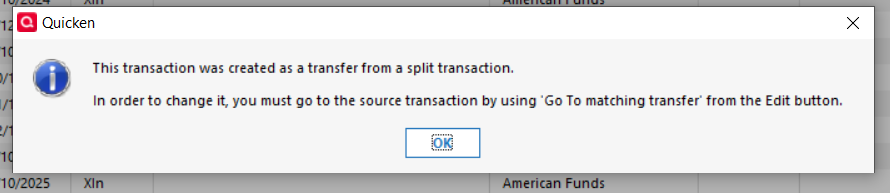
but it does this…

note it changed the date and changed my boughtx to miscexp.
I'd prefer not to have to add the buys as separate transactions if possible.
Any insights?

Comments
-
Posted this before, last November, was informed the developers were looking at it. In the meantime, it appears my only option is to keep the xin and create another trasaction for the buy. that would not match the downloaded transactions.
0 -
Hello @scottmonte,
Thank you for reaching back out. I can see that the ticket, CTP-15185, is still open.
I updated the ticket to make sure our teams know this is still happening. Thank you for sending the updated problem report. I also attached that to the ticket.
Thank you!
Quicken Kristina
Make sure to sign up for the email digest to see a round up of your top posts.
1 -
Thank you Kristina. Is this just a low priority bug?
0 -
Hi @scottmonte,
This issue is currently being treated with high priority. At this time, however, there are no new updates or an estimated timeframe for resolution.
Please feel free to check back on this thread for any updates, and you’re welcome to follow up here at any time.
Quicken Laura
Make sure to sign up for the email digest to see a round up of your top posts.
1 -
for more context, the one account that is working is a Mutual Fund Only account, it got created when I set up the second account by connecting to the financial institution. The first account that does not work is one I created manually, and I can not set it to mutual fund only.
0 -
@scottmonte What is the main issue here? A doctor would call this your "chief complaint."
Is it
a) you can't get the holdings, balance, cost basis, etc. in one of your American accounts correct even after editing the downloaded transactions, or
b) you also want the problem account to look tidy, with a BoughtX transaction for each of your contributions rather than an XIn and a Bought on the same day.
I can think of several ways to accomplish a} without requiring changes to Quicken, but b) might be more difficult.
One of the underlying issues appears to be that as the accounts are currently set up, the one that is working correctly is a Single Mutual fund (SMF) account and the other is a Brokerage account, which can hold cash and more than one security. I believe if you buy American funds directly from American, they only download correctly into SMF accounts.
QWin Premier subscription0 -
@Jim_Harman the account in question is not one that I download transactions into, i have been maintaining it by hand. I can recreate it and start downloading I suppose, but I haven't done that yet. I'd like b) and I should be able to do that manually, as I was able to do it when the xin was not part of a split.
Yes one account (the one that works) is an SMF account. I can not convert the other one to an SMF. the ui won't let me.
0 -
If it were me, I would simply enter a Bought transaction on the same date as each Xin for the correct number of shares and the amount of the Xin, so you end up with 2 transactions instead of a BoughtX.
But if you really want to have BoughtX's in the register and since you are able to edit the Xins in an SMF account, one experiment you could do would be to:
- Back up your file in case this does not work or the result is not what you want
- Open a new offline SMF account in Quicken
- Move the existing BoughtX transactions from the old account to the new account
- One transaction at a time, starting with the oldest split transaction, edit the split so it sends the money to the new account instead of the old one and edit the Xin in the new account to be a BoughtX for the appropriate number of shares.
If for some reason this does not work, you can revert to the backup you saved.
QWin Premier subscription0




