I can't get my Discover Card to update using the Online Services. I was able to connect my Discover Savings with the online services. Why will Online Services with Chase Bank not connect?
Hello @VCX,
Thank you for sharing your experience with us.
After checking your connections internally, I am not seeing any errors on our end, which is good news. However, I am unclear about what you are having issues with. Please provide more information:
The more information you can provide, the better!
Additionally, screenshots of what you are seeing might be helpful. If needed, please refer to this Community FAQ for instructions on how to attach a screenshot. Alternatively, you can also drag and drop screenshots to your response if you are not given the option to add attachments.
Looking forward to your response!
Also I can't get my Discover Card to update using the Online Services.
Hello @philbeccia,
Thank you for adding to this discussion.
After checking your internal connections, I can see that you are getting an FDP-350 error. In Quicken for Windows, that translates to a CC-901 error.
For context, CC-901 generally appears when Quicken detects that your account authorization needs to be refreshed. This can happen if:
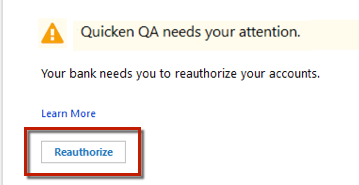
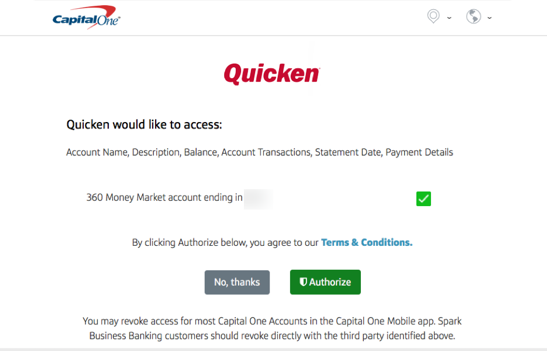
You can resolve this by reauthorizing your Discover account:
Important: If you have multiple Discover accounts or instances in Quicken, you may need to authorize each one individually. Make sure you don’t uncheck accounts unless you don’t want them in Quicken, as that would revoke their authorization.
If reauthorizing doesn’t resolve the issue, you may need to follow the steps in this Support Article to deactivate and reactivate the affected accounts.
Let us know if you continue to see the error after completing these steps.
Thanks again!
@philbeccia & @VCX,
Just checking in, we haven't heard back from you in a while.
Do you still need assistance?
Thank you!
Hello again,
Checking in once more before this thread is closed.
Let us know if you still need assistance.
I am STILL having the same problem, so I don't think this problem is resolved. About a month ago my Discover Card stopped downloading transactions. I forget the error I was getting, but I was just waiting it out to see if it would resolve itself. It did not.
I eventually tried to click the "Fix It" button in Quicken when the download failed. It did not fix it. I deactivated the account and tried to reconnect. No luck. Went to the Discover site and deactivated third party access for my card. Went back to Quicken, started the authorization process all over again, and still can't connect. Discover authorizes my request, but Quicken continually returns this error:
My default browser is Firefox, but I have tried this with Chrome and Brave as well. Same result.
This appears to me to be a Quicken issue and not a Discover issue.
Hello @Brian Biggs,
Thanks for sharing the details.
Please try the following steps below and see if it resolves the issue:
Let us know how it goes!
@Brian Biggs,
Just checking in!
Your suggestion did not work. This is the same thing I had already done, except using the "Fix it" button initially or the "Setup Now" from the Discover Card account. I did the Tools -> Add Account path and still get the same error. All authentication at Discover Card works fine, but when the browser returns to Quicken, I get the error (previous screenshot).
Other options to get to a solution?
Thank you for following up!
Due to the nature of this issue, it is recommended that you contact Quicken Support directly for further assistance, as they can walk you through troubleshooting steps in real-time and escalate the situation as needed.
The Quicken Support phone number can be found through this link here.
I worked through this the other day with Quicken Support. The root of the issue was that I was using Firefox as my DEFAULT browser. They had me switch to using Microsoft Edge as the default browser and then I was able to authenticate to Chase as well as other accounts that were no longer authenticated for some reason. The authentication was fine under Firefox, but the communication back to Quicken after the authentication was complete was not working.
Firefox has always worked, so it feels like this should be submitted as a bug.
Hi @Brian Biggs, Thanks for your reply and for sharing what worked for you! During the authorization process, Quicken uses your default web browser to sign in to your financial institution. Once you successfully sign in, the browser must send that authorization back to Quicken.
Sometimes, browser settings such as pop-up blockers, privacy settings, or certain extensions can prevent that final step from completing. When that happens, the sign-in appears to succeed, but Quicken never receives the authorization. Switching your default browser to Microsoft Edge can help determine whether the issue is browser-related. If the authorization works in Edge (or another browser), it's likely that a setting or browser extension in your original browser is interfering with the process.
I also recommend reviewing our support articles on Adding Express Web Connect Plus Accounts in Quicken for Windows and Connectivity Troubleshooting for additional information and troubleshooting steps.
I hope this helps!