Very slow One Step Update and accounts not syncing with mobile [Edited]

boomer_1970
boomer_1970 Quicken Windows Subscription Member ✭✭✭

I am beyond frustrated with Quicken. When it works, it is wonderful, but way too often it glitches.

Over the past few months, I have frequently experienced One Step Update taking several hours. I figured that part of the reason was that I was using an older PC and would frequently access the PC remotely from an iPad app. I do know that I found that the desktop folder where the file was located was being backed up to OneDrive. I moved that file directly onto the hard drive, and it seemed to help.

One issue that I was frequently having was Quicken deciding to remove the accounts I wanted to sync to mobile. I use the mobile app on my iPhone quite religiously as a record of transactions/checkbook register, etc. Frequently I would look and all of my accounts were missing from the mobile app.

About a month ago, I purchased a Surface Pro and installed Quicken onto it, and moved the file onto the tablet. Up until a week ago, it worked pretty well.

A few days ago, I made some updates, and it took the better part of a day. The next day, when I updated accounts, all of my downloaded transactions were duplicated, causing me to have to clean them up.

This morning I updated, and the transactions did not double; they tripled, so I had to clean them up. Afterward, I did a One Step Update, and it took about 6 hours. When I looked, all of the accounts to sync online had been deactivated again. I am trying to delete my cloud file now (it has been running for about 2 hours).

Is it me or others experiencing similar recurring issues?

[Edited - Readability]

_________________________________________________Using Quicken Deluxe R50.8 Build 27.1.50.8 USA

Comments

  • NotACPA
    NotACPA Quicken Windows Subscription SuperUser ✭✭✭✭✭

    If you're running Q Subscription, how are you still on a release (per the final line of your message) that's ancient?

    And QWeb/QMobile are known to cause the types of issues that you're describing. Try turning them off, say for a week or two, and see what happens.

    Q user since February, 1990. DOS Version 4
    Now running Quicken Windows Subscription, Business & Personal
    Retired "Certified Information Systems Auditor" & Bank Audit VP

  • Quicken Kristina
    Quicken Kristina Quicken Windows Subscription Moderator mod

    Hello @boomer_1970,

    Thank you for letting us know you're seeing these issues.

    I think your signature line on the Community is outdated. When I checked our internal tools, it shows you're using R66.28. Is that correct? You can check which version you're using by navigating to Help>About Quicken.

    Screenshot 2026-04-20 at 3.46.34 PM.png

    As @NotACPA said, the issues you're seeing may be related to syncing with the cloud. Since you use that feature to sync with your mobile app, turning the feature off might help, but wouldn't be an optimal solution. Please provide more information to help troubleshoot the issues:

    • You mentioned this has been happening over the course of several months. Do you recall when it started?
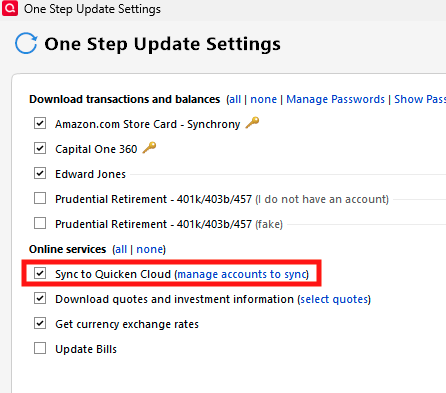
    • Do you sync to the Quicken Cloud when you run One Step Update?
      • You can check this on the One Step Update Settings screen. Screenshot 2026-04-20 at 3.36.48 PM.png
      • If you do sync to the cloud, try unselecting that option and confirm if that allows One Step Update to finish faster.
    • If you sync to the cloud without running One Step Update (Mobile tab, Sync Now button), is it still super slow? Mobile tab Sync Now button.png

    You mentioned that your downloaded transactions starting duplicating. To clarify, is this happening in the mobile app, the desktop app, or both? Is this affecting all of your accounts? Which financial institution(s) are the affected accounts with?

    I look forward to your reply!

    Quicken Kristina

    Make sure to sign up for the email digest to see a round up of your top posts.