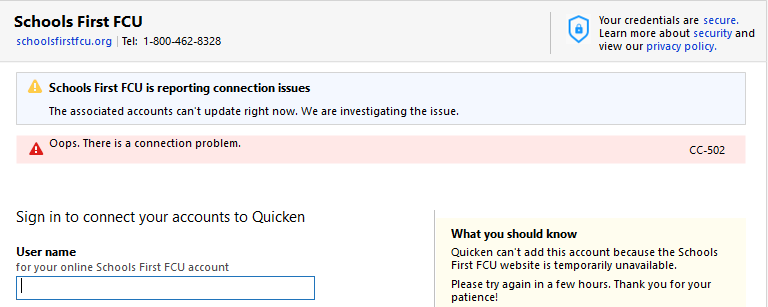
This started April 20th, 2026. I can log into the site through my browser just fine. I have tried deactivating all accounts and setting them up for download again, but the message is the same.
[Edited-Readability]
Hello @Vairspyder,
Thank you for reporting the issue you are seeing with Schools First FCU.
After reviewing your internal connections, I can confirm that you are getting a CC-502 error. This error is caused by maintenance on the bank's servers that Quicken uses to download transactions.
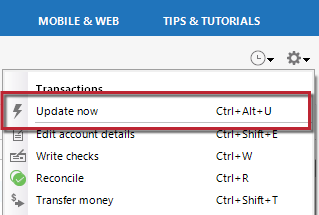
You can try the following steps if your accounts are connected:
Try waiting one business day. You can try updating again in a few hours or the next business day. If the issue still occurs after one business day, try the steps above again.
Please contact us so we can help you resolve this issue.
I know you mentioned that you had deactivated your accounts. So if they are still deactivated, you can skip to the last step and contact Quicken Support, since it has been more than 24 hours.
Hope this helps!
I have been experiencing this exact problem and have attempted updating from individual accounts without success for several days. Is this a Quicken problem or a SchoolsFirst issue?
@islandlife589,
Thank you for adding to this discussion and posing this question!
The CC-502 error is caused by maintenance on the bank's servers that Quicken uses to download transactions.
I checked internally and can confirm this is the error you are receiving. Please follow the steps outlined in my previous post here:
Thanks again!
I am also having the same error with multiple attempts.
Hello All,
Thank you for continuing to update this thread.
We now have an Open Alert for this issue. This has been escalated internally, and we do not have an ETA as to when it will be fully resolved.
Ensure you bookmark the alert linked above to stay up to date on the progress of this situation.
Thank you!
I've been having the same issue for multiple days. Also had difficulties syncing with new transactions on 4/10 but resetting the connection worked at that time. Resetting or Deactivating no longer works. Discussed with SFFCU online support afternoon of 4/22/26, they had no definitive update other than wait 24 hours and try again, wait another 24 hours and try again, and so forth.
I am going to add myself to this thread. This is clearly a widespread problem as I see most of the users that posted are Windows users and I am on a Mac. I am hoping it gets resolved quickly. Perhaps before the weekend?
They've updated their website and online app. That's certainly the issue.
To add additional information from my prior post - The SFFCU online support stated the new SFFCU SW update turned on Multi-Factor Authentication for 3rd party App access and was causing the issue. They stated the MFA was not to have been targeted to 3rd Party apps in their SW update but it is unclear when or if this will be resolved and by which party Quicken or SFFCU. (Note: this is one data point and statement accuracy not validated.)
Hello everyone,
Thank you all for continuing to share updates and additional context. It’s very helpful in understanding the scope of what’s going on.
Based on the reports here and what we’re seeing internally, this does appear to be related to recent changes on SchoolsFirst Federal Credit Union’s end, including their website update and possible changes to authentication (such as MFA). When a financial institution makes updates like this, it can disrupt the connection methods Quicken relies on, which is why you’re seeing CC-502/FDP-102 errors across both Windows and Mac.
To summarize where things stand:
At this point, since resets and reactivations are not resolving the issue, the best course of action is to wait while the investigation continues. In the meantime, please be sure to bookmark the Community Alert for the latest updates as they become available.
We understand how frustrating this is, and we appreciate your patience while this is being worked on.
They are now reporting that connections will be blocked until 4/29 in the afternoon PDT.
@salter7 Thank you for sharing that update!
In the meantime, please continue to monitor the Community Alert for any official updates.
We appreciate everyone’s patience while this is being worked through!
The newest issue is FDP-102 as of 8:12 this morning. Still no connection.
I have tried multiple times and still getting FDP-102. I have deactivated the accounts and cannot re-add the accounts and getting the same message.
Hello @dcmm14 & @lesliermm,
Thank you both for the updates.
The FDP-102 error you’re seeing is part of the same ongoing issue affecting SchoolsFirst FCU connections. This issue has already been escalated and is actively being worked on.
At this time, attempts to deactivate/reactivate or re-add accounts are not expected to resolve the issue, as it is related to changes on the financial institution’s end. For now, we recommend continuing to monitor the Community Alert for the latest updates and any new information as it becomes available.
We appreciate your patience while this is being worked on.
While we wait for a fix to this issue, is there any workaround? I tried downloading recent transactions from the credit union's website in QFX format and then import the resulting file but got the following error from Quicken:
"Quicken is unable to update this account because Web Connect support for your financial institution has been either temporarily, or permanently discontinued [CC-885]."
Manually entering individual transactions is too error-prone to be the workaround.
Unfortunately that doesn't work because it's part of the same issue - my understanding is the financial institution ID is the thing that Quicken is choking on so it will not import the file. A Quicken person explained it to me before and that's the gist of how I understand it.
Getting used to this frustration every time Schools First does something in their system. This seems like the longest wait I can remember to get it fixed…….. Frustrating for sure as someone who updates my banking on Quicken daily. Always seems to take longer to fix with SFFCU than any of my other banks. Hopefully it has a remedy soon!
Thank you all for continuing to share updates—we definitely understand how frustrating this has been, especially for those who rely on frequent updates.
At this time, this issue remains ongoing and is still being worked on. We don’t have an ETA to share, so for now, we recommend continuing to monitor the Community Alert for any official updates, as that’s where new information will be posted as it becomes available.
We truly appreciate your patience while this is being worked through.
Tried to add today and got this message:
"Schools Federal Credit Union doesn’t support Quicken connections."
Is this the outcome or is there going to be a fix from Quicken?
@lesliermm,
Thank you for adding to this discussion.
We have not been made aware of any such decision. In fact, I have come across other users reporting success connecting to Schools First today.
Would you mind sharing a screenshot of the message you are receiving? If needed, please refer to this Community FAQ for instructions on how to attach a screenshot. Alternatively, you can also drag and drop screenshots to your response if you are not given the option to add attachments.
Also, keep in mind that the Alert for this issue is still considered open and ongoing.
5/4/26 it did not work. Today, 5/5/26 I checked for Quicken updates and there was one. It did not work at first but after a couple of tries I was able to add back the accounts to download.
There are 3 options for Schools First and not sure why as they are all the same website address but one worked and the others did not. Why 3 options with the same website address??
Make sure you do not add back as NEW accounts which was the default option!!
Happy it is back!
@lesliermm Thanks for coming back and updating the thread.
Can you share the exact names of the three connection options you saw and which one ultimately worked for you? A screenshot would be even better if you still have it. That detail is important because those options often map to different aggregation routes on the backend, even if they all look like the same website URL on the surface.
If needed, please refer to this Community FAQ for instructions on how to attach a screenshot. Alternatively, you can also drag and drop screenshots to your response if you are not given the option to add attachments.
Appreciate you circling back with a resolution update!
Sorry, I do not have a screenshot. The 3 options all had the correct website but as you said there must be a different backend. I would hope Quicken could identify which to use and eliminate the triplicate that now exists as it is confusing.
Thank you all for taking the time to report this issue!
The Community Alert has been marked as Resolved. If you’re still encountering the issue, we recommend reaching out to Quicken Support for further assistance.