Reports
When I call up a report, or create one, and enter my selection of criteria, such as accounts to use, then if I notice on the resulting report that I need to exclude an account, when I go to the account selection list, many accounts appear that were excluded on my previous report and I need to again make my selection of only accounts that I want to report on.
Comments
-
The default reports that we can select cannot be permanently modified and saved back to those default reports.
In order to save reports that you have customized you need to manually save them to My Saved Reports. Then the next time you open that report from My Saved Reports it will have the same customized configuration that it had when you last saved it.
Then each time you open that saved report and customize it, again, if you want that customization changed, you need to either save it back to that saved customized report or save it with a new report name to My Saved Reports.
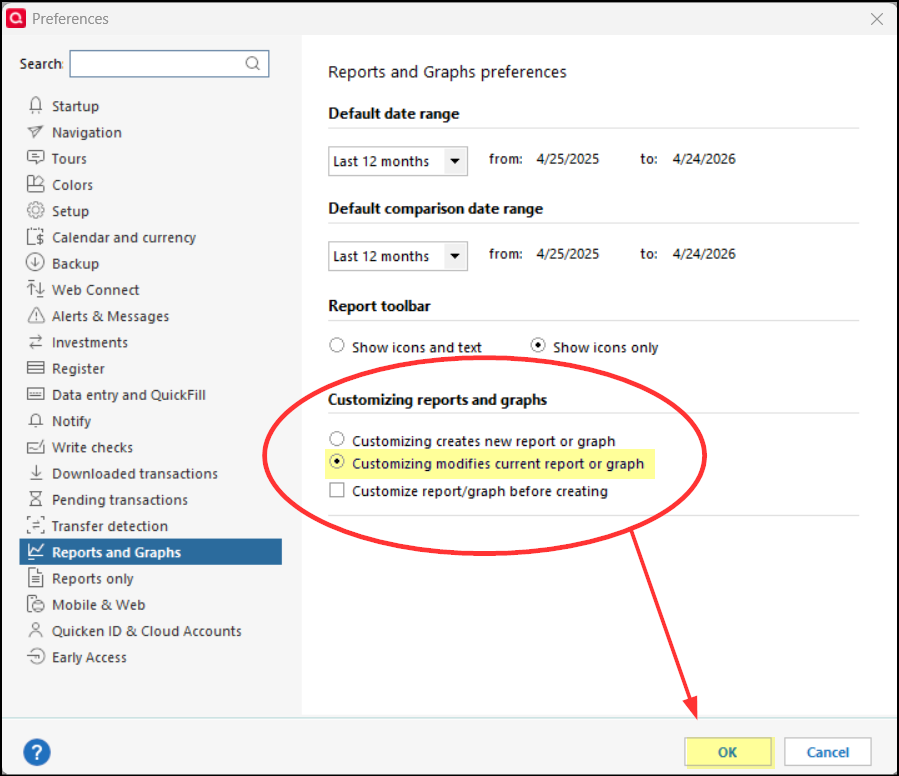
Also, you might want to Edit > Preferences and make sure the option circled in red in the following picture that you want has been selected. I highlighted in yellow the option I selected because with this checked when I close on opened Saved report I am prompted to either save the report to the original saved report or to save it with a new name.
Did you find this helpful? If not, please provide additional information/clarification regarding what the issue is that you are experiencing.
Quicken Classic Premier (US) Subscription: R66.28 on Windows 11 Home
0