Selecting Edit And Mark As Paid does not remove from Bills & Income List (Q Mac)
After installing the latest release for Mac: Version 9.0.1 (Build 900.60628.100), macOS 26.3.1. When I select Edit And Mark As Paid, the transaction is created in the Register but the Reminder is not removed from the Bills & Income List. If I select Mark As Paid then it does drop off. Can this be fixed please? Thanks!
Comments
-
Hello @MyQknSupport,
Thank you for letting us know you're seeing this issue. To help troubleshoot, please provide more information:
- Is this happening with online bills, manual bills, or both?
- Is this affecting all of your bills?
- If not, which specific ones are affected?
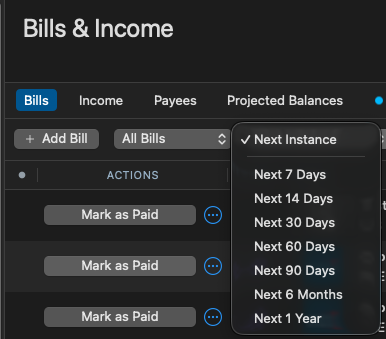
- What filters are active on your Bills&Income tab?
- For example, is it set to Next Instance, or a specific timeframe?
I look forward to your reply!
Quicken Kristina
Make sure to sign up for the email digest to see a round up of your top posts.
0 -
Thanks for the response! After your suggestions, I experimented but alas the issue still occurs. These are Manual bills and I tried different filter settings, specifically next 90 days and also Next Instance, but the reminder remains after I do Edit And Mark As Paid. I did verify if I select Mark As Paid it then drops off to the next instance.
0 -
Thank you for your reply,
I'm not able to replicate what you describe. Because of that, I suspect the issue may be file-specific. Please try restoring a backup from before the issue started and verify if the issue is resolved in the restored backup. To restore a backup, please follow these instructions from our article on backing up and restoring Quicken files:
Restore Quicken data
- In Quicken, select File > View/Restore Backups...
- Browse your computer or external media to find the backup file you want to restore. The Quicken backup file has the extension .quicken2017backup or .quickenbackup.
- Select the file to restore.
- Click Choose.
If you don't have a manual backup from the correct timeframe, follow the instructions below to restore an automatic backup.
Restore an automatic backup
Quicken creates a copy of your data every time you close the program and stores five of these copies in a BACKUP folder. If the backup file you've created becomes damaged, you may be able to restore an automatic backup and save yourself the need to re-enter data.
First, check to see if automatic backups are turned on (this is on by default)
- In Quicken, select Quicken > Settings.
- Go to the Backup tab.
- In the Local backups section, make sure there is a check mark next to Automatically create a local backup when quitting Quicken.
- Under that option, there is a Backup Folder button that links directly to your BACKUP folder - a good way of finding them fast!
Then, restore the automatic backup
- In Quicken, select File > View/Restore Backups...
- Click Restore a Local Backup.
- Select the Automatic Backups folder (Quicken > Backups > Automatic Backups).
- Select the file to restore.
- Click Choose.
Please let me know how it goes!
Quicken Kristina
Make sure to sign up for the email digest to see a round up of your top posts.
0 -
For existing manual bill payments [and deposits], if I use Edit and Mark Paid, the transaction is recorded to the register, but the bill payment reminder stays on the active list of pending bills.
I just upgraded from 8.x to 9.01 this morning. It's a very minor issue but thought I'd report it here.
I saw the same behavior with a scheduled Income reminder.
0 -
Hi @R1456,
Thank you for reaching out. Just to clarify, based on your example, when you mark the April bill as paid, does the April transaction appear in your account register, but the April reminder remains in the Bills list instead of advancing to the August reminder (assuming this is a monthly bill)?
Please let me know if that’s what you’re experiencing or if I’ve misunderstood. I’m happy to help further.
Quicken Laura
Make sure to sign up for the email digest to see a round up of your top posts.
1 -
@Quicken Laura This is not the first report of this particular problem since the release of version 9.0. Here's one (and I think there may have been another):
Quicken Mac Subscription • Quicken user since 19931 -
Yes, that's the issue.
0 -
I have the same issue; mentioned in this thread.
[Edited - Enabled Link]
0 -
Hi everyone,
Thank you all for the detailed information; it’s been very helpful in narrowing down the issue. I’ve merged the threads to help keep everything organized in one place.
At this time, we haven’t been able to replicate the issue on our end. When you have a moment, please try the steps provided by @Quicken Kristina and let us know if you notice any changes.
I appreciate your cooperation and look forward to your updates!
Quicken Laura
Make sure to sign up for the email digest to see a round up of your top posts.
-1 -
» …. When you have a moment, please try the steps provided by @Quicken Kristina and let us know if you notice any changes .
»>Please try restoring a backup from before the issue started and verify if the issue is resolved in the restored backup.I'm not sure this recommendation would work. I think the issue came along with the upgrade to 9.x so there's really no meaningful backup to restore.
0 -
I am not sure if what I am experiencing is different as there is no mention of actually changing the date as I experienced the problem. These are the steps that I follow to re-create the problem.
- Open the “Bills & Income” tab.
- Select a bill that needs to be paid.
- Choose “Edit and Mark as Paid.”
- Adjust the payment amount, if needed.
- Do not change the payment date.
- Click “Save & Mark as Paid.”
- Confirm that the payment is posted to the ledger of the selected account using the original date.
- Confirm that the bill is removed from the “Bills & Income” tab.
- Repeat the process with another bill.
- Select “Edit and Mark as Paid.”
- Change the payment date.
- Click “Save & Mark as Paid.”
- Confirm that the payment is posted to the correct account ledger using the changed date.
- Check the “Bills & Income” tab.
- Confirm that the bill remains in the “Bills & Income” tab instead of being removed.
Observed issue:
Changing the payment date appears to prevent the bill from being removed from the “Bills & Income” tab, even though the payment is posted correctly to the account ledger.
macOS 26.4.1Version 9.0.1 (Build 900.60628.100)
2 -
This is happening to me as well since the latest upgrade.
0