Reports Incorrect

ArcadiaCOG1423
ArcadiaCOG1423 Quicken Windows Subscription Member

In March of 2026, there was a glitch in the system and a couple of our standard reports are no longer accurate or matching each other.

We run 3 reports every week that reconcile with the bank account and some time in mid march there was a glitch in the system. Our Register Report and Account Totals report are consistent and match the bank account, but now the itemized category report is consistently off the same amount.

We have made sure that the parameters on the report are all included as before and the dates are inclusive, also there are no uncategorized payments.

Has anyone else had this issue recently? It's been just in the past month that we've had a problem.


Comments

  • Quicken Laura
    Quicken Laura Quicken Windows Subscription Moderator mod

    Hi @ArcadiaCOG1423,

    Thank you for sharing what you’re experiencing. To help narrow this down, could you clarify a few things?

    1. Are you using a saved “Spending Itemized by Categories” report?
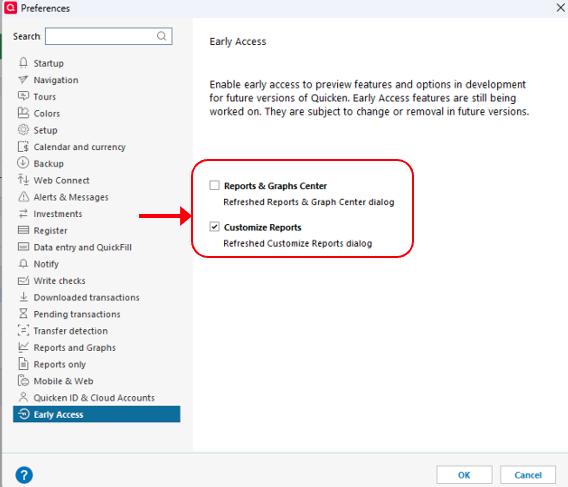
    2. Do you have Early Access features enabled?
    3. Do you have any split categories in your transactions?
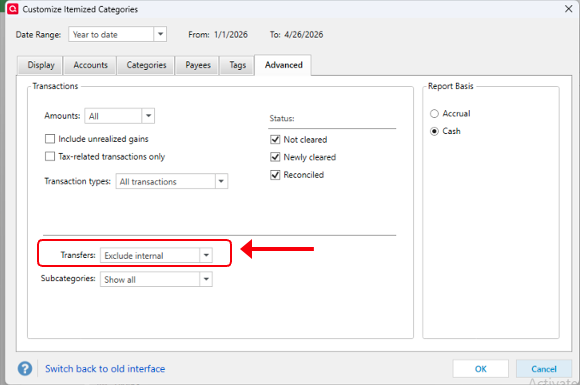
    4. Are transfers being included or excluded in this report?
    5. Have you identified where the discrepancy occurs—e.g., is there an unexpected category added to the report?

    To check Early Access:

    • Go to Edit → Preferences
    • Select Early Access from the left menu
    • If Reports & Graphs Center and Customize Reports are checked, uncheck them and run the report again Screenshot 2026-04-26 at 11.28.47 AM.png

    To check transfer settings:

    • Open the Spending Itemized by Categories report
    • Click Customize → Advanced
    • Make sure all options you want to include are properly checked Screenshot 2026-04-26 at 11.30.37 AM.png

    Looking forward to your reply so we can pinpoint the cause of the mismatch!

    Quicken Laura

    Make sure to sign up for the email digest to see a round up of your top posts.