Why did categories on quick-fill rules stop auto-filling? (Q Mac)
Very recently on one of my accounts (I use Quicken for Mac version 9.0.1), the categories for payees stop auto-filling when downloaded? These have worked forever, but in the last week or so have stopped working. They do work on several other of my Quicken accounts.
Best Answer
-
Hello @Jim Richar,
Thank you for reporting the issues you are running into.
I have some follow-up questions for you:
- Did anything significant happen around the same time that this issue began?
- Computer updates, Quicken updates, etc.
- Where is your data file located?
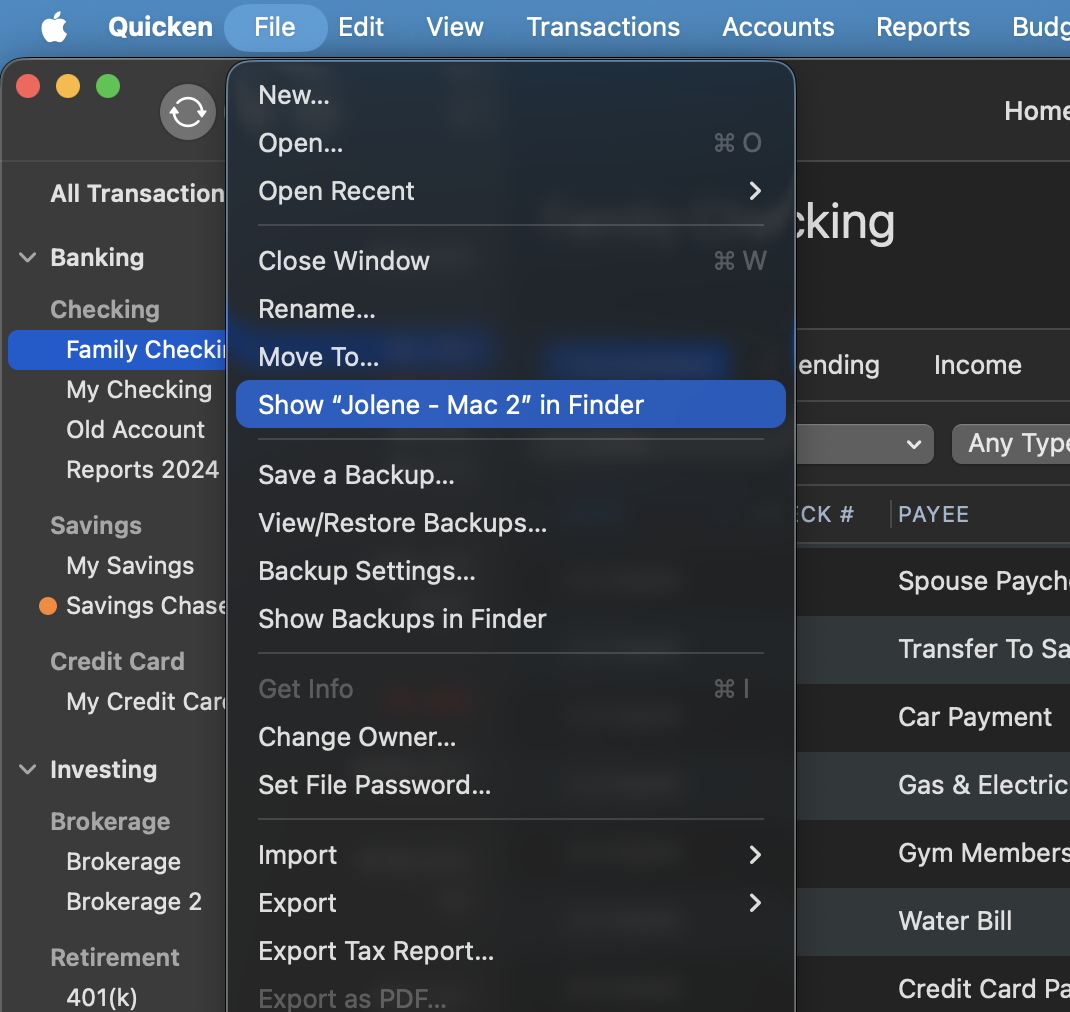
- You can see this by going to File>Show "name of file" in Finder.
- Is your file being synced/backed up by any third-party cloud services like iCloud, Dropbox, or BackBlaze?
- Have you tried restoring a backup from before the problem started?
- If not, this is a good first step to consider.
Restore Quicken data
- In Quicken, select File>View/Restore Backups...
- Browse your computer or external media to find the backup file you want to restore. The Quicken backup file has the extension .quicken2017backup or .quickenbackup.
- Select the file to restore.
- Click Choose.
Looking forward to your response!
Quicken Alyssa
Make sure to sign up for the email digest to see a round up of your top posts.
0 - Did anything significant happen around the same time that this issue began?
Answers
-
Hello @Jim Richar,
Thank you for reporting the issues you are running into.
I have some follow-up questions for you:
- Did anything significant happen around the same time that this issue began?
- Computer updates, Quicken updates, etc.
- Where is your data file located?
- You can see this by going to File>Show "name of file" in Finder.
- Is your file being synced/backed up by any third-party cloud services like iCloud, Dropbox, or BackBlaze?
- Have you tried restoring a backup from before the problem started?
- If not, this is a good first step to consider.
Restore Quicken data
- In Quicken, select File>View/Restore Backups...
- Browse your computer or external media to find the backup file you want to restore. The Quicken backup file has the extension .quicken2017backup or .quickenbackup.
- Select the file to restore.
- Click Choose.
Looking forward to your response!
Quicken Alyssa
Make sure to sign up for the email digest to see a round up of your top posts.
0 - Did anything significant happen around the same time that this issue began?
-
@Jim Richar That's really odd, since QuickFill rules have no capability of being applied to some accounts but not others, and Quicken's server-based auto-categorization process is similarly not account-specific.
In addition to answering @Quicken Alyssa's question about the exact location of your data file, please check and report on the status of the checkbox in Settings > Connected Services for "Automatically improve the quality of downloaded payee names and categories" — is it checked or unchecked. (The release notes mention a bug fix related to this setting.)
Quicken Mac Subscription • Quicken user since 19931 -
@jacobs I used the wrong terminology… it's not (as I said) working in some accounts but not this one… it's working fine on other Quicken files! I have different Quicken files for each of several people I manage finances for. This particular person's file's downloaded payees do not apply the QuickFill rules for categories. I did check the checkbox you mentioned, and it is properly checked.
0 -
@Quicken Alyssa I believed this stopped working when I was on vacation and brought my laptop with me to occasionally download and check finances for me and other people (I manage the finances for a couple of other people other than myself, each in their own Quicken file). So I was on a different wireless network, and I didn't have my backup drive with me, so some dynamics were different.
The "show name of file" has this file in the same directory I have all my other Quicken files (that work properly).
I pay extra to Quicken to use their cloud based backup for my files. Wouldn't doing a restore to a previous file mean all my updates since that time would be lost?
Attached is an example of the QuickFill not working
0 -
Hi @Jim Richar,
Thanks for your reply and for answering the questions above in this thread!
If you haven’t tried this yet, I recommend checking the following settings:
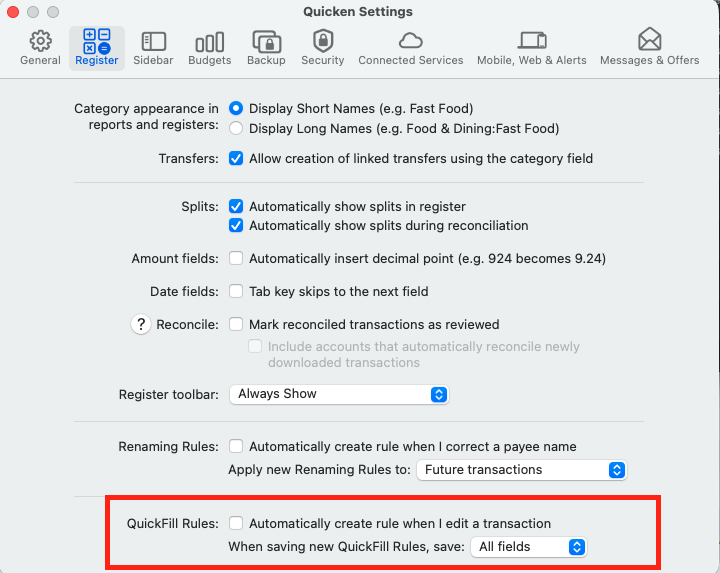
Please go to Quicken > Settings
Click on Register
Go to QuickFill Rules and confirm that All Fields is selected in the dropdown menu.If those steps do not resolve the issue, I recommend deleting the existing QuickFill Rule and trying again:
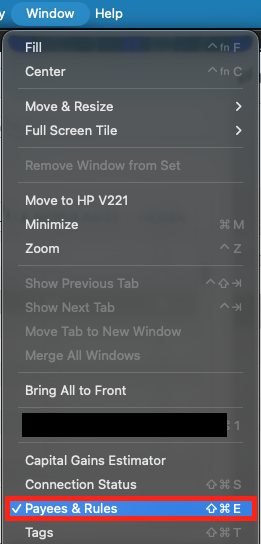
- Go to the top menu and select Window
- Click Payees & Rules
- Select QuickFill Rules
- Find the rule in question
- Click the rule once to highlight it
- Press the Delete (–) button at the bottom of the list
- Confirm the deletion when prompted
- Press the Add (+) button
- Re-enter the rule and try again
Let us know how it goes!
Quicken Carlos
Make sure to sign up for the email digest to see a round up of your top posts.
0 -
I pay extra to Quicken to use their cloud based backup for my files. Wouldn't doing a restore to a previous file mean all my updates since that time would be lost?
Whether you restore from the automatic backups Quicken creates (for free) on your local Mac, or the 10 most recent cloud backups (add-on fee), the result is the same: you will be back exactly as things were at the time of the backup. So yes, you would lose any transactions you have entered or edited since that time if you restore. If most of your transactions are downloaded, then the first update after you restore should bring in all the transactions since then.
This doesn't get to the bottom of the situation you describe, of course, but I wanted to answer that question. 😉 If you do decide to try restoring a data file, note that you can move forward with the restored file OR switch back to your current file if you find things worse or not improved. If you do restore, before you download any transactions, check the Settings > Connected Services for "Automatically improve" to make sure it's checked — and then download transactions.
Quicken Mac Subscription • Quicken user since 19930 -
@Quicken Alyssa I tried all the sugestions given and none worked. So I resorted to your suggestion of doing a restore of the file. This was a bit painful, but it worked! I had been on vacation on different WiFi's and doing things a bit different than if home… something must have corrupted the file. Everything seems to work fine now! Thank you!
1 -
Thank you for following up and letting us know that restoring a backup resolved the issue.
Very happy to hear you are up and running again! If you need more help, you know where to find us!
Thanks again!
Quicken Alyssa
Make sure to sign up for the email digest to see a round up of your top posts.
0