How do you correctly manually enter a buy or sell stock transaction in an investment account?

jdparker225
jdparker225 Member ✭✭✭✭

I created a new transaction (this is a bogus one to illustrate):
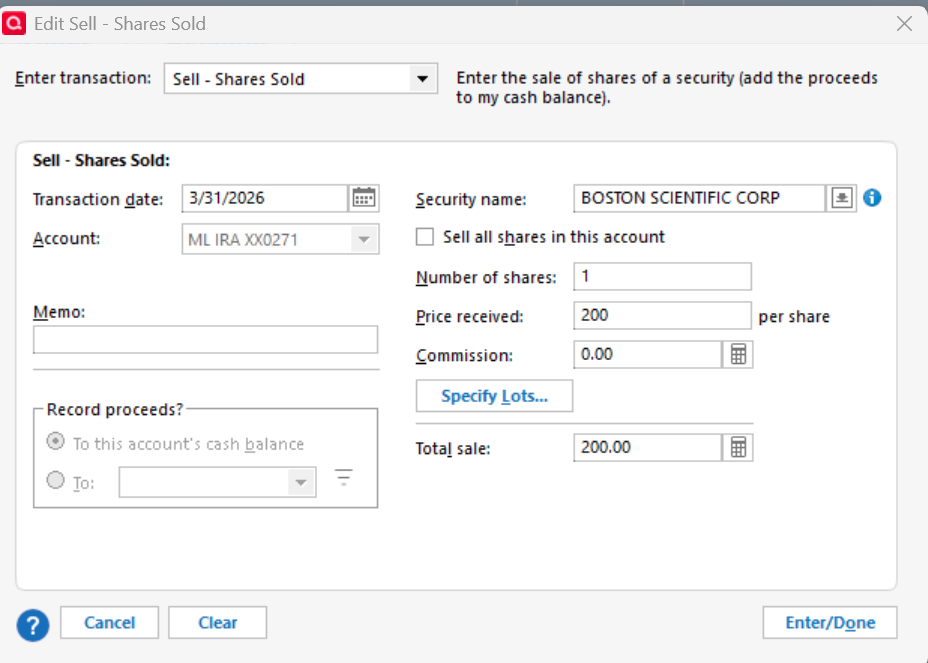
image.png

I pressed "Enter/Done" and got these two transactions:

image.png

The transaction is supposed to look similar to this (without the Clr status):

image.png

Also a correct sold transaction updates the Cash Bal column (not shown) based on the proceeds of the sale. Neither the Xout nor the Sold transaction caused any update to the Cash Bal.

I also tried a bought transaction with analogous results.

So how do you enter stock buys and sells manually?

Thanks

Jim

Comments

  • jdparker225
    jdparker225 Member ✭✭✭✭

    Forgot to mention: I am using Quicken Classic Premier Version R67.7 Build 27.1.67.7

    Thanks

    Jim

  • jdparker225
    jdparker225 Member ✭✭✭✭

    OK, I have figured something out: it happens this strange way if the date is in the past. If you use current date it goes in correctly, then you can edit the transaction and change the date.

    Another thing about this anomaly: if you delete any one of the transaction pairs created with a date in the past, the other will get deleted as well. Haven't done enough experiments to determine if there is some limit on how far in the past the new transaction has to be in order to get this behavior. I have no intention to do such a set of experiments.

    This is definitely a bug but there is a workaround. I plan to report it.

    Thanks

    Jim

  • Jim_Harman
    Jim_Harman Quicken Windows Subscription SuperUser ✭✭✭✭✭

    This is what you will see if there is a Placeholder in the account for this security on a later date than the transaction you are trying to enter.

    Placeholders prevent new transactions like Div, Bought and Sold prior to the security’s Placeholder date from affecting the account’s cash balance. This shows up as N/A in the Cash Amt column of the transaction list. Quicken does this by creating a linked Cash Balance Adjustment just before the affected transaction. Deleting one of the transactions will delete them both.  

    To allow the cash balance to change when entering missing transactions that affect the cash balance, you must first delete all the Placeholders in the account for this security that have later dates than the transaction you are entering. Because of this, if you are entering a series of missing transactions it will be easiest to work in reverse chronological order.

    Always back up your data file before changing historical transactions.

    QWin Premier subscription
  • jdparker225
    jdparker225 Member ✭✭✭✭

    OK, so not a "bug" because there were placeholders for the securities I was trying to enter transactions for. I put bug in quotes because, although that may be the intended behavior, the way it works is not very good design.

    Better would be a popup error messsage rather than creating bad transactions.

    On the other had… I am pretty sure in the past that I have had placeholders that are in the future with respect to downloaded transactions. E.g., when Merrill Lynch was under Direct Connect, pending sales and purchases would not download but ML had already updated the holdings to reflect that transaction and that would result (because I elected for Quicken to do it) in the creation of a placeholder with a date of the download. So let's suppose a buy had a trade date on Friday the 13th but didn't settle until Monday the 16th and I did a one step update on Saturday the 14th. The date on the placeholder would be the 14th and, on Monday when I did another OSU, the date on the downloaded transaction would be the 13th (Quicken uses the trade date not the settlerment date) which would be in the past with respect to the placeholder. Quicken can handle that (updates the placeholder to reflect 0 shares). Why can't it handle a manually entered transaction?

    I know that trade and settlement date are usually the same day and only very rarely separated by more than a day. But I have seen more than one day separation between trade and settlement date fairly recently so I suspect that the scenario I suggested probably did happen at least once but I cannot guarantee it.

    This is not the way things are handled in Merrill Lynch now since the switch to EWC+. Trades are downloaded while still pending so that Quicken holdings match what ML has and you don't get placeholders.

    Oh, I did back up my data file prior to entering the historical transactions.

    Thanks

    Jim

  • Jim_Harman
    Jim_Harman Quicken Windows Subscription SuperUser ✭✭✭✭✭

    I agree that preventing newly entered transactions before placeholders from affecting the cash balance is confusing and unnecessary. It is apparently by design, but I have never seen an explanation of why Quicken does that, and the fact that it is not mentioned anywhere in the Help makes it worse.

    Perhaps a Moderator could get us an explanation of why Quicken does this.

    QWin Premier subscription
  • jdparker225
    jdparker225 Member ✭✭✭✭

    Especially sense you can get around the restriction by entering the transaction in the future with respect to the placeholder and then just edit the date and it seems to work fine.

  • recursor1
    recursor1 Quicken Windows Subscription Member ✭✭✭
    edited May 2

    I've learned a lot about investing since I started using Quicken, and I'm by no means an expert, but I think I may know why it was designed in this manner. And I wish I'd actually used them in the past, instead of doing a lot of other things I did. Would have been a time saver possibly.

    So the placeholder feature is designed for recording past investment performance, and auto-adding/removing cash for each transaction because it is assumed that you, the user who is using the placeholder, isn't concerned about cash movements in the past. By using the placeholder, you are picking your opening balance date and going "I only care about the cash balance on and after this date". So, Quicken sweeps out the cash automatically for you. This is only about investment performance and Quicken is divorcing the transactions prior to the opening date from meaning anything else.

    If I'd realized how they'd worked sooner, I probably would have recorded less transactions in my 401k accounts in Quicken. Instead of worrying about where all the money came from, and thus including the tracking of some random mutual funds who's performance effects I really don't care about, I could have used the placeholder feature instead to only record the performance of the mutual funds I ultimately care about (the mutual funds I decided on once I figured out what I was doing, and didn't let my brokerage play around with my money anymore. Because why would I care about the performance of my money when they were controlling it?)

  • Jim_Harman
    Jim_Harman Quicken Windows Subscription SuperUser ✭✭✭✭✭

    I don't think Placeholders improve performance tracking, especially not on the Investment Performance Report. Their main impact is to force the share count as of the Placeholder date to match the downloaded or user entered share count.

    I suppose the purpose of preventing the cash balance from changing when entering missing transactions prior to the Placeholder is to prevent side effects to the cash balance, but from my experience it mainly causes confusion.

    You can eliminate the unwanted cash balance adjustments by noting the correct share count and cash balance as of the Placeholder date and then deleting the Placeholder before entering the missing transactions. After deleting the Placeholder, any existing cash balance adjustments linked to transactions you have already entered will be un-linked, so you can delete them as well.

    If you have a bunch of transactions to enter and there is more than one Placeholder, it is best to work backwards in time and delete the most recent Placeholder first.

    QWin Premier subscription
