This discussion was created from comments split from:
Bank Of America - Reauthorize (FDP-390)
.
Same problem here. I end up with new Quicken accounts for checking and credit card, which are accurate, but the old accounts remain, meaning that balances are double-counted.
Interestingly, if I try to reauthorize the old accounts, the reauthorization screens are different and appear to work until I get a big gray screen saying the reauthorization failed.
I've been using BoA accounts for over 45 years and Quicken for 29 years. I'm thinking now that it's time to leave BoA.
Hello @Salvelinus,
Thank you for letting us know you're encountering this issue. To help troubleshoot, I checked our internal tools, and can see you use Quicken for Windows (QWin). I moved your post to a new discussion because troubleshooting steps in QWin are different from Quicken for Mac.
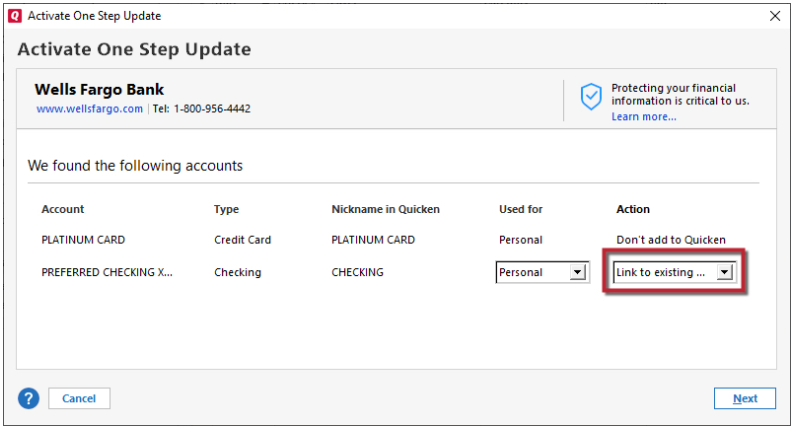
I suspect the reason you're encountering issues reauthorizing the original accounts is because they are on connection options that are being retired or no longer active (like Bank of America - Quicken). To reauthorize the accounts without creating new accounts, please follow these steps:
Once the original accounts are connected, if you still have the newer/duplicate accounts in your file, backup your Quicken file and delete those duplicate accounts.
Please let me know how it goes!
Thanks, Q Kristina.
Tried that. No joy. Quicken still insists on adding new accounts for my BoA checking and credit cards. I will try deleting the newly-added accounts from Quicken and then reauthorizing the old accounts.
By the way, my accounts are Merrill Lynch (part of BoA) are unaffected and are working properly, so it appears to only be an issue with Bank of America.
Thank you for the additional information,
I'm glad to hear your Merrill Lynch accounts are unaffected by this.
If the issue persists after you have deleted the new/duplicate accounts, please provide more details about what is happening that forces you to add the accounts as new. If possible, please include screenshots with any personal information/partial account numbers redacted. If needed, please refer to this Community FAQ for instructions on how to attach a screenshot. Alternatively, you can also drag and drop screenshots to your response if you are not given the option to add attachments.
Thank you!
Crossed fingers: I "think" this worked. Here's what I did:
Thanks for your help.
RWP
Thank you for the follow-up,
I'm glad to hear you were able to successfully reconnect the accounts. Thank you for sharing the process you used! Hopefully, it will help others encountering the same issue.
If you need further assistance, please feel free to reach out!