I've scheduled the one step update but it keeps asking for passwords
Hi friends,
I set up a schedule for the One Step update. It's supposed to happen at 3am daily. But when I go to my computer in the morning, it's always asking me for my Quicken password. Is there no way to store this so that it updates without me doing that? Otherwise, what's the point of scheduling it?
Also, when the updates do come in for my checking account and my credit cards, they sit in a pending status, until I approve them. Is there a way to get them all to be automatically approved?
Answers
-
Please clarify which PW you are being prompted for:
Quicken PW: This is the one that is for your online Quicken.com account and is sometimes needed when launching the software but you should not be getting prompted for this frequently.
Datafile PW: This is the PW that is needed to open the data file (if you had set your Preferences to require a PW before it can be opened). Try keeping Quicken open at night or (not recommended by me) removing the PW required setting in your Preferences.
Password Vault PW:
- PW Vault requires a PW to be entered in order to run OSU for security reasons.
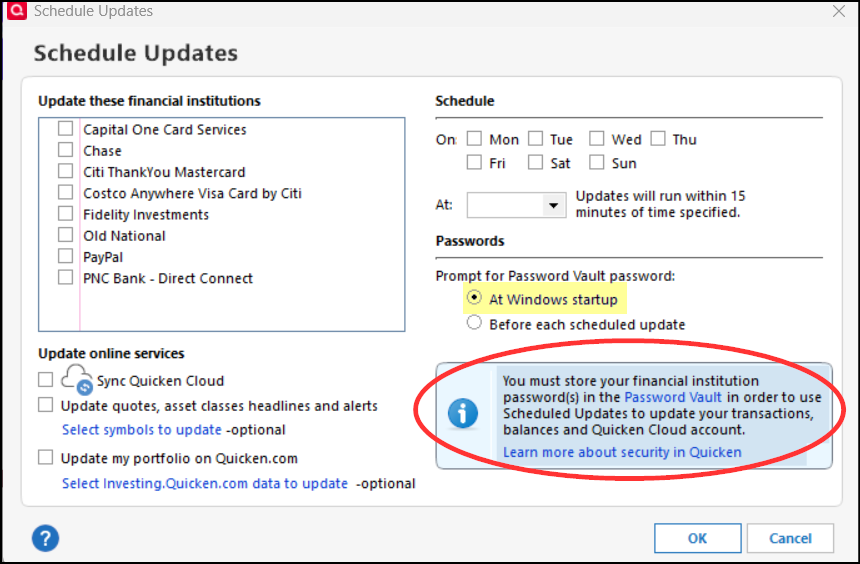
- In the Schedule Update settings you need to choose when the PW for PW Vault is to be entered.
- If you are OK with keeping your computer running at night you can choose to be prompted enter that PW every time you launch Windows. Then I think there will be no prompt for entering that PW when the scheduled update is run.
- If you are not OK with keeping your computer running at night you will need to enter this PW every time the auto update occurs.
Let me know if any of this helped you to resolve the issue?
Quicken Classic Premier (US) Subscription: R67.7 on Windows 11 Home
0