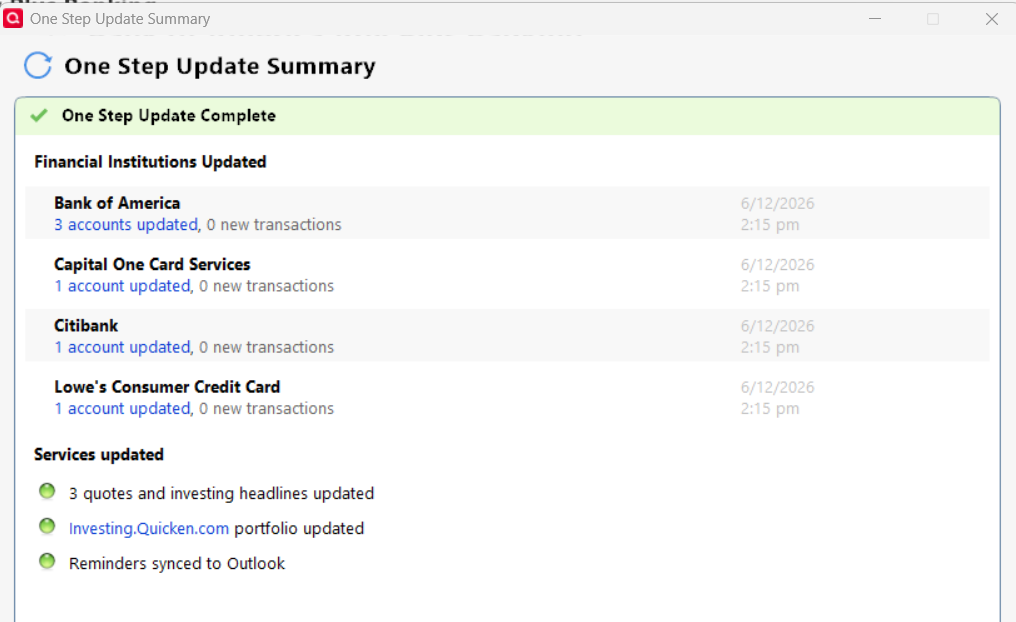
One Step Update Summary only shows 6 accounts updated, but I have 12 accounts set up for download.
Quicken Classic Deluxe for Windows Version R67.10
[Edited-Formatting]
Hello @gregorypbida,
Thank you for reporting the issue you are seeing.
I have some follow-up questions for you:
Screenshots of what you are seeing could be helpful as well. If needed, please refer to this Community FAQ for instructions on how to attach a screenshot. Alternatively, you can also drag and drop screenshots to your response if you are not given the option to add attachments.
Looking forward to your response!
Thank you for assisting me!
Thank you for your reply,
To help troubleshoot the issue, please provide additional information.
I look forward to your reply!
I was having the same issue. In the post below, the solution from @Quicken Laura was to rename Runtime.dat file and close and open Quicken and rerun OSU. This fixed the issue for me.
Thank you again for assisting me!
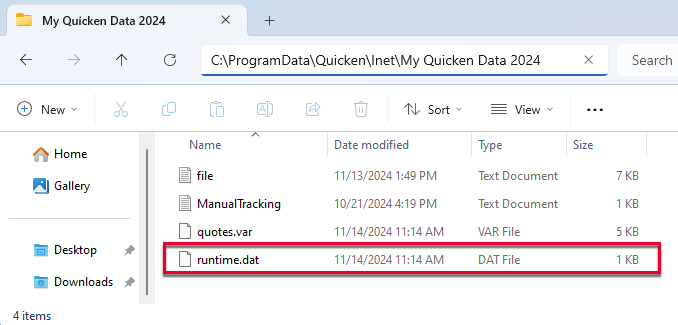
Based on your description, it sounds like the issue may be an issue with the runtime.dat file. To correct it, please follow these steps:
1. Rename the runtime.dat file found at C:\ProgramData\Quicken\Inet\FILENAME\. (For example, add a 1 at the start of the file name, so that it reads 1runtime.dat.)
2. Run a One Step Update (OSU) again to confirm the issue is resolved.
Note - The Program Data folder is hidden by default. If you need instructions on unhiding the folder, you can find instructions on Microsoft's support site.
Please let me know how it goes!
So far it does not appear that anyone has noticed that his QDF file is on a OneDrive (e.g. C:\Users\gpbid\OneDrive\Documents\Quicken\GREG_20100401_1Cpy). Quicken support has said in the past that this is not supported. While it may not be a factor in this issue, it would be best to avoid future problems if the OP moved the current directory to one that is only local to his system.
We haven't heard back from you in a while. Do you still need assistance?
Check back and let us know! Thank you.
Hello again,
Checking in once more before this thread is closed. Let us know if you still need assistance.
Thank you!
Due to the lack of response, I went ahead and closed this post.
If you still require assistance, please feel free to start a new post.