This discussion was created from comments split from: Vanguard connection issues.
I run Quicken Premier. Similar problem with Vanguard.
When I try to set up account for data download from Vanguard, I use my ID and Password, and it calls Quicken and then stops and returns to my screen without any attempt to connect. Have asked Quicken and Vanguard. No help.
Tried this numerous times. Vanguard connection is by Direct connect, and this problem is at least several months old.
Help.
BILL
Hello @whalsey,
Thank you for letting us know you're encountering this issue. To clarify, which Vanguard connection option are you attempting to connect to?
I can see that you spoke with Quicken Support a few days ago. It looks like they already had you test in a new file, confirming that the problem isn't file-specific.
What troubleshooting did you go through with Vanguard?
Would you please provide a bit more detail on exactly what is happening and where in the process it's failing? Are you entering your username and password in Quicken, or are you being redirected to the financial institution's website to authenticate? What do you mean by "it calls Quicken"? You mentioned that it stops and returns to your screen. Where is it returning from (for example, is the add account window closing)?
I look forward to your reply!
We haven't heard back from you in a while. Do you still need assistance?
Check back and let us know! Thank you.
Hello again,
Checking in once more before this thread is closed. Let us know if you still need assistance.
Thank you!
In case the other user has his/her problem solved, I am still experiencing this issue. I'm using Quicken Classic Business & Personal (R69.29) on a Windows 11 PC.
I have 3 Vanguard accounts: 2 IRAs and one taxable. The financial institution is "Vanguard," and the Connection Method is "Direct Connect." It's been several months since either One Step Update or Update Transactions from the account itself successfully pulled in transactions from my Vanguard accounts. There is no error shown during or after the update process. It appears to function normally, but none of the new transactions show up to be added to the register.
When updating by either method, I am asked to enter my Vanguard password in the Quicken field.
It would be great to know how to fix this so that I no longer have to log into Vanguard to push transactions to Quicken. Thanks.
[Edited - Readability]
Hi @as_hiker,
Thank you for sharing the details of what you're experiencing, including the connection you're currently using and the troubleshooting steps you've already tried. That information is very helpful.
Our Missing Transactions support article includes several troubleshooting steps that may help identify why the transactions aren't appearing. Please review the following:
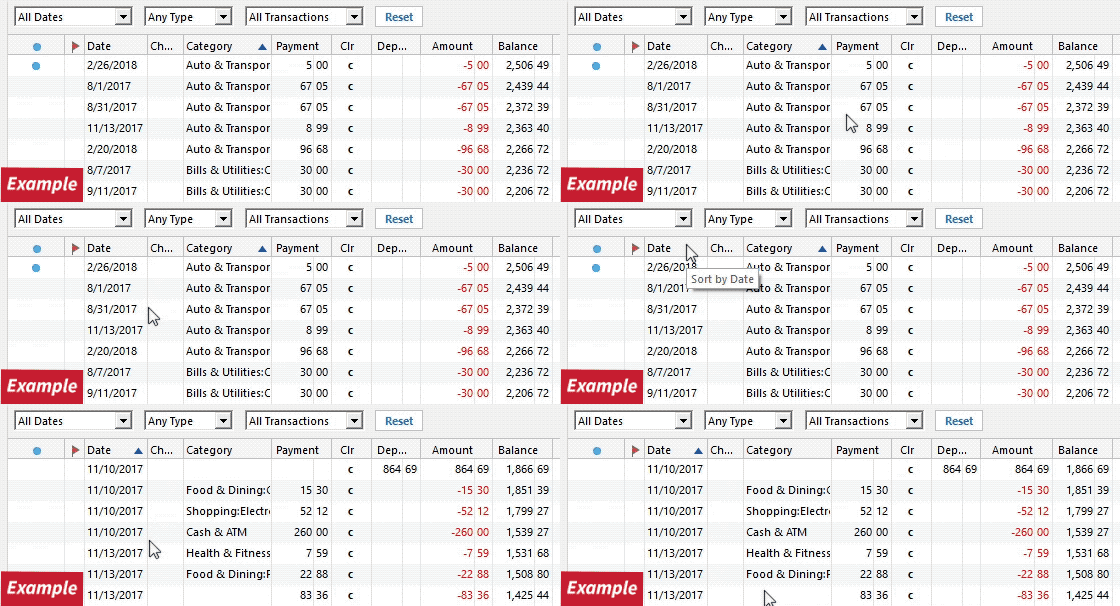
1. Has the sort order been changed in the register? Confirm that the Sort Order in your account register is by Date; just click the top of the Date column in your account register. It's likely the transactions are in your register, just not where you thought they'd be.
2. Click the Reset button at the top of the register. This will confirm that there's no filtering in your account register.
3. Try refreshing your login session: To do this, go to Help > Refresh Sign in. After completing the log-in process, trying running a One Step Update again.
4. Are these missing transactions over 90 days old? Transaction download is typically limited to the last 90 to 200 days, depending on the financial institution. If you need transaction history older than what the download contains, many banks will make this available on their website via Web Connect. To use Web Connect, you can find information here, or contact your bank.
5. Are these transactions still marked as "pending" on your bank's website? Pending transactions have been authorized by your bank but not cleared and paid from your account yet. Most banks don't allow transactions to download until the transaction clears the bank.
6. Was the missing transaction incorrectly matched to another transaction in the register? This is common with repeating payments made to the same payee for the same amount. To verify:
8. Have any transactions been deleted recently? Transactions won't download again after being deleted. If a transaction was deleted in error, you can re-enter it manually (if there's a large group of deleted transactions, it may also be easier to restore a backup).
9. Was the transaction moved from one account register to another? Click on All Transactions in your account bar and search for the missing transaction. If you find the transactions in an incorrect account, you can move the transactions to the correct account: just select the transaction(s), right-click, and select Move transaction(s). Select the correct account and click OK.
10. Was an older backup restored after you accepted the downloaded transaction(s)? The backup file will restore account information up to the date it was created, which may be before the missing transactions were downloaded.
Please let me know what you find after going through these steps. I'll be happy to assist further based on the results.
Hi Quicken Laura.
I responded last week, but the response is not showing up, so I'll try again.
AS_Hiker
Thank you for your response. That helps us rule out several possible causes of the missing information.
Since the steps you’ve tried, including changing the connection method, didn't help you download or locate the missing transactions, the best next step is to contact Quicken Support for further assistance. They can walk you through additional troubleshooting steps and escalate the issue if necessary.
Please also keep in mind that if the issue is related to Direct Connect, it may require escalation to the financial institution’s online banking support team to investigate and resolve the missing transactions, as outlined in our support article.
You can find the Quicken Support phone number here: Support Home | Quicken. Phone support is available Monday through Friday, from 5:00 AM PT to 5:00 PM PT.
I'm sorry I couldn't provide a more direct solution, but please don’t hesitate to reach out again if you have any other questions.