Lately every time I do an OSA, all my pending transactions get duplicated in my Visa accounts. Problem report submitted. I just noticed this over the last couple of days.
Hi @EvDob, Thanks for letting us know about the issue you're experiencing. To better understand what may be causing the duplicate transactions, could you please provide some additional information?
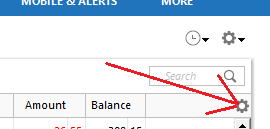
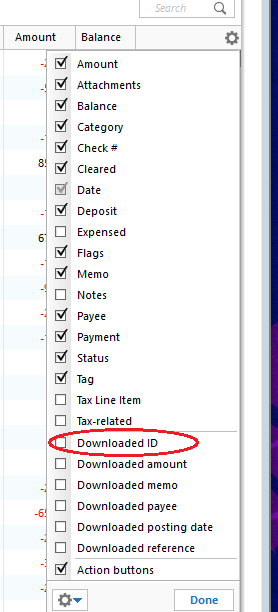
To check the Downloaded ID, I recommend following these steps:
Because duplicate transactions can occur under multiple scenarios, the answers to these questions will help us determine the appropriate next troubleshooting steps.
I look forward to your reply!
Turning pending transactions off & on didn't help.
I didn't enter the transactions manually.
How do I see the Downloaded ID in pending transactions?
Hi @EvDob, Thanks for checking that. The Downloaded ID is not displayed directly in the Pending Transactions section. The steps I provided are for viewing the Downloaded ID in the account register and confirming whether the transactions have been matched to an incorrect transaction.
Since turning the Pending Transactions option off and back on did not resolve the issue, could you please upload a screenshot of the duplicate transactions, if possible?
Also, could you please let us know the name of the financial institution where you're experiencing this issue?
This is from Elan Financial Services. I'm also seeing it with Chase. Both are Visa cards.
Thanks for uploading the screenshot of the duplicate transactions, @EvDob.
Since this issue is affecting multiple accounts and Financial, I suggest testing to see if the issue persists in a new Quicken file. This will help us determine whether the issue is specific to your current Quicken file.
To create a test file:
Please let us know whether the issue occurs in the new Quicken file as well.
That seems like too much work for someone who isn't a beta tester getting the product for free. Maybe you can improve your bug reporting so that you can diagnose these problems from looking at the report.
Hi @EvDob, I understand your frustration, especially after having to go through multiple troubleshooting steps. I appreciate you taking the time to share your feedback and the details of what you’ve experienced.
At this point, I recommend contacting Quicken Support for further assistance. They can guide you through any additional troubleshooting steps in real time and, if necessary, escalate the case for further investigation.
Phone support is available Monday through Friday, from 5:00 AM PT to 5:00 PM PT. This issue may require an agent to review the logs and escalate it to the appropriate team for further investigation.
I have the same problem after updating to R69.21. The problem is across multiple credit cards and banks. Example:
I just want to add that I am seeing the same problem with credit cards and bank accounts. This started very recently, with the last couple of version updates - R69.21 & R69.25. I get duplicate pending transactions with every download. I do not want to waste time with a bunch of troubleshooting steps. I want Quicken Support to do the troubleshooting and fix the problem and then send a new version to correct problems introduced by the more recent versions. Support should be monitoring this community forum.
Hi @geiranger, @EvDob and @voyagr7, Thanks for bringing this to our attention and letting us know that you’re experiencing the same issue with pending duplicate transactions.
To help us escalate this issue to the appropriate team, we’ll need the following information from each affected user:
If you’re willing to provide this information, please let me know. I can send you a Direct Message with instructions for securely sharing the screenshots.
(CTP-18428)
I no longer have any pending transactions. When these went off pending status, a couple of sets of duplicate pending transactions went away.
Sent another problem report in case it helps.
Thank you for your reply,
I forwarded the updated information to our teams.
Thank you!
Logs submitted.
Hi @EvDob
Thanks for sharing the screenshots. I’ve added them to the investigation ticket CBT-1272 for our team to review.
We appreciate you providing this additional information! (CTP-18428)
This duplicate transaction problem has been happening for months. Previous threads discussing it have been closed but it's not in the pinned list of problems. At one point a statement was made that no ETA for a fix has been made. It appears that the source of the problem could be server side and not a problem in the client, but no details have been published.
I reported duplicate pending transaction problem for the last several days. The duplicates occurred for multiple billers. Ticket # 12590736 was opened on 9/12/2026. Please refer to that ticket for all the information you need. Problem. Each time a 1 step update in executed the pending transactions are duplicated. I verified with the agent that the biller only has the pending transactions recorded once on their website. This points to the problem occurring within the quicken software, not on the biller website
Hello @wrldtvlr & @TimL,
Thank you for letting us know you're also seeing this issue. To contribute to the investigation, please provide a problem report with log files attached and screenshots. For instructions, please see @Quicken Carlos earlier post:
Same PENDING problem here with multiple accounts. Submitted a "Report a problem".
My title says Visa, but I'm seeing it with MasterCard as well.