Quicken Windows has stopped adding transactions since 7/25/2026
It does not give any errors simply completes the download. But no transactions show up. Zero, nothing.
[Edited - Readability]
Same here
Hello @sdai & @GTRMQuick,
Thank you for letting us know you're seeing this issue. To troubleshoot, please follow these steps from our article on missing transactions/transactions not downloading:
Be sure to follow these steps in order:
1. Go to Edit > Preferences > Downloaded Transactions. The option Automatically add to banking registers needs to be unchecked.
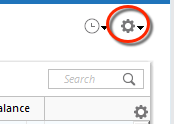
2. Refresh your online account information by clicking the Actions Gear Icon on the upper right of the register, and select Update Now. Follow the on-screen instructions to complete the update.
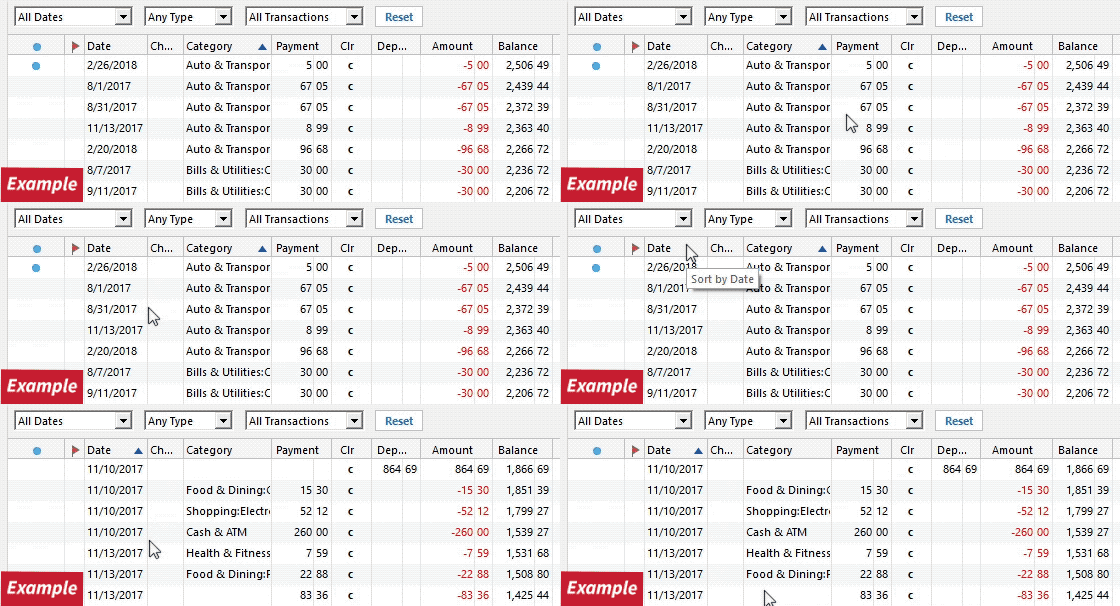
3. Confirm that the Sort Order in your account is by Date; just click the top of the Date column in your account register. It's possible the transactions are in your register, but not where you thought they'd be.
4. Click the Reset button at the top of the register. This will confirm that there's no filtering in your account register.
5. Try refreshing your login session: To do this, go to Help > Refresh Sign in. After completing the log-in process, trying running a One Step Update again.
6. Go to Actions (Gear Icon) > Register Columns > Check Downloaded Payee in the account register. This allows you to search by Payee to confirm the transactions haven't been renamed unexpectedly.
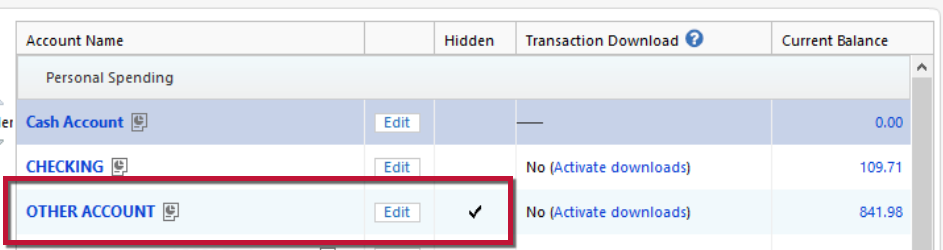
7. Go to Tools > Account List and check Show Hidden Accounts at the bottom left. Confirm the missing transactions haven't been added to a hidden account by clicking on the name of any account that appears with a check mark in the Hidden column.
If the steps above do not resolve the issue, please navigate to Help>Report a Problem and send a problem report with log files, a screenshot of the transactions as they appear on the financial institution website, and a screenshot of the transactions not being in the account register in your Quicken file. Please include at least 3 sample transactions (date/payee/amount).
Note: Problem reports allow a maximum of 10 attachments. If you need to send more than 10 attachments, you can unselect log files with OLD in the filename, or you can send a second problem report with the additional attachments.
Please let me know how it goes!
thanks, but did not solve my problem
Thank you for your reply and for sending the logs,
Since troubleshooting didn't work, could you please provide a screenshot of the transactions as they appear on the financial institution's website and a screenshot of the transactions not appearing in the account register in your Quicken file? Please include at least 3 sample transactions (date/payee/amount). I understand this may be an extra step, but it will really help us get to the bottom of the issue. If you're not comfortable posting this information in this discussion, you can send it with a problem report. Alternatively, you can also contact Quicken Support directly for further assistance. You can find the Quicken Support phone number at this link.
I look forward to your reply!
Same here. Bank of America credit card using Express Web Connect+ method. Online balance shown is correct and updating; but no transactions are downloading at all. Problem started after I was forced to reauthenticate access to the account with Bank Of America on August 15th.
Hello @YCymro,
Thank you for letting us know you're seeing this issue! If you haven't already done so, please follow the troubleshooting steps shared earlier:
If that troubleshooting does not correct the issue, then please follow the instructions below those steps to send a problem report with the information necessary for our teams to investigate the issue.
If you prefer, you can also contact Quicken Support directly for assistance.
The Quicken Support phone number can be found through this link here. Phone support is available from 5:00 am PT to 5:00 pm PT, Monday through Friday.
Thank you!
The troubleshooting steps have not helped. I have used Help / Report a Problem to submit a report, including screenshots.
Thank you for confirming. Since the troubleshooting steps did not resolve the issue and you’ve already submitted a Problem Report with screenshots, the next step would be to contact Quicken Support directly for further assistance, as mentioned above.
Mine seems to be working now. Thanks. But the lost data will take some time to type manually, since BoA does not allow for Quicken downloads from their site… (Their site does not work in Firefox either; thinking about it.)
[Edited - Readability/Language]
Thank you for the follow-up,
I'm glad to hear that it's started downloading again. I'm sorry you have to enter the missing transactions manually because the financial institution stopped supporting QFX.
@Quicken Kristina @sdai
Two things:
First, you should be able to download BoA transactions in CSV format (BoA calls it Microsoft Excel but it really is CSV which can be processed by Excel). You can then reorganise the CSV file into Quicken's format using either Excel or or OpenOffice Calc. You need to be careful when doing that because either might change the separator from coma to semicolon which Quicken will not import. You also need to delete any transactions from the CSV file that are already in your register in order to prevent duplicates. If you need help doing the reorganisation of the CSV file, ask. I have been doing it routinely for several months for a credit card account that I can't connect for one step update and does not have QFX files available for download.
Second, I use Firefox on Windows 11 for accessing BoA website and have no problem. What problem are you having?
Hope this helps.
Jim
Hello @jdparker225,
Thank you for sharing your experience! I'm glad to hear that importing properly formatted CSV files updates your accounts effectively.
@sdai,
For more information about how to properly format a CSV file, please review this help article: https://info.quicken.com/win/import-transactions-from-csv-file
Please also note that Quicken does not automatically detect transfers when you import information from a CSV file.