This discussion was created from comments split from: CC-501 Space Coast Credit Union.
New issue: Space Coast Credit Union is not downloading transactions, and my Visa account is being reported as checking. Sigh.
[Edited - Readability]
Hello @jbabiak,
Thank you for letting us know that the issue you're experiencing has changed! To clarify, you're no longer getting a CC-501 error, but now these new issues are occurring. Is that correct?
It's possible that these issues are related to the CC-501 error. If you would like to troubleshoot, please backup your Quicken file. Deactivate the problematic Visa account. Then, go to Tools>Add Account and follow the prompts, making sure to carefully link it to the existing credit card account in your file.
If the issue persists, please provide more information about what is happening when you attempt to reconnect (for example, are you not able to link it because Quicken sees an incorrect account type?).
To troubleshoot the issue with transactions not downloading, please follow these steps from our article on missing transactions/transactions not downloading:
Be sure to follow these steps in order:
1. Go to Edit > Preferences > Downloaded Transactions. The option Automatically add to banking registers needs to be unchecked.
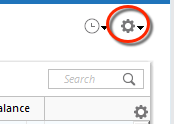
2. Refresh your online account information by clicking the Actions Gear Icon on the upper right of the register, and select Update Now. Follow the on-screen instructions to complete the update.
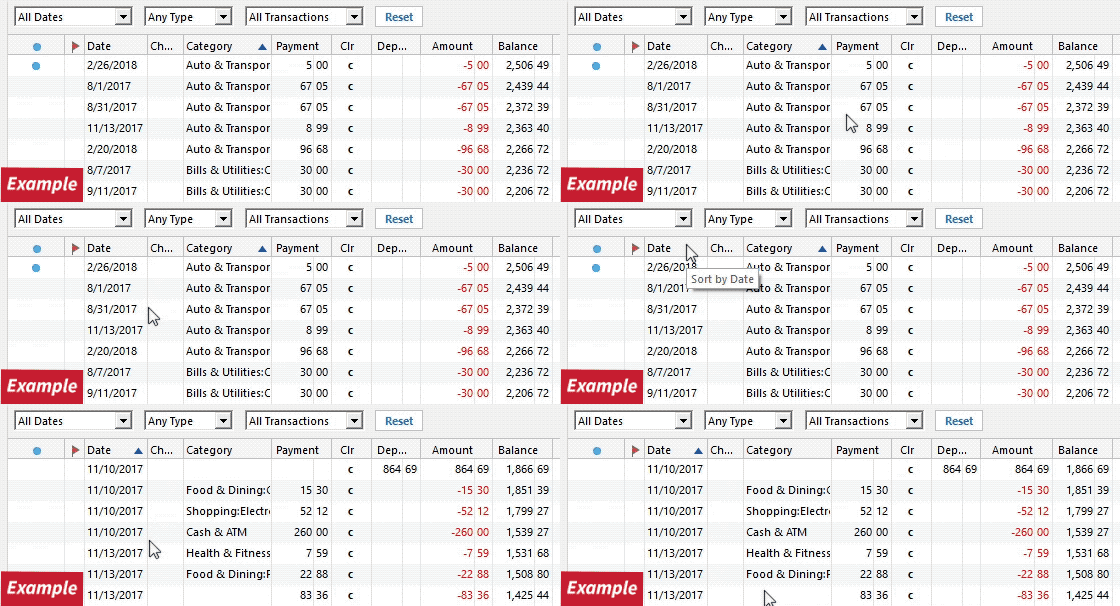
3. Confirm that the Sort Order in your account is by Date; just click the top of the Date column in your account register. It's possible the transactions are in your register, but not where you thought they'd be.
4. Click the Reset button at the top of the register. This will confirm that there's no filtering in your account register.
5. Try refreshing your login session: To do this, go to Help > Refresh Sign in. After completing the log-in process, trying running a One Step Update again.
6. Go to Actions (Gear Icon) > Register Columns > Check Downloaded Payee in the account register. This allows you to search by Payee to confirm the transactions haven't been renamed unexpectedly.
7. Go to Tools > Account List and check Show Hidden Accounts at the bottom left. Confirm the missing transactions haven't been added to a hidden account by clicking on the name of any account that appears with a check mark in the Hidden column.
Please let me know how it goes!
Have been on the phone with Quicken Support and downloaded Logs. They were able to see these errors while on Screen share. Issue has been escalated to Quicken Support .
"One Step Update" with Space Coast Credit Union has produced CC-501 response for over two weeks. Quicken FAQ advise is to not renew connection as error is between Space Coast and Quicken. Is this a solvable issue? as it has happened numerous times. "Report a Problem" has been submitted to Quicken with logs.
Sorry for your SCCU issues, At least I am not the only one having these issues
Thank you for your replies,
Thank you for confirming that the CC-501 error is still happening. I see an open escalation from when you contacted Support (ticket #12626083). They should contact you by email if they need additional information or believe the issue is resolved.
Thank you for letting us know you're encountering this error, and for sending a problem report with log files attached. I added you to the ticket for this issue.
Thank you!
(CBT-1297)
Received email on my open ticket. CC-501 Errors are still happening….. Sent new Trouble Report with logs.
=======================================================================
Hello ,
Your Quicken Online Banking case was escalated because you were receiving errors with your Express Web Connect (Quicken Windows) or Quicken Connect (Quicken Mac) online-activated account(s) with Space Coast Credit Union.
This issue has been resolved by our service provider's Scripts Operations engineers. You can now try updating your accounts in Quicken as usual.
We thank you for your patience while we worked to resolve this and apologize for any inconvenience.
For further assistance with Quicken, please go to: https://www.quicken.com/support#contact-support
Quicken Online Banking Escalations Team | Quicken Inc
Regards, Quicken Customer Care
Please don't delete this reference number: {"Ticket ID":"12626083"}