Why weekly CC-800 errors even after fixing it every week!

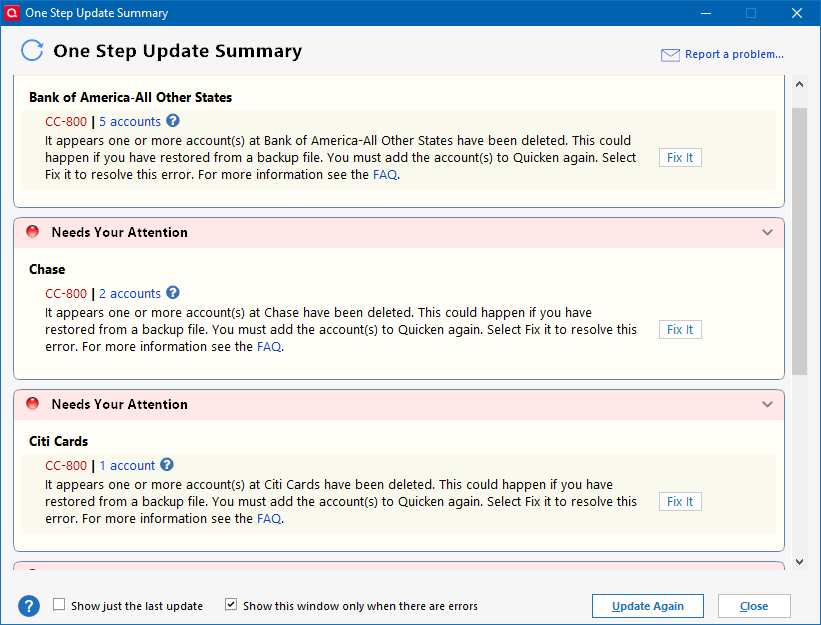
Every week, I get a batch of update failures with CC-800 code error. I spend 90 minutes reactivating and re-syncing to get all accounts back in good shape. A week later, I do an update, and get another batch of CC-800 code errors. I resolve again through "Fix It" and reactive, wasting another 90 minutes of my time. Same for week 3, etc. I don't have 90 minutes each week to waste on this.
It's not always the same accounts that have a problem. And from single financial institution, not all accounts are necessarily affected. Some updates show as good and ready to accept new transactions. Other accounts get flagged using a circle with a line through it.
If this does not get resolved soon, I'm afraid my 38 years as a Quicken user will have to come to an end. I cannot afford to spend this kind of time every week on something that was working perfectly fine before the last software update was pushed out. Maybe I can roll the software back and give that a try?
See attached screenshots.
Answers
-
Have you seen this thread?
Q user since February, 1990. DOS Version 4
Now running Quicken Windows Subscription, Business & Personal
Retired "Certified Information Systems Auditor" & Bank Audit VP0 -
Me to. 20+ year Quicken user and constantly getting connection errors. Technical support is all over the place. They said my file was too big so I basiscally started a new file from scratch and imported 24 months of data. Then they said it was becasue of One Drive. I fixed that. On and on and almost weekly I get a cc-800.
0 -
A Quicken Business user since the 1990's. My current version is updated by subscription. Never had a problem until 60 days ago. Opened the program as usual. I had a new update that installed. After the update finished, I closed the program. The following day I opened the program to find that any account that was also set up to download data where marked with a question mark. All failed the usual updates of account via "tools" update manager. I did re-do the credit card accounts and bank account and was successful. My brokerage account with "Schwab" would not reset. I went through all the current recommendations. I found that I could go to each individual account, click the wheel over to the top right and choose to update the specific account without any trouble. All 4 accounts done individually update. I still gt the CC-800 error notice in the master updates window regardless. After 10 times trying to correct by Quicken help info, I have just decided for now to do individual updates as previously described by the "update now" feature under the wheel symbol in the right hand corner of each account. 04-23-2025 - 1:17pm est.
0 -
To fix recurring and/or multiple CC-800 errors, I think the key is to deactivate ALL accounts not just the ones you have errors with. Then before you reactivate, on the General tab of Account Details, blank out FI Name and Account Number. Then, when you reactivate, use "Add Account" to reactivate the accounts and be sure to link to the existing accounts in Quicken.
This process has worked every time for me. I don't guarantee that it will work for everyone but I think it's worth a try.
2 -
In the case of extremely stubborn CC-800 errors, the other thing to try is making a clean copy of your data file through the "Copy-File" process and then reactivate online services for all accounts. the File-Copy process ensures that your online connections are completely cleaned out and provides a "fresh start".
Here is a Quicken Support article that describes the process -
1 -
I have read the suggestions of doing a clean sweep to reactivate accounts but this should in no way be happening. It seems that Quicken is losing authentication privileges to certain financial institutions and they need to fix it on their end - not us on ours.
1 -
I'm having this problem as well. cc=800 then I have to go through the presented steps to restore the accounts.
This usually happens in the second try to update my accounts; the first try of the day quicken abends before downloading the information.
As far as I can see, backing up to a file accomplishes the same thing as the resolution steps presented to fix the 800 error: Connect to the institution, relink the accounts. The question is why this is happening, and has been for a couple of months now.
My file isn't that big, since I start a new one every five years. Version R62.16 Build 27.1.62.16,
Instead of having to copy the quicken file or some other convoluted process, how about if Quicken were to FIX the problem. Been using quicken for a long time, since the demise of MS Money. It just keeps getting worse.
1 -
Same issue for me. CC-800 errors on every one of my accounts. Today was the 3rd day in row. Each time i have to use the laborious process to relink all of my Financial Institutions. Very Frustrating. Been using Quicken since it inception. On version R62.18
0 -
@sfrolls01 if deactivating your accounts doesn't work, make a copy of your data file using the "Copy File" process and then reactivate all your accounts.
I have found the following steps are pretty successful in permanently fixing the reoccurring CC-800 errors -
- Make a backup of your data file.
- Validate your data file. Click on File→Validate and Repair File, then select "Validate". Click "OK". Review the "Validate & Repair log" for any messages that need to be acted upon.
- Super Validate your data file. Same as step #2, except hold Ctrl-Shift when clicking on "Validate and Repair File".
- Do a "Copy File" to create a copy of your data file. This process forces a rewrite of code and fix some file corruption issues. It will also clear out online connection "remnants" for all accounts. Click on File→Copy or Backup File, and select "Create a copy or template", and then click Next.
- On the next screen, leave the defaults as is. You can change the new file name and location, if you wish. Click on "Save Copy".
- During the copy process, you will be asked to provide a password for the new file. If you don't want a password, hit ESC.
- When the process completes, switch over to the new file. You will need to re-setup online services for all accounts in the new data file.
This is the only way I have found to permanently fix the reoccurring CC-800 errors and CC-800 errors that affect multiple financial institutions.
1 -
I'm sorry @CaliQkn but I disagree with your assessment.
It is pretty clear to me that the CC-800 errors are some kind of server problem.
And at this stage all people can do is reset the accounts when it occurs. There isn't a permanent fix because of the fact that the problem is on the servers.
Looking at the Cloud Sync log I can clearly see it reporting that the accounts have been deleted which is of course wrong.
I'm going to reduce the log to the pertain information since some of it might be information that shouldn't be shared, and because there is a lot of repeating data because they are using a polling system instead of an event system.
To start, I had the same problem yesterday and a was able to reset the accounts and do the downloading. And it has repeated the problem today, so I will start with today's.
***** SEND to http://throttle.quicken.com/mayi/sync at 09:02:15 on 20250508 ***** (check to block updating to frequently)
***** RECV from http://throttle.quicken.com/mayi/sync at 09:02:15 on 20250508 *****
***** SEND to https://services.quicken.com/datasets/484532667355549953 at 09:02:28 on 20250508 **** (Query for datasets)
***** RECV from https://services.quicken.com/datasets/484532667355549953 at 09:02:28 on 20250508 ***** (Returned my "Current.QDF" one)
***** SEND to https://services.quicken.com/provider-logins at 09:02:28 on 20250508 ***** (Query for financial accounts)
***** RECV from https://services.quicken.com/provider-logins at 09:02:28 on 20250508 ***** (Several "FDP entries returned. My assessment of this is these are my Express Web Connect + accounts. That is all I have these days, accounts with Chase and Citi Cards)
***** SEND to https://services.quicken.com/datasets at 09:02:28 on 20250508 ***** (Another query of the dataset maybe just for the one being using in the One Step Update).
***** RECV from https://services.quicken.com/datasets at 09:02:28 on 20250508 *****
***** SEND to https://services.quicken.com/job-statuses at 09:02:35 on 20250508 *****
"type": "SYNC"
***** RECV from https://services.quicken.com/job-statuses at 09:02:35 on 20250508 *****
"id":"484681952277087233","status":"CREATED"
***** SEND to https://services.quicken.com/provider-logins at 09:02:36 on 20250508 ***** (More querying for the financial institution logins)
***** RECV from https://services.quicken.com/provider-logins at 09:02:36 on 20250508 *****
***** SEND to https://services.quicken.com/job-statuses/484681952277087233 at 09:02:36 on 20250508 *****
This querying of datasets and logins and jobs seems to just be the "polling" waiting for Intuit or the Quicken server to return the information.
***** RECV from https://services.quicken.com/institution-logins/484532685927928064/refresh at 09:02:36 on 20250508 *****
"status":"ACCEPTED_POLLING_REQUIRED"
<!-- ***** RECV from https://services.quicken.com/institution-logins/refresh/484681953468269568 at 09:02:36 on 20250508 *****
"status":"AGGREGATION_IN_PROGRESS"
***** RECV from https://services.quicken.com/institution-logins/484532684581028865/refresh at 09:02:37 on 20250508 *****
"status":"ACCEPTED_POLLING_REQUIRED"
…
Polling repeating…
***** RECV from https://services.quicken.com/institution-logins/refresh/484681953468269568 at 09:02:46 on 20250508 *****
"aggStatus":"CP_ACCOUNT_NOT_FOUND"} (repeated for each account).
So, clearly this is a server problem.
Signature:
This is my website (ImportQIF is free to use):1 -
I will state that there is a part of this problem that is on the Quicken program side. Once it starts reporting the CC-800 errors the summary might keep posting those errors until the next day even when an update succeeds.
Signature:
This is my website (ImportQIF is free to use):0 -
Thanks to CaliQkn for the very detailed instructions. They worked for me (for the time being anyway) I followed the instructions precisely then ran a series of one step updates and had no issues. Hope it stays that way!
0 -
Actually, I'm going to take back what I said above. I still say this is a server problem that clearly needs to be resolved but thinking about the problem and @CaliQkn 's workaround to clear the problem, I think that the Quicken Cloud dataset has gotten corrupted, and by blowing it away that will temporarily fix the problem.
I say temporarily because there is clearly a problem on the server that needs to be fixed. This problem has been going on for a very long time for lots of people.
Signature:
This is my website (ImportQIF is free to use):0 -
@Chris_QPW these CC-800 are certainly gremlins. The goal is to get a handle on these CC-800 errors so any feedback you or anyone can provide is much appreciated. Once we are get a definitive solution or even an explanation, we can effectively deal with these recurring and pervasive CC-800 errors, which are happening way too often.
@sfrolls01 glad its working now. Please keep us updated. Hopefully, it's a more permanent fix.
0 -
Well, it was nice while it lasted! Just got the indication that all of my tracking accounts show they have been deleted AGAIN!
 0
0 -
@sfrolls01 there seems to be a myriad of error conditions that result in the connections breaking and showing as these CC-800 errors.
@Chris_QPW I am thinking that your assessment that it is a server issue is a good one. Even though my fix worked, it lasted only as long as the verification criteria remained valid. Somewhere along the way the verification process breaks down and for security reasons, the connection is broken.
The issue could be corrupted datasets with the Quicken cloud as you stated. I do know that if I delete or restore a cloud file, I get the CC-800 errors.
0 -
I hope whoever has responsibility for the server is aware of this issue!
0 -
My accounts are throwing the CC-800 error again today.
Signature:
This is my website (ImportQIF is free to use):0 -
Same issue today 😮
0 -
@sfrolls01 @Chris_QPW do either of you use a file or registry cleaning utility program such as CCleaner? I am wondering if deleting files or registry items is causing the connections to break.
0 -
I do not
0 -
No, I don't use such a tool.
Signature:
This is my website (ImportQIF is free to use):0 -
Beyond Frustrating! I have received scores of CC-800 errors and relinked my accounts more times that I can count. Are we ever going to get a fix? I have relinked my accounts 5 times today alone. Are any of the quicken moderators seeing this?
0 -
As an experiment I created an entirely new quicken file and just added one account. Using this new file I am in the endless cycle of update works, next update fails with cc-800 for only account, do reset on that account to re-authorize with bank, update works, next update fails, …
it is obviously a quicken problem.0 -
This problem is now mine as well. Every single One Step Update account needs to be restored AGAIN after doing it a week ago. FIX THE PROBLEM! It's going to be simpler AND less time consuming to go back to Excel if you don't. Stop adding fancy features and give us something that actually works consistently!
1 -
I have the exact same problem, for the past week or two. Getting really frustrating as a 30-year Quicken fan. I've got better things to do than repeatedly re-link accounts for no reason.
0 -
Sadly, I am now included in the "club" of CC-800 errors. Looking through all the link, this problem has been around for a few years. I, too, have been using Quicken since the DOS days. Now that I am paying for an annual subscription (Windows Classic Premier) I expect a higher quality product, as do all here on this thread. How do we get Quicken to Fix this Problem?
(I'm always using the latest Quicken Windows Premier subscription version)0 -
This may be a red herring …
Are you using your laptop to connect from different locations, e.g., different coffee shops or restaurants around town or sometimes at home using an Ethernet cable instead of your WiFi home router?
Are you using a VPN which uses a different IP address for your laptop every time you connect?
In other words: Are you using different IP addresses when connecting to Quicken?
I'm suspecting that this might be causing the loss of account authorization.
Trying to use a static IP address might help …0 -
For what it worth, I don't do any of the things that @UKR mentioned, but I also have to say that about a couple of weeks ago I deactivated all my accounts and then reactivated them, and I haven't had the problem since.
This was for Chase and Citi Cards (I don't think I actually had a problem on Citi Cards. All my accounts are setup with Express Web Connect +).
Signature:
This is my website (ImportQIF is free to use):0 -
I have no idea what is causing the 800 errors. There is obviously something going on as indicated by the posts.
Just for info, I use 4 separate data files under 1 QuickenID and travel often (so different IP addresses) and it has only happened to me a couple times per year.
0





Categories
- All Categories
- 64 Product Ideas
- 35 Announcements
- 223 Alerts, Online Banking & Known Product Issues
- 21 Product Alerts
- 704 Welcome to the Community!
- 672 Before you Buy
- 1.2K Product Ideas
- 54K Quicken Classic for Windows
- 16.4K Quicken Classic for Mac
- 1K Quicken Mobile
- 812 Quicken on the Web
- 115 Quicken LifeHub