Reconciliation Question

So… as long as I've used Quicken, I shouldn't have to ask this, but I'm perplexed.
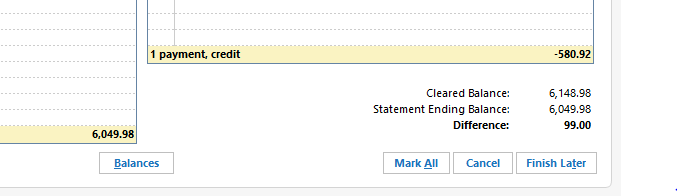
Trying to reconcile a credit card statement from March. The charges and Payments totals that come up match in Reconcile, match those on my statement. Everything matches, but it tells me there is a $99 difference.
Hand calculated the total of cleared charges is 6049.98 as shown on new statement and is the ending balance. The payment was 580.92, the balance of the last statement. Where is the 99.00 coming from? Why does the cleared balance show 6148.98 when that is NOT the total of cleared items… at least not that I can see. I'm lost. LOL
If I enter a 99.00 'payment' and use it in the reconcile, it balances out of course… but there are no 99.00 transactions except for a charge in January of 2024.
Comments
-
Can be a few things BUT 1st I would look in the registers 1st entry for an opening balance that may have changed.
1 -
@gt00tx verify that prior statements are still in balance. It could be that a transaction from a prior period was inadvertently changed or deleted. Or, it could be a current transaction that was misdated with a past date.
0 -
Well, the problem is…
1) how do you re-do a reconciliation to check it out? If I try to reconcile an old statement, it just says there are no transactions to reconcile.
2) For some reason, I don't have lines (Balance column) that match the ending balances of my statements because the charges and payments overlap, I guess you'd say.
3) No way to go back to 2022 to find out what my first charges were… well, it started at 0.00 of course, then I started using the card…
So you are saying that somehow it's taking into consideration prior transactions even though everything matches on the statement and the quicken register?
0 -
Also, confirm that the CLR status of ALL prior transactions is what you expect. If there's a future dated transaction with an R in CLR, that can screw thing up also. OR if a prior R transaction was deleted or changed.
And, since the difference is evenly divisible by 9, look for digit transposition issues also. E.G., shows as 90, should be 9, a difference of 81. (Old banker's trick).
Q user since February, 1990. DOS Version 4
Now running Quicken Windows Subscription, Business & Personal
Retired "Certified Information Systems Auditor" & Bank Audit VP0 -
It was in 2022! That was a long time ago… LOL It started at 0.00… well, there is just the first charge of many that long ago.
0 -
@gt00tx reconciliation in Quicken Windows is not sophisticated and not captured. When you reconcile any time period that doesn't mean it stays reconciled. Unless you saved a reconciliation report at the time the reconciliation was done, there is nothing really to go back to to verify.
That being said, reconciling in this case means going back as far as you can and compare bank statements to your transactions on Quicken. Once you can verify that a month is reconciled, you go onto the next month. The difference has to be somewhere.
0 -
I agree on something off somewhere, but what gets me is, with bank statements you enter a beginning and ending balance. The credit card reconcile only calls for an ending balance. So, what is it comparing to as long as the charges and payments match?
0 -
@gt00tx Your difference can be a result of
- a 99.00 charge that was marked reconciled that shouldn't have been.
- a reconciled charge that was adjusted by 99.00.
- a payment or positive adjustment that is not marked reconciled but should be.
These transactions do not have to be in the current reconciliation period. But they should have been pulled into the current reconciliation window and sometimes they aren't.
0 -
OK, well there is only one $99 item. It was in Jan 2023, shows reconciled and is on the statement for that period. It's legit. As for the other scenarios, I don't know yet.
I DID find that back to Feb 2024, I can find a balance in Q at or near the statement ending date that is off by $99.00! But… as I go back further, there is no balance that is either correct or off by $99, it's getting very catawampus. I've compared statements for Sep-Dec and found two transactions missing from Quicken. Of course when I add them in, the difference is now more. Arrgh! I'm about to use the Balance Adjustment feature. It's hardly worth this effort.
Honestly, I'm still hoping to get an answer on if the reconcile doesn't care what the previous balance is, at least not in the reconcile window, and all my transactions in a given month are correct, what is Q comparing to and why doesn't it show that value in the reconcile window so we know?
0 -
@gt00tx recheck your transactions and verify the reconciliation for February. Do you have Pending Transactions turned on for the account? Not sure that that has anything to do with your issue, but trying to rule out anything I can think of.
0 -
It was in 2022! That was a long time ago… LOL It started at 0.00… well, there is just the first charge of many that long ago.
Yes, but there's an outstanding issue in Quicken that sometimes when an account is modified, such as when the bank makes changes to what they send into your system in their Quicken download file, or when you get a new card number for any number of reasons, Quicken will update the starting balance. So any time you get this type of reconciliation issue, the first thing tocheck is the Opening Balance transaction. It's possible that Quicken modified your Opening Balance transaction to $99, and that's what's causing your issue. If so, zero that record and you'll be good.
I've compared statements for Sep-Dec and found two transactions missing from Quicken. Of course when I add them in, the difference is now more.
That part concerns me … if you were missing those two transactions, its possible you're missing another on the other side of the ledger. Good luck.
I'm about to use the Balance Adjustment feature. It's hardly worth this effort.
Sometimes that's the right thing to do.
0 -
Well, in the end I couldn't just give up… I can't walk away from things like this. LOL So, as it turns out, for some reason unknown to me, the transactions for the Jan-Dec statement period were MISSING from my register. May have been a few others. I am not even going to try to explain. I had reconciled since then. Maybe I did a batch delete accidentally…? At any rate, I started looking for the statement ending balance figures, which yes, should be in the register. Not finding any, even back to Jan 2022 when I started the card, lo and behold, for some reason the Starting Balance had an odd $734.xx transaction! WT…?!?! (As someone said to check. But how? LOL) Again, I cannot explain, but of course, operator error at some point, I suppose. Once I fixed that, I found the next monthly balance that was incorrect and fixed if needed. Then I got to Jan-Dec '24 which was all missing. Once I fixed that, it was good to date. Sheesh! That was fun! Thanks everyone for your suggestions.
1 -
Well, as it turns out, those two weren't missing, they just weren't in the group that I put in custom dates for… but there were others.
0 -
And, why does Quicken mess with the first transaction? I've probably had that issue before and never figured it was a SW 'feature'.
0 -
@gt00tx glad you found the missing transactions that caused you to not to reconcile. I have learned after many years of reconciling is that there is always a reason why you can't balance. Finding it is the "fun" part, as you found out.
One thing you can do to prevent this from happening in the future is to "lock" your older transactions by clicking on File→"Set password to modify transactions", and chose your date range and password. It's not perfect. It will lock your transactions for all your accounts, but at least, it will prevent accidental changes or deletions.
2 -
My current theory is that it's a bug in a section of code for which Quicken has lost their only copy of the code. They're not able to fix the bug because they have nothing to look at, and they can't rewrite their code because they have no documentation about what it's supposed to do. People have been complaining about it for at least 5 years to my knowledge.
I've developed the habit: whenver there's ANY reconciliation discrepancy, I scroll to the top of the register and look at the opening balance before I look at anything else.
1 -
I have a problem with discover. Transaction that I downloaded that have the same day as the ending day of the statement may not appear on the statement I get from discover and I have to uncheck the cleared box for them to make the account balance. Then I recheck the cleared box for them so they are included in the following months reconciliation.
1 -
I have had this issue with Quicken changing the starting balance on multiple accounts. It got so aggravating that I changed my starting balance to 0 and set the opening date to the previous year. I then made another entry for the correct date and amount, made it a lot easier to see what was happening.
The worst part was that it was happening for multiple accounts. I had decided a couple of years ago to start with a completely blank data file for the first of the year, so I had to manually calculate my "opening" balances for the first, since the majority of my accounts do not reset on the first of the month.
Two years later, I'm still wondering if it was worth it. Quicken just has so many quirks and troubles, but there isn't anything else out there for desktop usage that handles both personal and business accounts.
I still miss Microsoft Money.Westley
0 -
I've had Quicken change my first opening transaction many times, which throws the reconcile off. I think in many instances it has been when I've been forced to reset my online services because of transactions not downloading.
0 -
I’ve had quicken several times now remove transactions from my bank account. This started occurring about two years ago in a bank account I have used for over 20 years in Quicken. For this account I can NOT stand to use “adjust balance” as I want to know what is going on. I’ve had to do it so many times now that I’ve built a spreadsheet of ending balances by statement period (from the bank statements) so I can then quickly review ending balance in the register to identify which month is the problem first occurs. However if this problem ever occurs further back than the bank will provide statements for (currently about two years), I’m out of luck. Though for taxs purposes, I suppose I could live with only two years of correct transactions. Sigh…
0 -
This content has been removed.
-
Based on being a ~30 year Quicken user and having had your issue too many times, all of the responses above are excellent and helpful. The beginning balance was the issue for my troublesome credit card account. Some additional things to consider in the future:
- Validate your data from time to time (after backing up, File>Validate and Repair…>Validate File). I especially thought of this given you comment about losing two months of transactions. The data file does catch partially corrupted from time to time.
- Make a local backup file (NOT a cloud file) every day so you can restore to the prior state easily, especially useful when ‘yesterday was OK but today is screwed up.’
- Create a report so you can easily, and on an ongoing basis, answer the question “does your online balance equal your reconciled and cleared balance in Quicken?” For this I have a custom report for my particularly troublesome credit card account with the starting point being running the register report. I customized the register report by choosing only the account(s) I am focused on, use “sub-total by account,” sort by “account/date” and “include all dates”, and on the advanced tab, unselect the “not cleared” box (leave “newly cleared” and “reconciled” checked). I saved this )"My Saved Reports) as a custom report so I can easily run this once a week, usually it is fine, but sometimes I find user errors or card issuer errors.
- Some or all the blame may not be Quicken, but (using your case) the card issuer. I have a similar problem in an investment account for which the investment firm will provide me with the same interest payment from a bond two times but two days apart which is easy to miss and therefore messes up the monthly cash reconciliation (i.e., Quicken worked perfectly, the investment firm did not).
- Check posted date versus date you entered. Not sure but sometimes I think Quicken uses the “downloaded posting date” instead of the “date” I entered for reconciling. Downloaded posting date is a column you can add to your register under “Setttings>Register Columns.” For “Settings” is the gear symbol above and to the right of your account register. In those cases where this is causing the error I have had to do things like change the statement date in the reconcile dialogue to pick up transactions, or ‘unclear’ certain items to get them out of the reconciliation totals (make sure you ‘clear’ them again once you have reconciled). I get rid of this column after I have identified this as a potential problem.
Good luck.
2 -
Eric in North Texas said, "Make a local backup file (NOT a cloud file) every day so you can restore to the prior state easily, especially useful when ‘yesterday was OK but today is screwed up.’ "
I heartily concur. I've been doing this for 3-4 years now, and it's saved me a LOT of grief.
0 -
Here's what I do to find the problem. Some of my credit cards go back to 2010 and I've always found and corrected the problem transaction.
- In the opening balance, I enter the date and amount in the Memo field. For example, "2/18/2010 Opening Bal = $366.96." As others have said, Quicken will sometimes change the amount.
- Periodically, I print the whole register (opening balance date to today's date) and Export as a CSV file. I do this for all of my accounts roughly each year. (You can start with your latest backup Quicken file that is correctly reconciled.) I save each with the account name and current date. I keep all of them. When the account won't reconcile, I compare the current file's running balance to the latest CSV's balance side-by-side in Excel. Start in the middle. If the balances match, the error is in the newer half. If they don't match, it's in the older half. Look midway in the half with the error. Repeat. This binary search is relatively fast.
2 -
My method is a variation on yours. With around 200 accounts in two files (two family households) it'd be a pita to CSV every one of them. But each morning I open my Quicken directory and ctrl-c/ctrl-v backup my two current files. I then double-click on the one I work on first to open Quicken.
When I run into a problem that needs that level of resolution, I can export the CSV of the one account that has a problem, switch to a recent backup that was good, export the CSV of the same account from that file, and compare.
Once I know what the problem is, I'll often rename the problem data file to whatever.badnnn, copy a good recent backup to my primary Quicken file name, and apply updates to the problem account to verify they go in good. Assuming they do, I can OSU all my other accounts.
That way if there's new hidden corruption in the file where I find the problem, I don't carry that corruption forward.
1 -
Pending transactions seem to be a problem
0 -
Sorry, got busy. Thanks to everyone for all your great suggestions!
0 -
I have my Quicken folder automatically backed up every morning. Your method is easier. As the reconciliation issue is within a month of the previous "good" reconciliation, you can find it by comparing a recent backup to the current. Be careful when restoring a backup to change the name so you don't overwrite the current file. I've always found that either Quicken changed the opening balance or I erroneously edited a transaction.
1 -
Hi…Just my $0.02 from a former bank teller who had to balance a large amount of cash EVERY DAY! When the variance is evenly divisible by 9, you've made a transposition in some entry. For example $38 instead of $83. These are very easy to overlook when reconciling but solve the problem 99.9% of the time….well, not in your case of $99 but I'm chiming in for future reference.
I'm a 30+ year user of Quicken and though I depend on it, I have frequently despised it for its quirks!
1

![[Deleted User]](https://us.v-cdn.net/6031128/uploads/defaultavatar/nTYA6S0SVB4GN.jpg)



