transactions are not being downloaded

For the last 3-4 weeks, my bank transactions (including credit cards) do not get downloaded when I update. This is for multiple financial institutions. I usually update about once a week. Two weeks ago I had to literally review or input transactions from off a bank statement.
I use Classic Premier for Windows.
Investment transactions don't seem to be a problem, only bank and credit card transactions.
Answers
-
Hello @Daren,
Thank you for letting us know you're encountering this issue. To help troubleshoot this issue, I checked on our end, and can see a lot of account not found (CC-800) errors and expired token (FDP-350) errors. Are you seeing any errors on your end, or does it act like everything is working, but no transactions download?
To troubleshoot this issue, please backup your Quicken file, then follow these steps from our article on CC-800 errors:
First, you'll need to deactivate the affected accounts:
- Select Tools > Account List
- If present, select the Show Hidden Accounts checkbox at the bottom of the Account List
- Select Edit on each account with this error and Deactivate them on the Online Services tab
- When finished, close the Account List.
Second, reactivate the accounts:
- Select Tools > Add Account
- Complete the flow of re-adding the deactivated accounts to Quicken, using your bank login credentials and answering any security questions.
- When you reach the screen listing the accounts discovered at the financial institution, use the Action drop-downs to re-link your accounts:
Please let me know how it goes!
Quicken Kristina
Make sure to sign up for the email digest to see a round up of your top posts.
0 -
No errors seen on my end, which is why it was baffling.
I'll try deactivating and reactivating, and then let you know. I was avoiding that in part because so many accounts (at least 9 from 4 or 5 different institutions) and in part because it seemed like a general problem that would have a general fix.
2 -
Kristina - It worked for 8 of the 10 accounts. I didn't get recent (4 weeks worth) transactions downloaded for a checking account, even after trying the procedure twice. Also, somehow the opening balance for both it and another checking account was messed up - and it took me some time to figure out. Those accounts are each associated (i.e., same login credentials) with savings accounts and there seemed to be little problem with them.
0 -
I also got this message (both times):
Quicken is unable to complete your request. Please try again later. [OL-232-A]
But the setup went ahead anyway.
0 -
Thank you for your reply,
I'm glad to hear that it worked for most of your accounts.
Which financial institution(s) are the 2 accounts that are still having problems connected to? OL errors are typically associated with Direct Connect connections. Are the problem accounts Direct Connect? You mentioned the setup continued after you saw the error. Did the accounts successfully connect and download? Do you see any errors when trying to update them?
Thank you!
Quicken Kristina
Make sure to sign up for the email digest to see a round up of your top posts.
0 -
I'm having what looks like the same problem on Quicken Classic Premier, software version for Windows, on Windows 11. I have 3 Wells Fargo accounts (checking, savings, Visa.) These were all downloading fine for a long time. A few weeks ago Quicken told me I needed to recreate my connections to Wells Fargo. I ended up talking with their tech support due to problems getting reconnected, and I finally got connected again. But then Quicken told me that it downloaded hundreds or thousands of transactions for each account, with no error message, but no transactions actually appeared in my registers. The Wells support agent said it must be a Quicken issue. Just tonight I went through the deactivate (all 3 accounts) and reactivated again, being careful to link the Wells accounts to my Quicken accounts, but still no transactions appeared in my registers and no error messages. (I have accounts at other banks that are downloading fine.)
When I reconnected the first time, I chose Direct Connect because the Wells agent told me I could also use that to make transfers or pay bills. Is that the right connection type? When I deactivated and reactivated again, it automatically made it Direct Connect without asking me what connection type I wanted. If you want me to change connection type, you'll need to give me instructions how to do that, because it looks like the regular connection sequence won't give me a choice now.
0 -
@LawrenceKells Direct Connect is the better connection method to use for Wells Fargo accounts. That message you received about "hundreds or thousands of transactions" downloaded is a standard message and doesn't mean that the transactions actually downloaded. As long as your online balances agree with your ending balances, and you are able to reconcile, you should be fine.
If transactions are missing and didn't download, changing connection methods won't make them download. You will need to input the missing transactions manually to Quicken.
As far as being able to pay bills and make transfers with your Wells Fargo account within Quicken, with Direct Connect, that is definitely available. You need to ensure that that option is turned on for your Wells Fargo checking account. Go to the Online Services tab of Account Details. Towards the bottom of that window, you should see "Bank Bill Pay". If "Online Bill Pay" is "No", click on "Check for Bank Bill Pay" and activate Online Bill Pay.
0 -
My credit union, with Express Web Connect. 5 accounts, but only one of them had transactions that didn't download.
0 -
Thank you for your reply,
Are the transactions still not downloading? If that is the case, then please follow the troubleshooting in this article on missing transactions/transactions not downloading:
Which credit union are you encountering this issue with? If you're not comfortable disclosing that information in this discussion, then you can send the information by navigating to Help>Report a Problem and including the name of the credit union in your description of the issue.
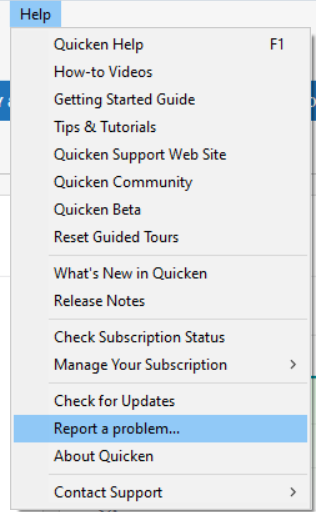
If you do send the information via problem report, please post to let me know.
Thank you!
Quicken Kristina
Make sure to sign up for the email digest to see a round up of your top posts.
0 -
I tried to be complete in my post on May 20, but I guess I missed something. The date of my last downloaded transaction to Wells Fargo is April 25. That was around the time that Quicken told me I needed to update my connection, and I did. The new connection doesn't give any error message, but no transaction has ever come in. (I have tried to download nearly every day.) There are plenty of transactions on my May 15 statement from after April 25. I guess I'll just enter and reconcile them manually until this is solved. I'll look at the troubleshooting article when I have time.
Also, in my alerts it keeps telling me that I haven't downloaded from that account for over 30 days.
0 -
I'm having a similar issue with all my Express Web Connect+ accounts. These include Capital One, Citi, Discover and Chase credit card accounts. Same issue on Express Web Connect+ for USAA and Copper State Credit Union banking accounts. Essentially I have to reset each account every day. If I do not, updating transactions proceeds with no error messages, but also no new transactions. I'll check each account by logging in on their respective sites and seeing new transactions that did not appear in Quicken. When I reset the accounts in Quicken, the new transactions do show up.
0 -
Thank you, Kristina. My accounts appear to be working now, after deactivating and then reactivating the Express Web Connect again.
0
