EWC+ not downloading for last week

It seems there was a hiccup with Express Web Connect accounts last week. My PNC bank and AMEX are both EWC+ and have items from last week showing uncleared, but some from this week have cleared.
I manually downloaded the AMEX file and it matched things up, appears I"m going to have to do this for PNC as well. @Quicken Anja @Quicken Anja @Quicken Alyssa have you guys had other reports? I see a few discussions which likely are the same thing. Any resolution?
Comments
-
Hello @jasonpbyu,
We appreciate you reaching out!
Upon reviewing your account, I do not see any internal errors occurring for these financial institutions. So to better assist you, could you please provide the following details?
- Where is your Quicken data file stored? Is it on your local hard drive (C: Drive) or a cloud-based/external drive (e.g.: OneDrive, DropBox, USB, etc.)?
- Have you attempted any troubleshooting steps so far? If so, what were they?
- Are you seeing any error codes or messages on your end when trying to connect?
- Are you using a VPN while updating your accounts? If so, does disabling it make any difference?
- Do you have any antivirus or malware protection software running that may be interfering with Quicken? If so, have you tried temporarily disabling it to see if the issue persists?
- Were there any significant changes to your system or software before the issue began (updates, new installations, etc.)?
Looking forward to your response!
-Quicken Anja
Make sure to sign up for the email digest to see a round up of your top posts.0 -
Data is stored in local hard drive.
I have disconnected account and reconnected.
No error codes
No VPN
I have antivirus which I've always had and used Quicken with no problems
Nothing has changed on my computer.
As noted, I'm seeing this same issue on other posts… it's not just me.
0 -
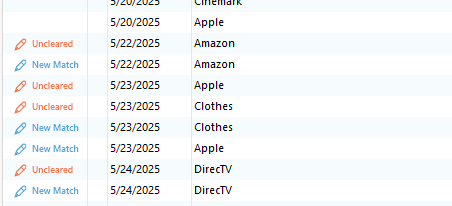
@Quicken Anja So I again went and disconnected and reconnected after it still not finding matches, now it downloaded duplicate transactions as "new match"… i've never seen "new match" usually it downloads the transactions. Is this something new? Why is it not recognizing these as a match? i have to delete them now?
 0
0 -
@Quicken Anja today's update - there are items on my PNC card, my AMEX and my Chase card which have cleared the bank but are not downloading. No errors, it says everything updated successfully. These are all EWC+ accounts.
0 -
Thank you for following up with additional details.
To start with, please review and follow the guidance outlined in this support article regarding missing transactions.
Let us know how it goes or if the issue persists after!
-Quicken Anja
Make sure to sign up for the email digest to see a round up of your top posts.0 -
I'm having the same issue. Fidelity, which I believe is Direct Connect, is downloading transactions fine, but Chase, Bank of America, AMEX, etc. (which I believe are all EWC+) aren't downloading transactions from this past Monday. They're all posted charges from two days ago.
0 -
l was billed for simplify, download did not finish. I want to download again without being charged
0 -
EWC+ is broken. I have cleared transactions on multiple accounts. They do not update in Quicken. If I reset account, they appear. I need to do this daily to get EWC+ to work.
0

