New account getting CC-503 error

After YEARS of successfully syncing my Barclay account with Quicken, I am suddenly getting CC-503.
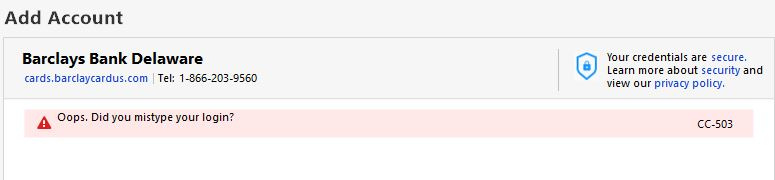
I can sign into the bank website so I know I have the correct login/password, but when I tried to re-add the account using the same credentials I get this:
I now have FIVE accounts that no longer sync with Quicken. It started with Nordstrom and that's been since November 2024.
PLEASE FIX
Comments
-
Hello @jtomalley,
Thanks for reaching out, and I totally understand how frustrating this must be—especially after years of smooth syncing.
CC-503 errors are usually tied to login issues, even when credentials work directly on the bank’s site. Here are a few common-sense steps that often help:
- Double-check that the login credentials are entered correctly in Quicken.
- If you’re using a password manager, try typing the username and password manually. Password managers can occasionally store outdated or incorrect info.
If everything looks right and it’s still not working, it could be an issue on the financial institution’s or Quicken’s end (note that we do also currently have an open Alert with Barclays for a different error).
Let us know how it goes!
-Quicken Anja
Make sure to sign up for the email digest to see a round up of your top posts.0 -
It's on Quicken's end. There is no way that EIGHT of my accounts are having this problem on their end.
0
