Quicken is unable to verify Target transactions

I am unable to retrieve any information from Target. I do not get an error message when attempting from the One Step Update. I just get no data into my Quicken. Online, at the Target page, I am able to see that there are current transactions, but when I attempt to download them to Quicken, I get the following message "Quicken is currently unable to verify the financial institution information for this download. Please try again later". This has been going on for a couple of weeks. Meanwhile, I have to enter the Target transactions manually into Quicken.
Comments
-
Looking at the financial institution directory file, it appears that some of the "Target …" entries allow transaction downloading using One Step Update or Update Now from within Quicken (Express Web Connect), but they do not appear to allow transaction downloading from the website for prior months or selected date ranges (QFX File, Web Connect), hence the "unable to verify" message.
If Target does indeed want to allow QFX file downloading, they need to talk to Intuit and have their directory entry updated to include the Web Connect option. If they don't, then they will need to remove QFX file format downloading from their website.
0 -
I am not sure if this still works but some users have found a workaround for downloading QFX files for Target -
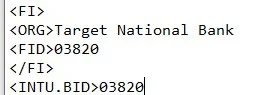
You need to edit the QFX file in Notepad to what it shows in the attached example, then save it and upload to Quicken.
3 -
Hello @BryantH,
Thanks for reaching out!
This is a known issue that has been escalated internally, though we do not have an ETA on resolution at this time. While the investigation remains ongoing, please refer to this Community Alert for any and all available updates and information.
We apologize for any inconvenience in the meantime! Thank you.
-Quicken Anja
Make sure to sign up for the email digest to see a round up of your top posts.1 -
Thanks, Anja. It's nice to know that I am not the only one with this issue. Thanks. for the update!
0 -
Thanks CaliQkn! I modified the download qfx file as you suggested and ran it. Quicken required that I link it to the Target account in Quicken. Once I did that, all of the transactions appeared!
1 -
I don't know if this is related or not, but ever since the issues with Target started and were allegedly solved, I have needed to use a 2FA for Target each time I run an update on Quicken. Does anyone else have this issue? Have you solved it?
0 -
@alohafrilovesSMG from what I understand, the 2FA is a requirement from TD Bank USA, N.A. the issuer of Target credit card, and there isn't a way to bypass the 2FA requirement when downloading transactions to Quicken. You might want to check the security settings in your Target card online account profile, or give TD Bank a call to confirm.
0

