Upon download, auto categorize all Amazon transactions to Amazon category

I searched for some help, but did not find this side of the issue. I used to try to categorize Amazon purchases according to various categories. Now, all I am interested in is how much I am spending at Amazon. Has anyone found a way to do this?
Best Answer
-
I have two Renaming Rules for Amazon:
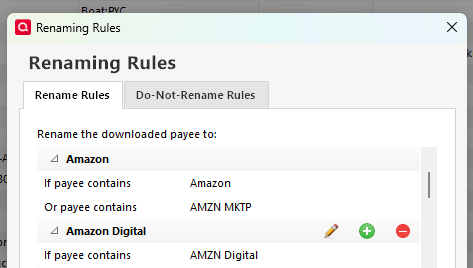
The first is for general purchases and renames the downloaded Payee to "Amazon"
The second is for subscriptions and such and renames the downloaded payee to "Amazon Digital.
Then there are two corresponding entries in the Memorized Payee List. The one for Amazon sets the Category to the one I use most often for general purchases, which is Household. The entry for Amazon Digital sets the Category to the one I use for subscriptions.
There is nothing new about this. The new ability to make separate Memorized Payee entries for transactions with different amounts or charged to different accounts provides even more flexibility.
QWin Premier subscription0

Answers
-
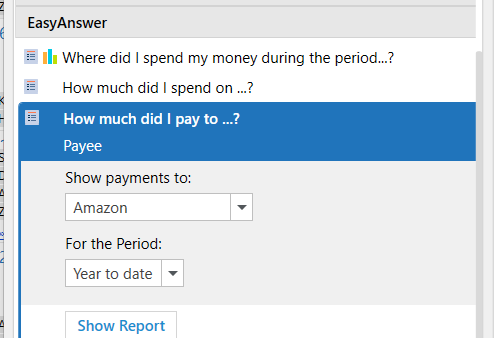
Can't you run an Easy Answer report?
 1
1 -
I have never used that feature, thank you for pointing that out. My question relates to the automatic categorization of downloads in Quicken Classic for Windows. For instance, this AM there were 7 Amazon transactions, each different, but all in the Subscribe and Save order. So I have to categorize each one individually to the same "Amazon" category. So, that which individualizes each debit prevents automatically categorizing them.
0 -
Is there nothing between the downloaded payee and memo fields that would identify it as an Amazon purchase?
If there is and it is okay for the Payee to be changed to a consistent Payee, use a Renaming Rule (Tools menu) to change the Payee to "Amazon" and then have a Memorized Payee (Tools menu) with Amazon as the payee and the Category as the Amazon category. In the Memorized Payee, the Memo field should be blank and it will be filled in with the downloaded memo field. Leave the amount field blank also and lock the Memorized Payee to prevent it from changing. Then a downloaded transaction that matches will be renamed and matched to the Memorized Payee and entered with your changed Payee and Category with the downloaded memo and amount.
-splasher using Q continuously since 1996
- Subscription Quicken - Win11 and QW2013 - Win11
-Questions? Check out the Quicken Windows FAQ list1 -
The new feature giving opportunity to create memorize payee with option being simple "amazon" seems to be helping.
0 -
I have two Renaming Rules for Amazon:
The first is for general purchases and renames the downloaded Payee to "Amazon"
The second is for subscriptions and such and renames the downloaded payee to "Amazon Digital.
Then there are two corresponding entries in the Memorized Payee List. The one for Amazon sets the Category to the one I use most often for general purchases, which is Household. The entry for Amazon Digital sets the Category to the one I use for subscriptions.
There is nothing new about this. The new ability to make separate Memorized Payee entries for transactions with different amounts or charged to different accounts provides even more flexibility.
QWin Premier subscription0

Categories
- All Categories
- 6 Product Ideas
- 34 Announcements
- 249 Alerts, Online Banking & Known Product Issues
- 19 Product Alerts
- 266 Welcome to the Community!
- 301 Before you Buy
- 1.5K Product Ideas
- 55.8K Quicken Classic for Windows
- 16.9K Quicken Classic for Mac
- 1K Quicken Mobile
- 834 Quicken on the Web
- 129 Quicken LifeHub