Downloading Investment Details From SoFi to Quicken For Mac

When I Add a new SoFi investment account in Quicken for Mac, during the set-up process, Quicken says "SoFi only supports Simple Investment Tracking". This prevents me from updating transactions. The Simple Investment Tracking download does not contain the stock purchase price and the Transaction menu is greyed out so I cannot add the stock purchase price to the purchase transaction. Any rumors of SoFi supporting Detailed Investment Tracking? Anyone know of a workaround to add the stock transaction purchase price? Thanks
Answers
-
Hello @Scott21,
Thank you for reaching out to the Community with this question. If you intend to keep the account as a connected account, then you can use the Notes field in the Account Settings window for the account to document that information.
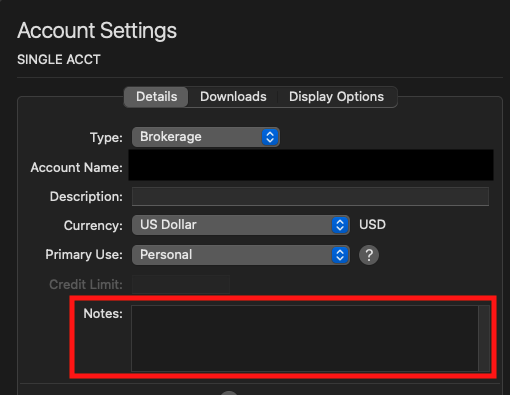
To get to the Account Settings window, click on the account to select it, then navigate to Accounts>Settings…. You will see the Notes field in the Details tab.
Another possibility, is to update the Price History for your securities. You can do that from the Portfolio tab, by clicking on the security you wish to edit, select the Edit Security button, then the Price History tab.

The downside to using this as a work around is the fields allow numbers only, so there's no way to add any note that it is to document the original purchase price.
If you do not want to keep the account as a connected account, then you could backup your file and deactivate your account. As a manual account, the Transactions tab would no longer be greyed out, and you could manually input the information. On the negative side, while it's disconnected, it would not get any updates from the financial institution; you would need to enter updates manually. If you reconnect the account, it will be able to download updates, but the Transactions tab will be greyed out again.
I hope this helps!
Quicken Kristina
Make sure to sign up for the email digest to see a round up of your top posts.
0 -
Quicken Kristina
Make sure to sign up for the email digest to see a round up of your top posts.
0 -
Kristina, I ended up deleting the connected account and creating a offline account. The account is a small account as far as number of transactions. Your recommendation for the connected problem relating to the Price History was helpful in solving a problem with the offline account. The Market Values in the Portfolio did not match the Sidebar amount. I checked the 3 securities' and found an erroneous entry of a Saturday price history for Nvidia. I deleted the entry and rebuilt the price history and the erroneous Nvidia entry did not reappear and the amount matched. Thanks for your help.
0 -
Thank you for the follow-up,
I'm glad to hear you found a resolution!
If you need further assistance, please feel free to reach out!
Quicken Kristina
Make sure to sign up for the email digest to see a round up of your top posts.
0
