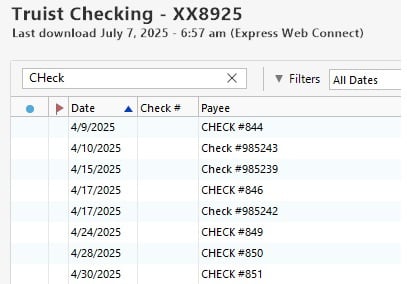
Truist check numbers do not appear in the Check # column

Attached is a picture of the Truist checking transactions. The check # does not appear in the column. Previously Suntrust worked as well as Bank of America. It appears to never have been right after they merge. Please put on the fix list.
Comments
-
I followed up with Quicken Support and was told that this was a Truist issue. I did call Truist Digital Support and got an agent that was a Quicken user. He told me he would put in a ticket but this is how they were doing it and would probably not change.
I missed this but found that this changed actually in November 2021.
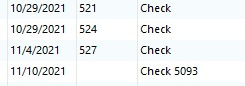
I bet this was the time that the online was updated following the transition.
0 -
Thank you for coming back to update us on this issue. If you hear any further news, please don't hesitate to report it here for other users who may be experiencing the same!
-Quicken Jasmine
Make sure to sign up for the email digest to see a round-up of your top posts.
0

Categories
- All Categories
- 6 Product Ideas
- 34 Announcements
- 249 Alerts, Online Banking & Known Product Issues
- 19 Product Alerts
- 266 Welcome to the Community!
- 301 Before you Buy
- 1.5K Product Ideas
- 55.8K Quicken Classic for Windows
- 16.9K Quicken Classic for Mac
- 1K Quicken Mobile
- 834 Quicken on the Web
- 129 Quicken LifeHub