Unable to connect to Navy Federal Credit Union.

I am running Classic Deluxe Version 8.2.1 (Build 802.57282.100) and today am unable to connect to my Navy Federal Credit Union Accounts. When I try Quicken responds with the following message:
Navy Federal Credit Union is asking you to reauthorize. Select 'Reauthorize' and follow the prompts to restore Quicken account access. (FDP-350)
When I attempt to reauthorize I get a message from Navy FCU (after being directed to their website and logging in) saying there was a problem connecting, and an error code 500. Note that I am able to connect to my accounts directly using the same login credentials. That is, it seems that only Quicken cannot connect.
Answers
-
In an attempt to fix this myself i "disconnected" the connections in Quicken and attempted to reestablish them. Doing so, I still get the same result, the error code 500 from Navy FCU despite the fact that I received confirmation via email that my accounts are linked to Quicken. It reads…
You've successfully linked your Navy Federal account(s) to the requested third-party service.
0 -
I have spent an hour on the phone with Navy Federal Credit Union. They say the problem must be with Quicken. They recommend I sever and remake the links which I tried as discussed above.
0 -
Hello Quicken… Can you help???
0 -
Hello @Makers,
Thank you for letting us know you're encountering a FDP-350 error when trying to connect/reconnect with Navy Federal Credit Union.
Based on your description of the issue, it sounds like you've already followed the initial troubleshooting steps for FDP-350 errors (clicking the reauthorize button and following the prompts).
To continue troubleshooting the issue, the next step is to backup your Quicken file, deactivate the affected account(s), then revoke the authorization for Quicken on Navy Federal Credit Union's website. Following this process should completely remove the expired token.
Once that is done, navigate to Accounts>Add Account… and follow the prompts. Once you get back to the Add/Link screen in Quicken, make sure to carefully relink your account(s).
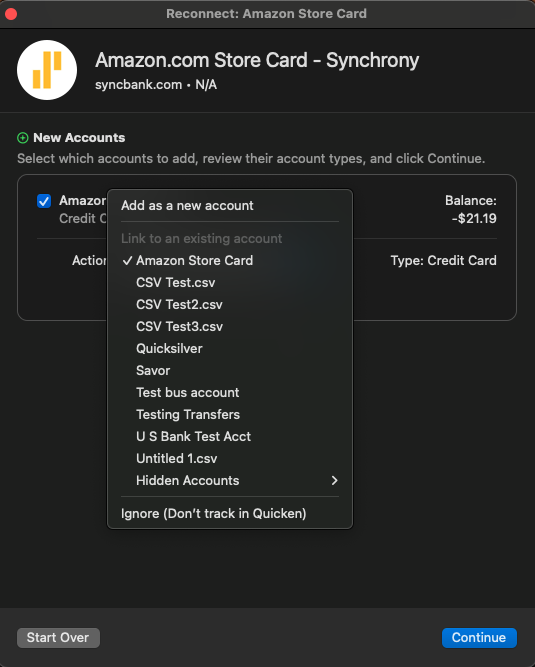
If you are still getting the 500 error on Navy Federal Credit Union's website when trying to authorize the account, try temporarily setting a different browser as your default (do not use Brave or Duck Duck Go, since those browsers are known to cause issues with the authorization process).
Please let me know how it goes!
Quicken Kristina
Make sure to sign up for the email digest to see a round up of your top posts.
0 -
Thanks, Kristina. I followed the steps you outlined above. Switching browsers to Microsoft Edge fixed the issue though I would love to understand why that worked. I contacted Navy Federal's digital support team and they couldn't give me an explanation beyond saying that they made changes to their system, then they contradicted themselves by saying Chrome should've worked fine. Can you say/guess why (temporarily!) switching browsers worked?
Before I switched browsers I did try deactivating the linked accounts on Quicken and "revoked authorization" on the Navy Federal website (the Navy Federal website calls it "unlinking"). Unfortunately relinking didn't fix the problem, and had two interesting effects. 1) I received and automated email confirming the new links despite the fact that the process resulted in an error 500 message each time I tried, and 2) the website listed the new link with a (establishment?) date of July 2024 (ie, last year!), the same date that was listed before I "unlinked" or "revoked authorization" in the first place.
Hopefully you can explain why all this happened. I'd really appreciate it! It'll make fixing the problem a lot easier next time it happens.
0 -
Thank you for the follow-up,
I'm glad to hear that switching to Edge corrected the issue. Since you were getting the confirmation email that you'd authorized the connection, but Quicken wasn't "seeing" it, that indicates that a browser extension or setting was blocking communication between Navy Federal Credit Union and Quicken. Switching to a different browser worked because it did not have the extension or setting that was causing the problem.
Thank you!
Quicken Kristina
Make sure to sign up for the email digest to see a round up of your top posts.
0 -
Hmmmm. I suppose that makes sense though I haven't changed any browser settings in ages and Quicken has worked just fine. Do you have any idea what sort of extension or setting might've been the culprit?
0 -
Thank you for your reply,
The most common culprits are ad blockers and pop-up blockers. Browsers and browser extensions do periodically have updates pushed. Most likely, an update caused one of them to no longer work well with Quicken.
Thank you!
Quicken Kristina
Make sure to sign up for the email digest to see a round up of your top posts.
0
