Moving from Quicken for Mac Premier US version to Quicken for Mac Canadian version

If I buy the Canadian version of Quicken classic for Mac
Will I be able to open my Quicken Classic for Mac Premier version ( for which I can use features for Canada ) with the Canadian Deluxe version
or will I need some conversion or importing actions
Comments
-
Hi @Gilles9 ,
We appreciate you reaching out! You won’t need to do any conversion—the data file from your U.S. Quicken for Mac Premier version will open just fine in the Canadian version.
To ensure the program registers the subscription change, you’ll just need to sign out and sign back into your Quicken ID within the application, though we do recommend saving a backup first (just in case). Here’s how:
- Go to the Quicken dropdown menu (top left of your screen).
- Select Sign Out...
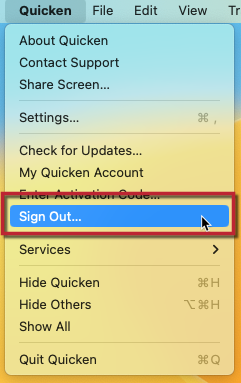
- After signing out, sign back in using your Quicken ID (email) and password.
- Follow the prompts to return to your data file.
That’s it! Your file will be ready to use in the Canadian version.
Hope this helps!
-Quicken Anja
Make sure to sign up for the email digest to see a round up of your top posts.1 -
Thank you very much
I asked because doing a search on Google, their AI states that it is impossible
most likely for the Windows version
and it puzzled me as I always thought it was the same US and Canadian for Quicken classic for Mac, due to the fact that we can switch country in the settings and that Canadian banks use Quicken Connect without any problems
It should be stated somewhere on your website (Quicken's) for the Mac version, and maybe state under the Windows version that it is not possible to open US version with the Canadian version
Again thank you very much for the clarification, and if it changes one day, I hope you'll advertise it
0 -
You're very welcome—I'm glad I could help clarify things!
To add a bit more detail: it’s actually possible to open a U.S. Quicken data file in both the Canadian versions of Quicken for Mac and Windows. There’s no need for file conversion in either case. The key step is simply to sign out of your Quicken ID and sign back in after switching your subscription, which updates the program to recognize the change.
That said, there may be some feature limitations depending on which tools or services were used under the U.S. subscription, especially if they were U.S.-specific (like certain online services or connections). But the data file itself will remain accessible.
You bring up a great point about documentation—thank you for that! I’ll go ahead and submit a request to our content team to have this added to our FAQs, so it’s clearly outlined for both Mac and Windows users in the future.
Thank you!
-Quicken Anja
Make sure to sign up for the email digest to see a round up of your top posts.1 -
(?!?) Yes, you are likely seeing the Windows side information. Ignore AI.
On the Mac side, it's the same program with a simple popup in Settings to choose in which country you reside. I don't see why you even would have to log out/iin.
You're a regular around here-you already are using the correct program for Canada/US.
0 -
Yes I'll ignore AI
I was just checking as there are some different informations floating around
I always thought it was the same program/app for US/Canada, but some state the contrary ( even here I read that it was a different program, maybe windows ), most likely because they do not look in the Quicken classic for Mac settings
I just thought I would ask the question here to get a final answer , which I got from Anja
0

