Nordstrom Card - now connecting again but...

Looks like connecting to Nordstrom again (in my case the store charge card) is now working again but now each time I sync I am prompted for 2 factor authentication via a one-time passcode. Each time.
Are there any solutions to this?
Paul
Comments
-
Hello @Paul1,
Thanks for reaching out about this issue!
Multi-factor authentication (MFA) requirements are typically set by the financial institution—in this case, Nordstrom—not by Quicken. If you're being prompted for a one-time passcode each time you sync, it may be due to their current security settings.
You can try disconnecting and then reconnecting the account in Quicken to see if it helps reset the behavior. However, if the repeated prompts continue, we recommend reaching out to Nordstrom directly to see if there's any way to reduce the frequency of MFA prompts on their end.
Thank you!
-Quicken Anja
Make sure to sign up for the email digest to see a round up of your top posts.0 -
The connection issue has been resolved and includes 2-factor authentication however, there are multiple new issues.
- All the transactions are not downloading
- The the transactions that do download are all coming through as payments instead of charges
- The initial download after I was finally able to reconnect after 9 months only downloaded a few news transactions and it changed the opening balance on the existing Quicken Nordstrom account.
Is anyone else having these issue? I tried signing out of quicken, resetting the download and deactivating/reactivating the connection.
0 -
Thanks for following up!
To help us investigate further and get this properly documented, could you please provide the following:
- 3 example transactions that didn’t download correctly (including the dates and amounts)
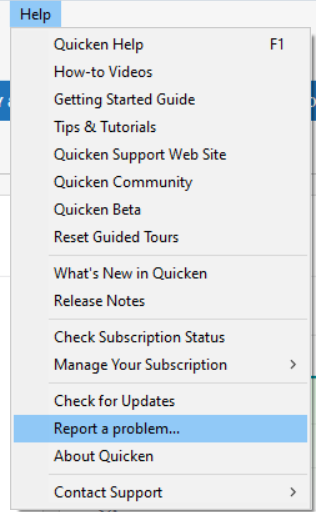
- A copy of your log files (Help > Report a Problem, and be sure to include log files)
- The account type your Nordstrom account is currently set to in Quicken (e.g., Checking, Credit Card, etc.)
Sometimes if an account is set up under the wrong type, it can cause problems like reversed or misclassified transactions—so we’ll want to confirm that as well.
Also, please take a moment to review and follow the steps in this support article regarding missing transactions.
Lastly, I’ll be sending you a direct message shortly to request a few additional details that will help with the investigation. When you have a chance, click the envelope icon in the top-right corner of the Community page to check your inbox.

Thank you!
-Quicken Anja
Make sure to sign up for the email digest to see a round up of your top posts.0 -
QWin R63.21 Build 27.1.63.21
I also have issues with the Nordstrom card. Just reconnected after 8 months off-line.
Only 1 transaction downloaded even though there were three transactions this month and other prior month transactions.
The downloaded transaction came in as a credit/payment vs. charge.
Quicken Online balance reflects a credit vs debit (443.25 vs -443.25)
My beginning balance was not changed (maybe b/c prior month's balance was $0?)
It is setup as a credit account.
0
