Billable Expenses question (Q Mac)

I'm using quicken classic business and person Mac version 8.2.1. I realized recently realized that the billable expenses feature was not working as it should on my quicken. I had expenses for a work trip that my client paid for. I entered them in the account register, tagged them as billable, selected the client and s saved the expense. Then when I created my invoice I had the consulting hours line I manually added and from the window pane on the right pulled over the highlighted expenses for the month.
I received payment from the client and linked the payment to the invoice. When I got into the P&L I noticed that the full invoice amount is showing as income when in reality it should not be counted since its just pass through. everything I'm reading suggests I did this correctly but quicken does not seem to categorizing this correctly.
any help is appreciated. .
Comments
-
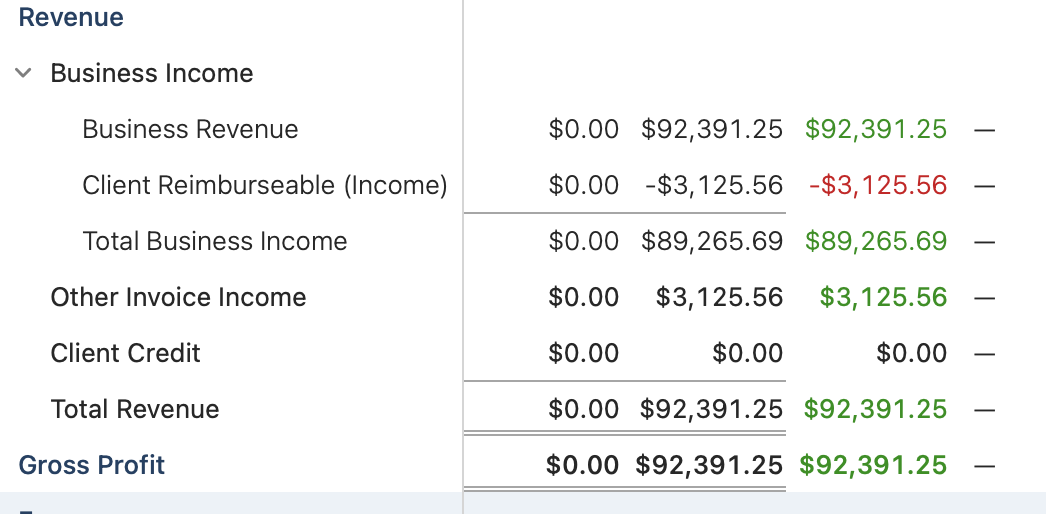
well looks like this is a known bug after spending hours with support. Essentially I was able to fix the income going in by creating an income category and tagging all billable expenses with this category. This way in the income report it subtracts out that income and gives true income. However when I run the report, even after ignoring the other invoice income, it still show up adding back in the billable expenses. this really needs resolution ASAP.
 0
0 -
Hello @Wingman6,
Thank you for letting us know you're seeing this. To clarify, you mentioned that this is a known issue. Were you provided with any ticket number or reference number for this issue?
I look forward to your response!
Quicken Kristina
Make sure to sign up for the email digest to see a round up of your top posts.
0
